AvoidanceStats TBC
- By
Track tank avoidance and the crush cap in real time, compare gear upgrades, and view tank, DPS, and healing stats in your TBC Classic character window.
Description
AvoidanceStats TBC
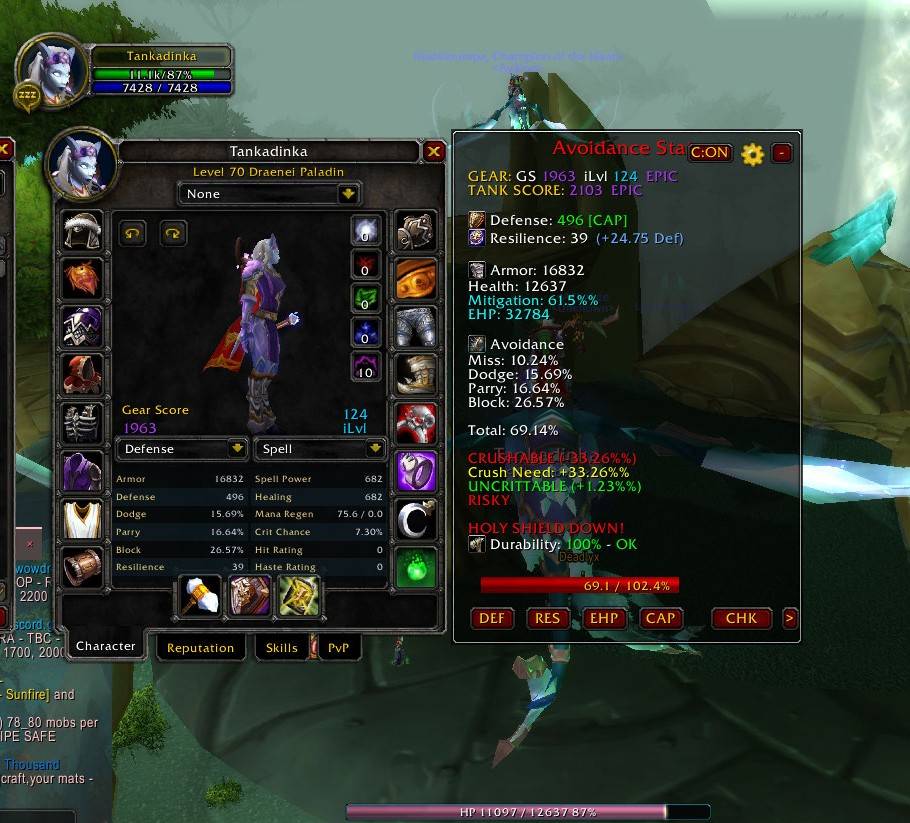
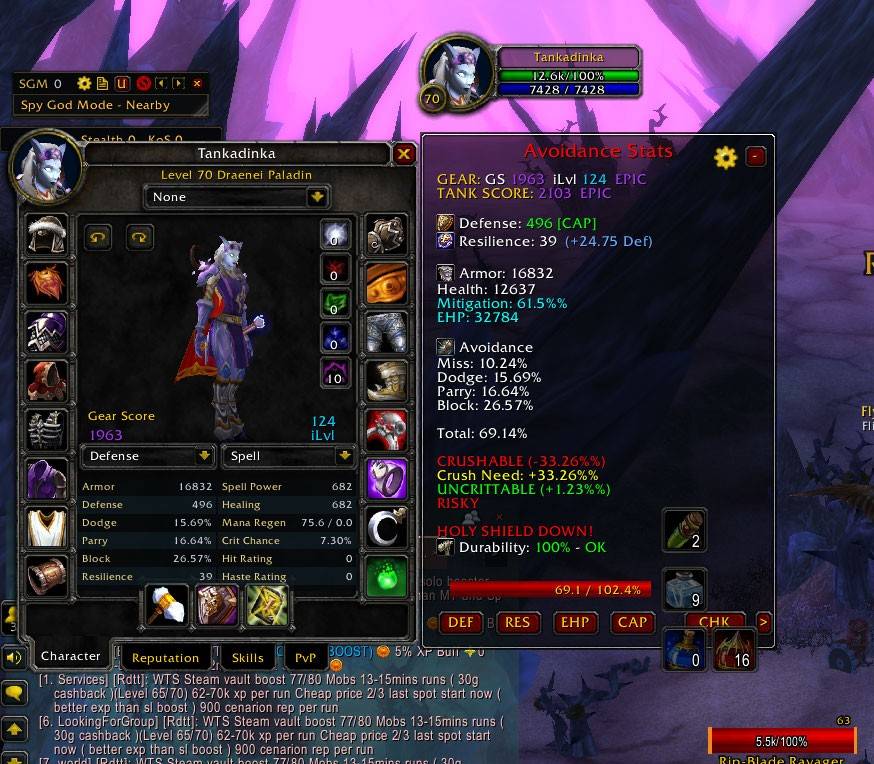
AvoidanceStats TBC brings tank avoidance, DPS and healing stats, and gear comparison into your TBC Classic character window. Check how close you are to a defensive cap, see what changes when you swap an item, or find upgrades among gear you already own.
Tank avoidance and raid readiness
Track miss, dodge, parry, and block in real time. For shield tanks, the addon shows how much combat table coverage you still need to reach the 102.4% crush cap against a level 73 raid boss. A separate critical-hit readout shows how defense and resilience contribute to crit immunity.
- Protection Paladins can track Holy Shield and see how their block coverage changes when it expires.
- Protection Warriors can monitor Shield Block and check their crush-cap status with the ability active or down.
- Feral Druids can review Bear Form armor, physical damage reduction, and effective health when choosing between defensive items.
Run a Tank Check before a dungeon, heroic, or raid to review your defensive stats and get a gear-based readiness estimate.
DPS, healing, and character stats
The Character Stats panel groups primary attributes, melee, ranged, spell, defense, gear, and combat ratings in one place. Use automatic role detection or select Tank, DPS, or Healer manually.
- DPS mode shows melee and ranged attack power, weapon DPS, critical strike chance, hit, haste, expertise, and spell stats. Use it to see what you gain or lose after a gear change.
- Healer mode shows bonus healing, spell critical strike chance, current mana, mana percentage, and mana regeneration while casting and outside casting.
Gear comparison and equipment sets
- Item Simulation previews how a potential upgrade affects your stats before you equip it.
- Gear Optimizer compares equipped items with gear in your bags and includes bank items while the bank is open. Review recommendations by slot, see the stat changes, and equip the recommended gear.
- Resistance sets let you look for Fire, Frost, Nature, or Shadow resistance gear for a specific encounter.
- Equipment Sets let you build named loadouts, choose compatible items by slot, and equip a saved set by name.
- GearScore and durability give you a quick equipment overview and help you spot repair needs before a run.
Display and alerts
Move the stats panel and save its position, display it alongside the character window, or enable automatic display in combat. Optional glow and sound alerts let shield tanks know when they reach the crush cap.
Commands
| Command | Action |
|---|---|
/avoid |
Open settings |
/avoid stats |
Open Character Stats |
/avoid tank, /avoid dps, /avoid heal |
Select a role manually |
/avoid check |
Run a tank readiness check |
/avoid sets |
Open Equipment Sets |
/avoid equip <set name> |
Equip a saved set |
/avoid update |
Refresh your stats |
/avoid reset |
Reset the panel position |
/avoid help |
Show the command list |
AvoidanceStats TBC Team