AutoQuestButton
- By
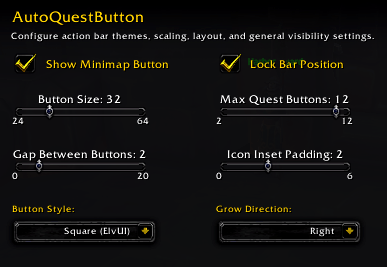
AutoQuestButton automatically scans your bags and displays active quest items on a sleek, customizable action bar. Easily control bar size, growth direction, button gaps, and visual styles through native WoW Settings or profiles.
Screenshot 2026-10-18 155622.png
Description
AutoQuestButton is a lightweight, modern World of Warcraft add-on that automatically tracks your inventory and creates an interactive action bar for active quest items. No more digging through crowded bags or manually dragging items to your action bars!
| Command | Description |
/aqb or /aqb options |
Opens the main settings window in Blizzard options. |
/aqb profile <name> |
Switches your active profile to the specified name. |
/aqb size <24-64> |
Sets the button size in pixels. |
/aqb max <2-12> |
Sets the maximum number of quest buttons shown. |
/aqb spacing <0-20> |
Adjusts the gap between buttons on the bar. |
/aqb padding <0-6> |
Adjusts the internal icon inset padding. |
/aqb style <square/blizzard> |
Toggles between Square and Blizzard visual themes. |
/aqb direction <right/left/up/down> |
Changes the growth direction of the bar. |
/aqb toggle or /aqb lock |
Locks or unlocks the bar anchor position. |
/aqb minimap |
Toggles the minimap button on or off. |
AutoQuestButton Team

![ArkInventory [Rules] ItemVersion project image](https://media.forgecdn.net/avatars/thumbnails/2129/697/256/256/639279368600401666.jpg)