


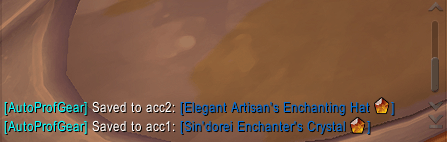
Screenshot 2026-04-14 143650.png
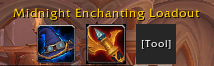
Screenshot 2026-04-14 143618.png
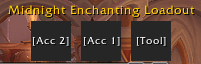
Screenshot 2026-04-14 143556.png
Description
# AutoProfGear (v1.0)
**AutoProfGear** is a lightweight World of Warcraft AddOn designed to automatically manage and equip your profession tools and accessories based on the expansion selected in the profession UI.
---
## Features
- **Smart Loading (Event-Driven):** Uses Blizzard's modern `EventRegistry` system to detect expansion changes without overloading the CPU.
- **MVC Architecture:** Code separated into `Core.lua` (Logic/Data) and `UI.lua` (Interface) following SOLID design principles.
- **Drag & Drop System:** Configure your loadouts simply by dragging items from your bag to the interface slots.
- **Per-Character Persistence:** Saves independent configurations for each of your characters and their respective professions.
## Project Architecture
The project has been refactored to maintain a clear separation of concerns:
- **`Core.lua`**: Handles application state, `SavedVariables` database, and equipment logic via `C_Item.EquipItemByName`.
- **`UI.lua`**: Manages dynamic frame creation, anchoring to the official `ProfessionsFrame`, and visual icon feedback.
- **`AutoProfGear.toc`**: Load index and AddOn metadata.
---
## How to Use
1. **Installation:** Copy the `AutoProfGear` folder to your `_retail_/Interface/AddOns/` directory.
2. **Initial Setup:** Open any profession window (Alchemy, Enchanting, etc.).
3. **Select Expansion:** Choose an expansion from the filter menu (e.g., *Midnight*). The interface title will change to "Midnight Loadout".
4. **Equipment Assignment:** Drag your tool and accessories to the 3 corresponding slots (`[Tool]`, `[Acc 1]`, `[Acc 2]`).
5. **Item Removal:** Right-click any slot to remove its assigned item.
6. **Automation:** Done! Next time you switch between expansions or professions, the equipment will change automatically.
> **Note:** For game safety, equipment switching will not occur if you are in combat.
---
## Contributions
Contributions are welcome! If you find a bug or have an idea for a new feature, feel free to open an Issue or submit a Pull Request.
Developed for the WoW goblins.
The AutoProfGear Team
