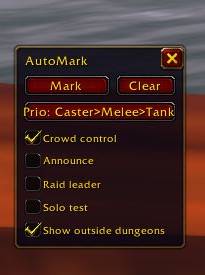
Panel.jpg
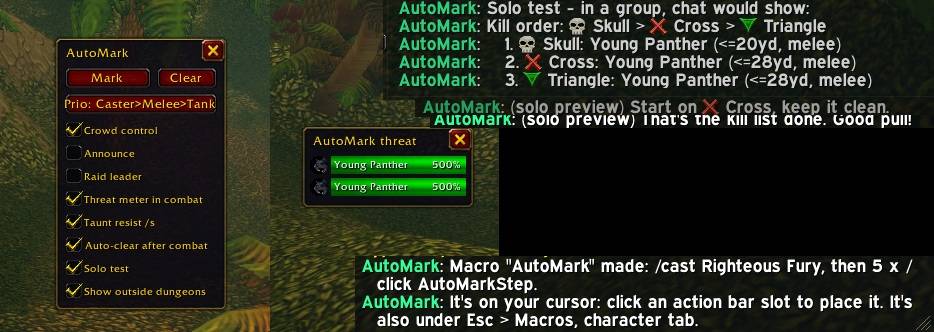
AMark.jpg
Description
AutoMark: one key, clean pulls
Tired of marking every pack by hand, or never sure what to hit first? AutoMark does it for you. Walk up to a pack, press one key, and every mob gets the right mark before the pull. Your group sees the kill order straight away, and AutoMark keeps helping once the fight starts.
Marking
• Marks the whole pack in one press: Skull, Cross, Triangle, Diamond, Circle, in kill order.
• Picks targets your way: Closest first, Danger (healers and casters first), or Caster > Melee > Tank.
• Sorts out crowd control: if your group has a Mage, Hunter, Rogue, Priest, Warlock or Druid, AutoMark puts Moon, Square or Star on a mob they can actually CC. Never on bosses.
• Auto-clear: your first Mark press after a fight wipes the old marks and marks the new pack in one go.
• Mark from further away: set how far AutoMark reaches with /automark range.
• Works in your own macros too, e.g. /cast Bloodrage followed by /click AutoMarkStep lines.
Keeping the group on target
• Announces the kill order and CC assignments to party, raid or instance chat.
• Raid leader mode: optional callouts as you fight, like "Skull dead, let's get Cross!", with plenty of variety so it never gets stale.
Threat meter
• In combat the panel turns into a threat bar for each enemy, showing its raid mark and how safe your hold on it is: green when it's solidly yours, draining to red and LOST if someone pulls it.
• Hover a bar to see who has aggro.
• Only living enemies get bars. Party members and friendly units are left out.
• Try it solo, out of combat, with /automark threattest.
Handy panel
• Mark and Clear buttons, a kill priority button and quick on/off switches for every feature.
• Pops up in dungeons and stays out of the way everywhere else. Drag it anywhere, or show it in the open world with one key.
Practice solo
• Mark while questing alone and AutoMark shows you in chat what it would have told your group, and why it picked each target.
Getting started
1. Turn on enemy nameplates (default key V). AutoMark and the threat meter find enemies through them. Don't like seeing them? Type /automark hideplates to keep them on but invisible.
2. Bind keys under Options > Keybindings > AddOns > AutoMark: Mark the pack, Clear all raid marks, Toggle raid leader mode, Show/hide the panel.
3. Press Mark before the pull. That's it!
Commands
Type /automark or /amark:
• /automark - show help
• /automark prio [closest | danger | roles] - kill priority
• /automark cc - crowd-control marks on or off
• /automark announce - kill order message on or off
• /automark leader - raid leader mode on or off
• /automark threat - threat meter in combat on or off
• /automark threattest - try the threat meter solo, out of combat
• /automark threatcheck - if the threat meter shows no bars, run this during a fight
• /automark autoclear - auto-clear after combat on or off
• /automark test - solo test messages on or off
• /automark panel - show or hide the panel (panel dungeon | always | off sets when it appears)
• /automark range [yards] - how far away AutoMark can mark
• /automark hideplates - keep enemy nameplates on but invisible
• /automark macro - how to use AutoMark in your own macros
• /automark players | neutral - also mark enemy players or neutral mobs
• /automark verbose - list what got marked in your own chat
• /automark debug - show what would be marked and why
Good to know
• Mark before the pull: the game doesn't let marks change during combat. Raid leader mode calls the swaps for you instead.
• Callouts and chat messages pause in boss fights, Mythic+ keys and PvP matches, where the game blocks addon chat.
• In a raid you need lead or assist to mark.
• The threat meter shows up to 8 enemies in nameplate order. On bosses it shows whether you hold aggro rather than exact numbers.
• Clicking a threat bar doesn't target the mob on WoW Forever; click the mob or its nameplate instead.
New to dungeons? AutoMark takes the guesswork out of kill order. Been tanking for years? It saves you a dozen clicks every pack, and it's easy to set up how you like.
Built for WoW Forever and its addon rules. No extra libraries needed.
AutoMarkForever Team