Aura Sounds
- By
Sample1.png
Sample2.png
Sample3.png
Description
Aura Sounds
Aura Sounds is a lightweight addon for playing configurable audio when player buffs/debuffs and auras are gained, stacked, or removed. In-game sounds, other addon sounds (via sharedmedia), and custom sounds are supported.
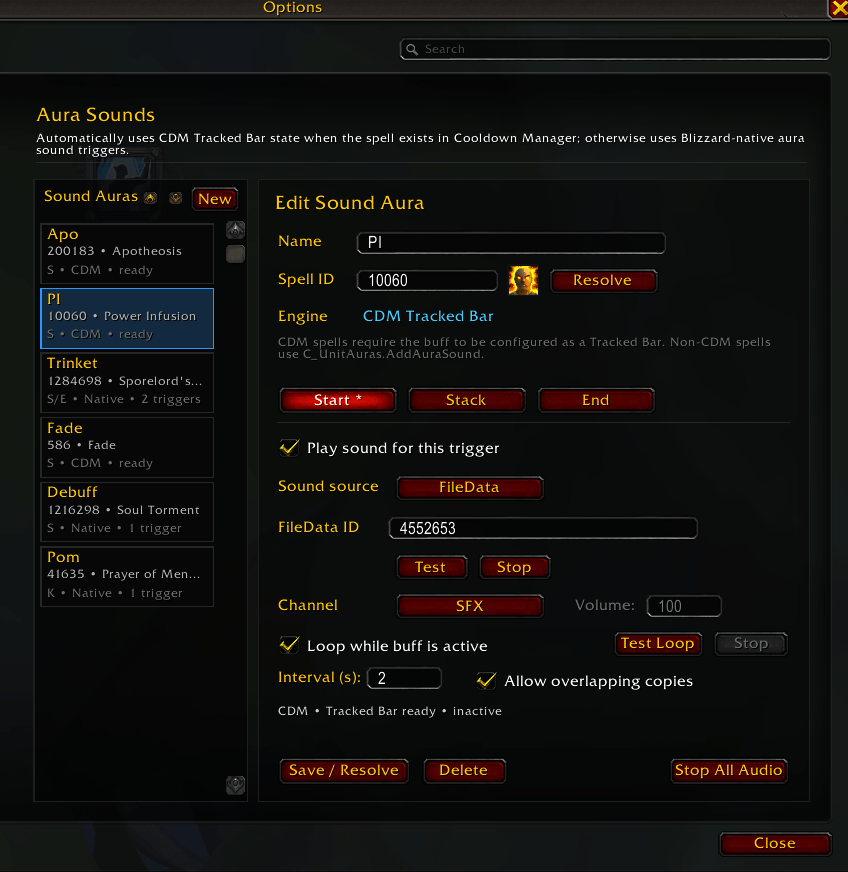
It supports both Cooldown Manager (CDM) tracked buffs and non-CDM player auras, automatically choosing the appropriate tracking method based on the Spell ID you enter.
Simply enter a Spell ID, click Resolve, choose your sounds, and Aura Sounds handles the rest.
I've included a handful of .ogg tones, but you can add any sounds you want in the sounds folder (.ogg/.mp3) and by adding the file names to CustomSounds.lua (explained more below). Alternative you can use any in-game sound effect (search via https://www.wowhead.com/sounds ).
Features
Automatic aura type detection
Enter a Spell ID and Aura Sounds automatically determines whether it belongs to the Cooldown Manager.
CDM spells use Cooldown Manager Tracked Bar state detection (spells added to the in-game CDM set as a tracked bar have the best results).
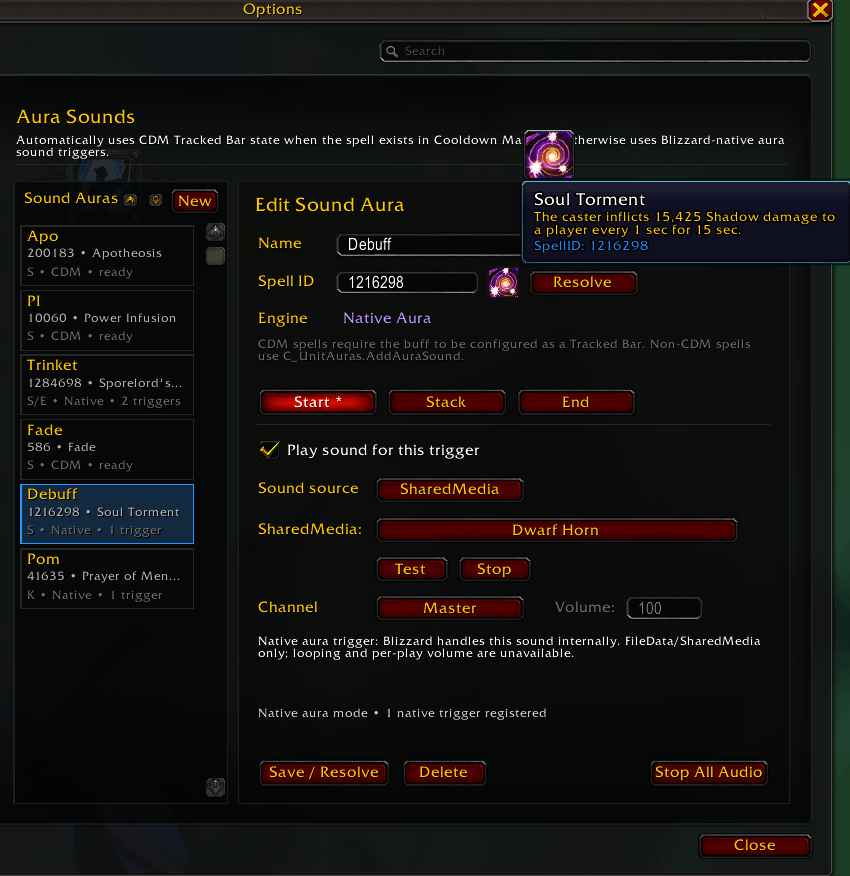
Other spells use Blizzard's native aura sound triggers.
Start, Stack, and End sounds
Start — plays when an aura is gained.
Stack — plays when the aura's applications/stacks increase.
End — plays when the aura is removed.
Each event can have its own independently configured sound.
CDM aura sound looping
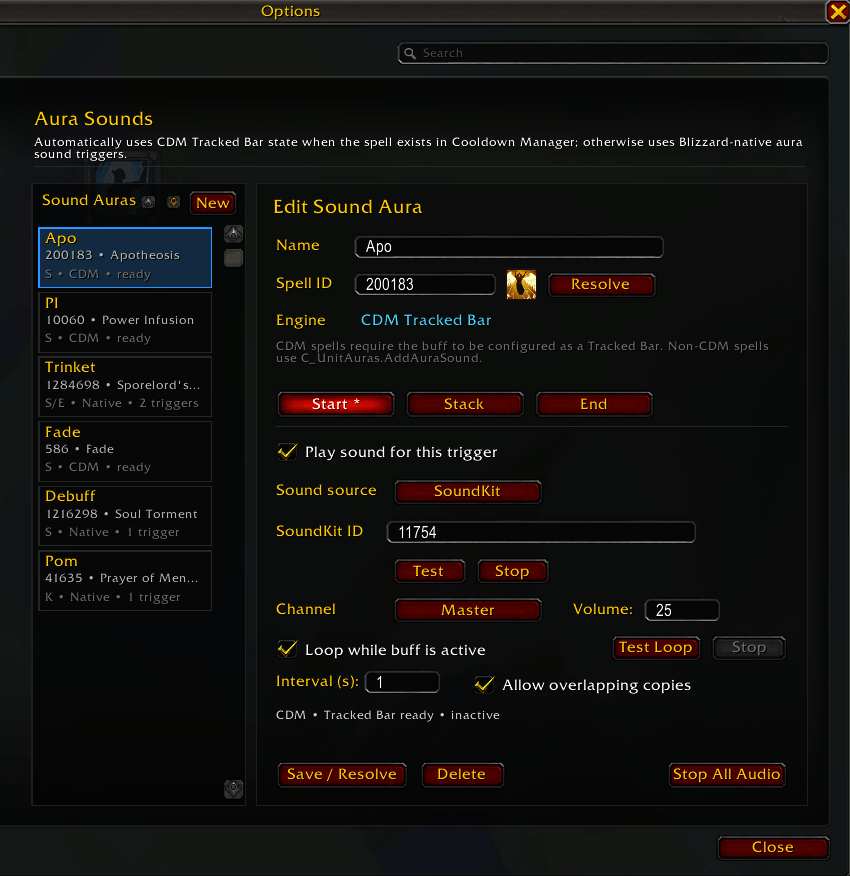
CDM Start sounds can loop for as long as the buff remains active.
Use a custom interval such as once per second.
Leave the interval blank to replay the sound after the previous playback finishes.
Optional overlapping playback for intervals shorter than the sound itself.
Active loop audio is stopped when the buff ends.
Multiple sound sources
SoundKit IDs (SoundKit playback supports per-aura volume adjustment.)
FileData IDs
LibSharedMedia sounds
Custom .ogg and .mp3 files included in the Aura Sounds folder.
Custom sounds
Add your own .ogg or .mp3 files to:
Interface\AddOns\AuraSounds\Sounds\
Then edit: AuraSounds\CustomSounds.lua
Add only the filename to CustomSounds.lua.
Reload the UI and the sound becomes available as:
AuraSounds: filename.ogg
Blank lines and lines beginning with # are ignored.
Example:
AuraSoundsCustomSoundList = [[
# Raid alertsWarning.oggMoveNow.ogg
# Voice alertsCooldownReady.mp3
]]
Using In-Game Sound Effects
Go to https://www.wowhead.com/sounds and find a sound you like. There's two ways to use in-game sounds, via a soundkit, or via a FileData sound id.
Soundkits
The only reason to use a soundkit ID is they have the ability to allow custom volumes, but there's a lot of restrictions. It has to be a soundkit with only one sound (you'll notice most are listed as "playlist" on wowhead). And it can only be assigned to spell ids tracked in the in-game CDM. The number in the URL is the soundkit ID.
FileData Sound ID
FileData sounds IDs can be used for anything, but don't allow custom volumes. You can find them by opening a soundkits and clicking the "copy ID" button on the sound you want.
Example:
https://www.wowhead.com/sound=416/murlocaggro
Soundkit ID would be 416, but the FileData Sound ID would be 556000 (specifically for the sound "mMurlocAggroOld" which is the only sound in this Soundkit ID "playlist").
Bundled tone library
Includes a collection of clean notification tones ranging from 100 Hz to 1000 Hz.
Multiple short-duration tones for quick alerts.
Longer 100 Hz and 200 Hz tones are available for duration-based notifications and loops.
Spell information
Resolving a Spell ID displays its spell icon.
Hover the icon to see the normal Blizzard spell tooltip.
Resolved spell names are displayed in the aura list.
Cooldown Manager Auras
If the entered Spell ID belongs to Blizzard's Cooldown Manager, Aura Sounds uses the corresponding Tracked Bar.
For CDM detection to work, the buff must be configured as a Tracked Bar in the Cooldown Manager.
This matters if you want to loop sounds, or have them automatically cut off once the buff is lost.
The bar does not need to currently be visible when configuring Aura Sounds. The addon can detect that the spell has been configured as a Tracked Bar even while the buff is inactive.
Non-CDM Auras
Spells that are not part of the Cooldown Manager use Blizzard's native aura sound system.
These support:
Aura gained
Stack/application increased
Aura removed
FileData sounds
SharedMedia/custom addon sounds
No soundkits or specific aura volume control
Because Blizzard handles these sounds internally, some CDM-only functionality—most notably looping and stopping an already-started native sound when an aura ends—is not available.
Duration refreshes that do not remove/reapply the aura or increase its stack count also do not generate a new native trigger.
Commands
/aurasounds
/asounds
Opens Options → AddOns → Aura Sounds.
/aurasounds stop
/asounds stop
Stops all audio currently being controlled by Aura Sounds, including active test sounds and CDM loops.
/aurasounds rebuild
/asounds rebuild
Rebuilds and re-resolves Aura Sounds' runtime tracking. This can be useful after changing Cooldown Manager configuration or if a tracked aura needs to be rediscovered.
Made with Notepad++ and AI.
Aura Sounds Team