Asylum Alerts
- By
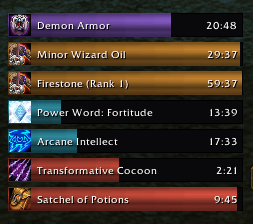
AAlertsBuffs.png
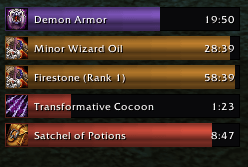
AAlertsBuffs2.png
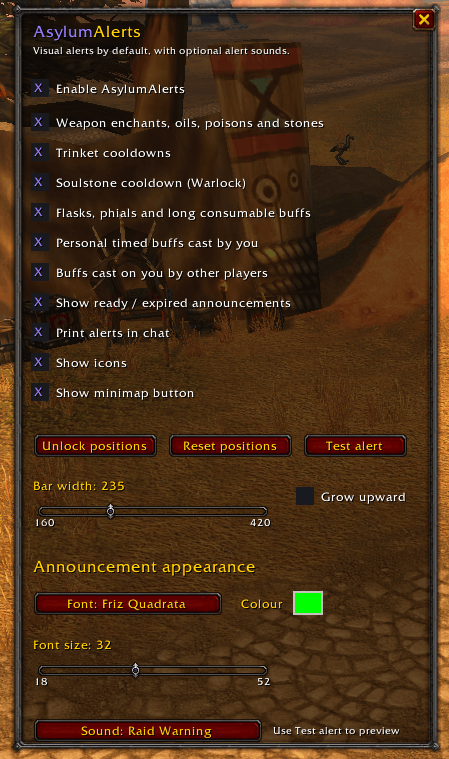
AAlertsConfig.png
Description
Asylum Alerts
Developed and maintained by Freddykr.
Asylum Alerts is a lightweight World of Warcraft add-on that displays visual duration bars for:
- Main-hand and off-hand temporary weapon enchants (oils, poisons, sharpening stones, runes, imbues, Firestone, and Spellstone), including multiple stackable enchants on one weapon in Forever
- Trinket cooldowns for slots 13 and 14, labelled and announced with the equipped items' actual names
- Warlock Soulstone cooldowns
- Flasks, phials, elixirs, and other long-duration personal consumable buffs
- Timed helpful buffs cast by the player or the player's pet
Alerts are visual by default. A small optional sound list is available, with None as the default; the add-on contains no voice or text-to-speech code.
An optional Print alerts in chat setting mirrors ready and expiry messages to the player's local chat window. It is disabled by default and never sends messages to party, raid, guild, or public channels.
When a cooldown or maintenance timer ends, a movable center-screen message appears. Examples include an equipped trinket's actual name followed by is ready!, Soulstone is ready!, and a reminder to refresh or recast an expired buff.
The announcement defaults to a bright green Friz Quadrata font with a thick black outline, matching the supplied reference. Font, font size, colour, and optional sound can be changed from /aa.
Controls
Type /aa or /asylumalerts to open settings. Click Unlock positions, then drag either the purple AsylumAlerts - drag to move bar handle or the separate Ready alert - drag to move announcement. Closing the settings window automatically locks both positions.
The draggable minimap emblem opens settings with a left-click. Right-click it to lock or unlock the bars and announcement position. It is shown by default and can be hidden with Show minimap button in /aa.
Other commands:
/aa lock/aa unlock/aa toggle/aa reset/aa refresh/aa test
Installation
Copy the AsylumAlerts directory into World of Warcraft/_classic_beta_/Interface/AddOns/ (or the corresponding AddOns directory for the supported Forever client), then enable it on the character-selection AddOns screen.
Notes
- Personal bars require a finite duration and default to at least 8 seconds, which avoids most very short proc spam.
- Buffs cast on you by other players and environment is optional and disabled by default. Enable it in
/aato show Camp Benefits, Paladin Blessings, Priest Fortitude/Prayer buffs, Druid Mark/Gift of the Wild and other timed auras cast on you by another player. - On Forever, ownership is verified against the character's known spells and observed casts rather than trusting the unreliable aura ownership flag.
- Temporary effects produced by equipped trinkets appear as duration bars while active, but remain excluded from maintenance warnings; trinkets announce only when their actual item cooldown finishes.
- Trinket effects are correlated across both event orders (aura-first and cooldown-first), preventing their expiration from producing a “recast it” message.
- Bars are grouped in this order: personal/flask buffs, weapon oils and stones, external-player buffs, then trinket and Soulstone cooldowns.
- Weapon enchant names are preserved when the game temporarily stops exposing their tooltip text near expiry, preventing an early duplicate warning and a switch to a generic main/off-hand label.
- The weapon-name fallback is stack-aware on Forever, so Firestone or Spellstone remains tracked when it is stacked with an oil or another weapon effect.
- Compound weapon durations such as
1 hr 52 minare parsed in full, preventing a stacked stone from borrowing an oil's shorter slot timer. - Weapon-bar fill uses the effect's full lifetime rather than its remaining time at login: oils use 30 minutes, while Firestone and Spellstone use two hours.
- Firestone and Spellstone countdowns prefer the matching player aura's exact expiration; the two-hour value controls only the bar scale and is not reapplied as a fresh timer after
/reload. - Because Forever exposes stacked stone time as a rounded tooltip bucket, the calculated stone expiration is persisted using server time so
/reloadcontinues the existing countdown rather than starting another two hours. - For a stone that was already active before this tracking was introduced, apply a fresh stone and run
/aa resynconce to establish its exact starting point. - When Forever changes a rounded stone tooltip such as
2 hoursto a minute or second-precision value such as90 minor2 min 40 sec, that more precise value automatically corrects the saved expiration and remains stable through/reload. - Oils and API-backed poisons use the weapon slot's exact millisecond timer. If their tooltip name disappears shortly before expiry, the bar and name remain until that exact timer reaches zero; Firestone and Spellstone continue using their independent tracking path.
- Numeric Firestone and Spellstone ranks are displayed explicitly, for example
Firestone (Rank 1). - Flask, phial, and elixir names are kept separate from long class buffs so Fortitude and Blessings receive the correct external-buff treatment.
- WoW Forever can conceal some aura timing values during combat. AsylumAlerts keeps the last safe timer visible until it expires instead of dropping all bars.
- If Forever returns a missing or zero icon for an aura or equipped item, the add-on resolves it again from the spell or item ID before using a generic fallback icon.
- Bar icons use a fixed high overlay layer so the status-bar fill cannot cover them after
/reload.
Asylum Alerts Team