Assisted Circle Highlight
- By
When you use the highlight assistant WoW highlights the action button with a glow effect. Assisted Circle Highlight replaces that glow with a configurable circle around the button. Making it easier to spot at a glance.
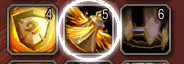
Well, they are actually 2 circles with a bit of glow around them, but hey... It looks like one big circle. :-D
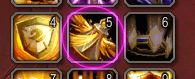
You can pick any color you like
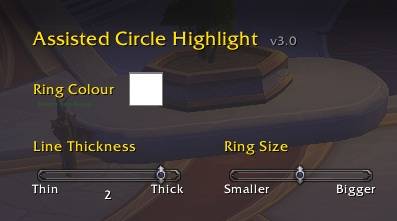
Config screen for the Assisted Circle Highlight
Description
# AssistedCircleHighlight
**Version:** 3.0 **Requires:** World of Warcraft Midnight (12.0+)
Replaces the built-in Assisted Highlight glow on action buttons with a configurable pulsing circular ring. Purely cosmetic, no combat data, no game mechanics.
## Installation
1. Place the `AssistedCircleHighlight` folder in `World of Warcraft\_retail_\Interface\AddOns\`.
2. Enable it on the character select screen under **AddOns**.
## Configuration
Use the config screen under the add-ons screen in-game.
## Options
Make the circle bigger
Make the circle thicker
## Slash Commands
/ach => Show managed button count and hook status
/ach test => Toggle ring on ActionButton1 for visual preview
/ach rescan => Re-scan all action bars ==> This one is a real live safer!!!!
/ach debug => Toggle verbose logging
## Troubleshooting
If the ring stops appearing, try /ach rescan.
Enable /ach debug and trigger an assist highlight to capture log output for bug reports.
## Credits
**Author:** Den de Rend
Developed with [Claude Code](https://claude.ai/code).
Assisted Circle Highlight Team