asraidtimer.jpg
asraidtimer2.jpg
Description
asRaidTimer (Midnight)
Major Cooldown Timing Alerts for Raid Boss Encounters
An addon created to mirror top rankers' major cooldown timings in the Rotmire raid without NSRT.
Key Features
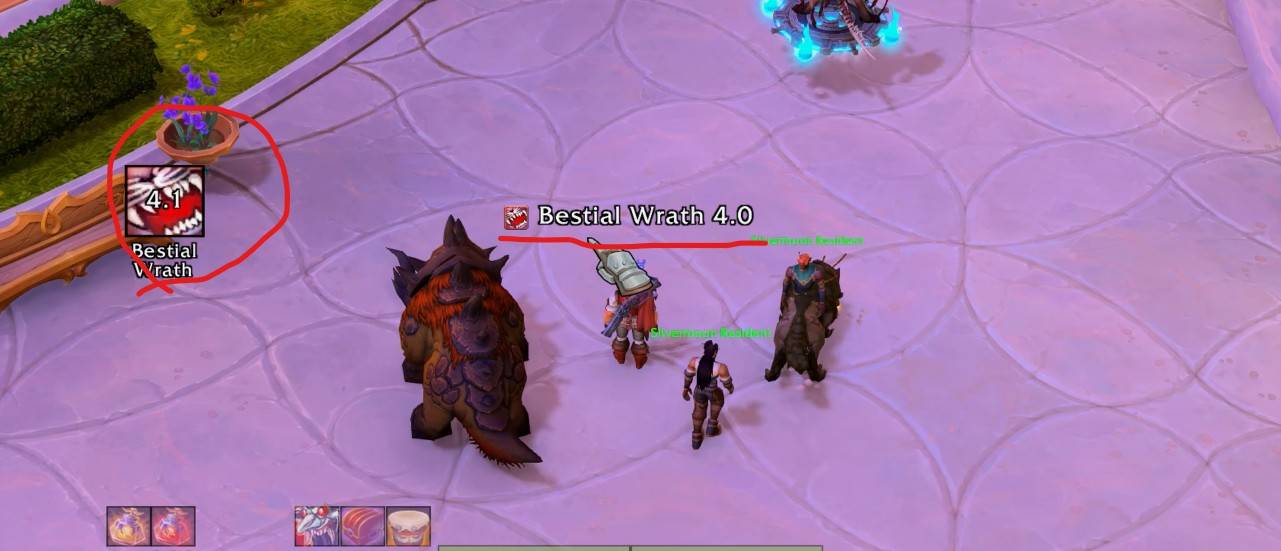
- [Left] Icon Display: When it is 10 seconds before the cooldown usage timing, a large icon is displayed on the left.
- [Center] Skill Name (Remaining Time) Display: Can be turned Off in the settings.
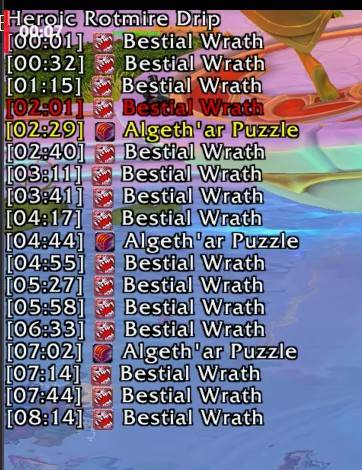
- [Top-Left] Entire Time Table Display: The active alert item changes to red, and the next upcoming item changes to yellow.
How to Use
Cooldown usage timings require manually entering a Timer Script.
- Visit Viserio Cooldowns (
https://wowutils.com/viserio-cooldowns/raid/wcl/top) where the cooldown Timer Scripts of top log-ranking players are shared. - Follow the video guide to apply the
Timer Scriptinto the addon (Configure viaEsc>Options>AddOns>asRaidTimer>Timer List). - Manages separate lists for each specialization.
- Only Heroic and Mythic difficulties can be registered; Normal and LFR difficulties will operate using the Heroic settings.
- Important: This addon is strictly designed for cooldown timing notifications; encounters with complex phase shifts are not supported.
Timer ScriptFormat
EncounterID:3159;Difficulty:Heroic;Name:Rotmire  -- Raid Information
time:1;spellid:19574;  -- Means casting 19574 (Bestial Wrath) at 1 second. Timings and entries can be adjusted using text editors like Notepad, followed by repeating lines of similar data structure.
Configuration
Adjustable via ESC > Options > AddOns > asRaidTimer
Minimum Warning Time(Default: 10s)[Button] Icon Size(Default: 50)[Center] Font Size(Default: 15)[Top-Left] List Font Size(Default: 13)[Button] Display Skill Name(Default: On)[Button] Display Icon(Default: On)[Center] Center-Screen Text Notification(Default: On)Move Anchor Positions: Type
/asConfigin the chat window.Reset Anchor Positions: Type
/asClearin the chat window to restore default settings.
Support & Feedback
Korean Users: Visit theInven asMOD Forum(https://www.inven.co.kr/board/wow/5288)English Users: Visit theasMOD YouTube Channel(https://www.youtube.com/@asmod-wow) orGitHub(https://github.com/aspilla/asMOD/)
asRaidTimer (한밤)
레이드 보스전 주요 쿨기 사용시점 알림 진균나락에서 랭커를 쿨기 타이밍을 따라하고 싶으나, NSRT늘 깔기 싫어 만든 애드온
주요 기능
- [좌측] 아이콘 표시: 쿨시 사용 시점 10초전에 되면 좌측에 큰 아이콘 표시
- [중앙] 스킬명 (남은시간) 표시: 설정에서 Off 가능
- [좌상] 전체 Time Table 표시 : 현재 알림 중인 항목은 빨간색, 다음 항목은 노란색으로 변경
사용법
쿨기 사용시점은 별도로 타이머 Script를 입력해 주어야 함.
- Viserio Cooldown 방문 (
https://wowutils.com/viserio-cooldowns/raid/wcl/top) 하면 Log 상위권 유저의 쿨기 Timer Script 가 공유 되어 있음. - 영상 참고하여
타이머 Script를 애드온에 적용 (Esc>설정>애드온>asRaidTimer>Timer List에서 설정). - 특성 별 별도 리스트 관리.
- 영웅/신화만 등록 가능하며 일반/공찾은 영웅 설정으로 동작.
- 중요) 쿨기 타이밍 알림만 고려 하였으며, Phase 있는 보스는 사용 불가.
타이머 Script양식
EncounterID:3159;Difficulty:Heroic;Name:진균영웅  --레이드 정보
time:1;spellid:19574;  -- 1초에 19574(야수의 격노) 시전이라는 의미, 시간등은 `메모장`등을 이용하여 조정가능, 이후 비슷한 정보가 반복
설정
esc >> 설정 >> 애드온 >> asRaidTimer 에서 설정 가능
최소 표시 시간(기본 10초)[버튼] 아이콘 크기(기본 50)[중앙] 글자 크기(기본 15)[좌상] 리스트 글자 크기(기본 13)[버튼] 스킬명 표시 여부(기본 On)[버튼] 아이콘 표시 여부(기본 On)[중앙] 화면가운데 글씨 알림 여부(기본 On)위치 이동 :
/asConfig명령어 채팅창에 입력위치 초기화 :
/asClear명령어 채팅창에 입력, 기본 설정으로 초기화
문의처
한글 유저:인벤 asMOD 포럼방문 (https://www.inven.co.kr/board/wow/5288)영문 유저:Youtube asMOD 채널방문 (https://www.youtube.com/@asmod-wow),Github방문 (https://github.com/aspilla/asMOD/)
asRaidTimer Team

Owner