Description
asCompactRaidBuff (Midnight)
Raid and Party Frame Enhancements
Key Features & Configuration
- Accessible via
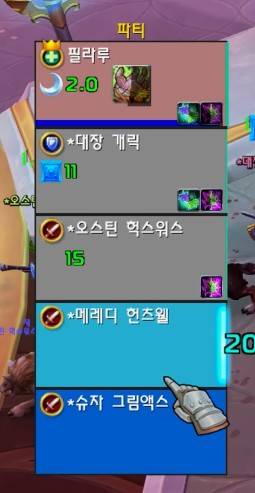
ESC>Options>AddOns>asCompactRaidBuff. [Bottom] Displays the healer mana bar: (Default: On).[Bottom] Displays the tank power bar: Displays only when the resource is not mana (Default: On).[Left] Displays the marker icon: (Default: On).[Top Left] Displays the party/raid leader icon:(Default: On).[Color] Change health color when HOT buffed: Not supporting to change buff, Grey color (Default: On).[Left] Display the remain time of HOT buff: (Default On)[Color] Change health color when HOT pandemic time: Red grey color (Default On)[Size] Remain font size: (Default 12)
| Class | Color Change |
|---|---|
| Restoration Druid | Regrowth |
| Holy Paladin | Beacon of Virtue |
| Discipline Priest | Atonement |
| Holy Priest | Renew |
| Preservation Evoker | Echo |
| Restoration Shaman | Riptide |
| Mistweaver Monk | Renewing Mist |
| Augmentation Evoker | Prescience |
How to Set Up Click Casting
ESC > Options > Keybindings > Click Casting
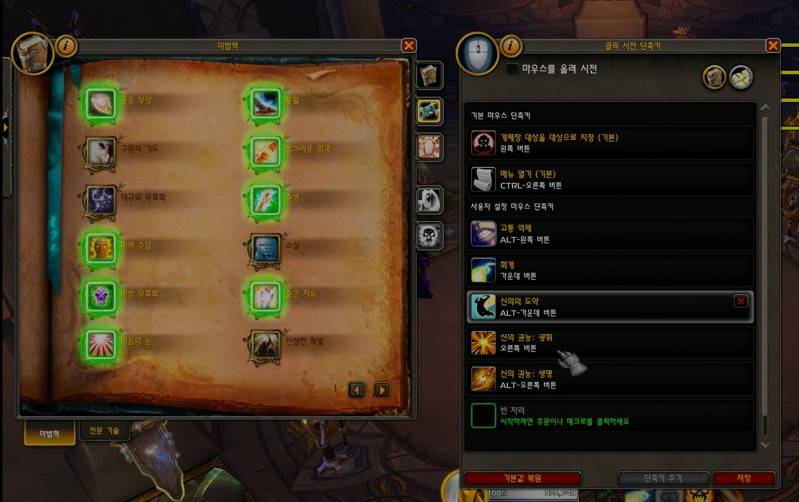
Click casting can be used on Raid, Party, Player, Target, Focus, and Boss unit frames. You can assign spells directly from the "Spellbook" or set up macros. It supports Mouse Left/Right/Middle clicks combined with modifier keys. By default, Left Click targets and Right Click opens the menu. In the example below, Right Click is set to cast Radiance, while CTRL + Right Click is configured to open the menu. Since macros are also supported, you can use click casting for things like Trinket macros.
How to Set Up Mouseover Healing
While click casting cannot be used on nameplates, mouseover casting has the advantage of allowing you to cast spells by simply hovering your mouse over a nameplate or a character.
ESC > Macros
Detailed explanations can be found on community macro boards (e.g., WoW Inven Macro Board). If you create the macro below and assign it to a hotkey like Mouse Wheel Up, it will cast Purge the Wicked on hostile targets, or Power Word: Shield followed by Renew on allies.
#showtooltip
/cast [@mouseover,harm,nodead] Purge the Wicked
/castsequence [@mouseover,help,nodead][]reset=3 Power Word: Shield, Renew, Renew, Renew, Renew, Renew
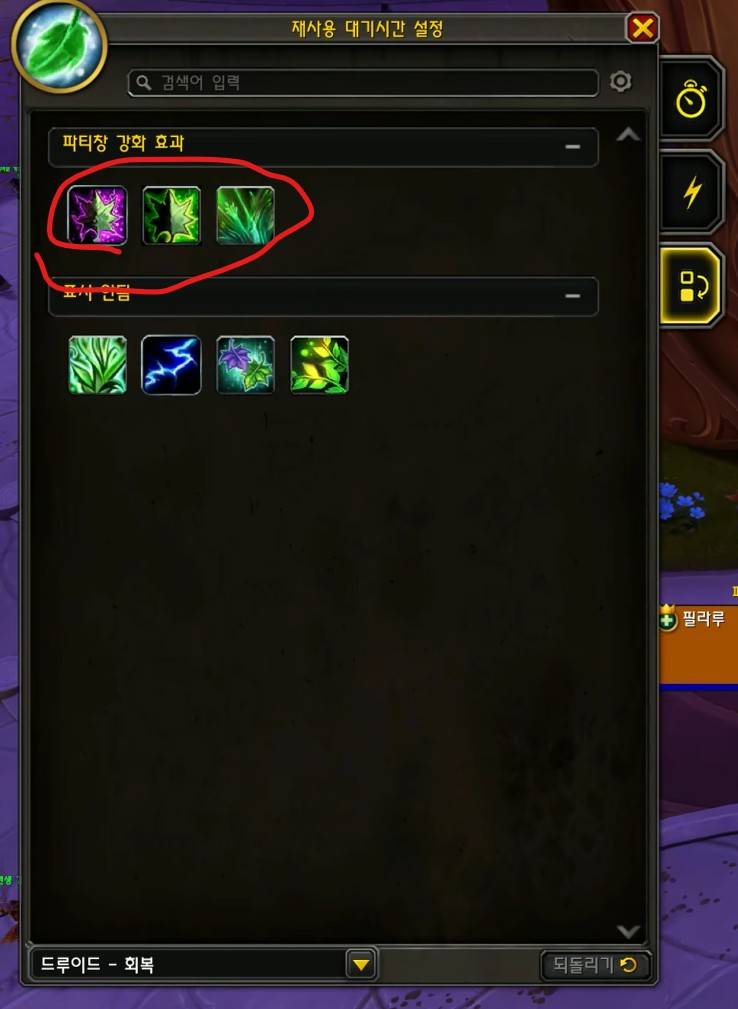
How to Display Only Desired Healing Over Time (HoT) Buffs
You can adjust this setting by navigating to:
Esc >> Options >> Gameplay Improvements >> Advanced Cooldown Settings >> Party Buffs
Contact Information
- Korean Users: Visit the Inven asMOD Forum.
- English Users: Visit the asMOD YouTube Channel or GitHub.
asCompactRaidBuff (한밤)
공격대 및 파티 프레임 강화
주요 기능 & 설정
ESC>설정>애드온>asCompactRaidBuff에서 설정 가능[하단] 힐러 마나 표시: (기본: On)[하단] 탱커 파워 표시: 마나가 아닌 경우만 표시 (기본: On)[좌측] 징표 아이콘을 표시: (기본: On)[좌상] 파티/공격대 리더 표시: (기본: On)[색상] 힐러 HOT 버프시 색상 변경: 버프 변경은 지원하지 않음, 회색 (기본: On)[좌측] 힐러 HOT 버프시 남은 시간을 표시: (기본: On)[색상] 힐러 HOT 버프 Pandemic 시간에 색상 변경: 적회색 (기본: On)[크기] 남은 시간 글씨 크기: (기본: 12)
| 직업 | 색상 변경 |
|---|---|
| 회복 드루이드 | 회복 |
| 신성 기사 | 고결의 봉화 |
| 수양 사제 | 속죄 |
| 신성 사제 | 소생 |
| 보존 기원사 | 메아리 |
| 복원 주술사 | 성난 해일 |
| 운무 수도사 | 소생의 안개 |
| 증강 기원사 | 예지 |
클릭 시전 설정 방법
esc >> 설정 >> 단축키 설정 >> 클릭 시전
클릭 시전 대상은 공격대/파티창/플레이어/대상/주시 대상/보스 유닛 프레임에 사용 가능 하고, 스킬은 "마법책" 또는 매크로를 설정 할 수 있습니다. 마우스 좌/우/중간 + 키보드로 설정 가능합니다. 기본 마우스 단축키 좌클릭은 대상으로 지정, 오른 클릭은 메뉴 열기 인데, 아래 설정은 오른 클릭에 광휘를 설정해 놓고, CTRL + 오른클릭으로 메뉴 열기를 해 놓은 겁니다. 매크로도 사용 가능하기 때문에 장신구 매크로 등을 사용 하신다면 장신구를 클릭 시전 할 수 있습니다.
마우스 오버 힐 설정 방법
클릭 시전은 이름표 등은 사용이 불가 한데, 마우스 오버 시전은 이름표/케릭 위에 마우스를 올려 두고 시전을 하면 마우스 아래 대상에 시전이 가능하다는 장점이 있습니다.
esc >> 매크로 설정
매크로 게시판 (와우 인벤 매크로 게시판 - 월드 오브 워크래프트 인벤 (inven.co.kr)) 등에 설명이 많이 나와 있으니 설명하지 않겠습니다. 아래 매크로를 만들고, 마우스 휠업 등의 단축키에 등록해 놓으시면 적대적 대상에게는 사악의 정화를 아군에는 보호막 > 소생을 시전 합니다.
#showtooltip
/cast [@mouseover,harm,nodead] 사악의 정화
/castsequence [@mouseover,help,nodead][]reset=3 신의 권능: 보호막, 소생, 소생, 소생, 소생
원하는 힐버프(HOT) 만 표시 하는 방법
esc >> 설정 >> 게임 플레이 개선 >> 고급 재사용 대기시간 설정 >> 파티 강화 효과 에서 조정 가능
문의처
한글 유저:인벤 asMOD 포럼방문 (https://www.inven.co.kr/board/wow/5288)영문 유저:Youtube asMOD 채널방문 (https://www.youtube.com/@asmod-wow),Github방문 (https://github.com/aspilla/asMOD/)
asCompactRaidBuff Team

Owner