Asa_GearInfo
- By
A lightweight World of Warcraft addon that enhances the character pane by providing essential information about your equipped gear at a glance.
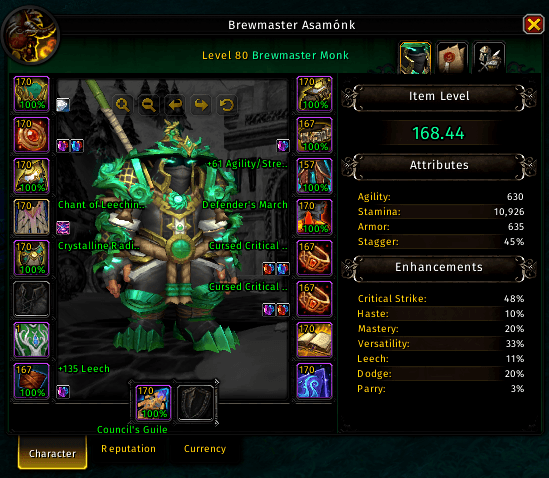
Screenshot 2026-01-25 232923.png
Description
Asa Suite: Gear Info
Asa Suite: Gear Info is a lightweight World of Warcraft addon that enhances the character pane by providing essential information about your equipped gear at a glance.
Features
- Character & Inspect Support: All features work on both your own character pane and when inspecting other players.
- Item Level (iLvl): Displays the item level of each equipped piece of gear directly on its slot.
- Durability: Shows the durability percentage of your items on the character pane, color-coded based on the remaining percentage.
- Enchants: Displays the name of the enchant on each item (where applicable). Includes missing enchant indicators.
- Gems & Sockets: Visualizes gems and empty sockets on your gear, making it easy to see what needs attention.
- Precise Average Item Level:
- Character Pane: Updates the average item level display to show two decimal places (e.g., 615.42).
- Inspect Frame: Adds a precise average item level display to the top right of the inspect window.
Customization
Highly customizable settings via the Asa Suite configuration panel. Most features can be configured independently for the Character and Inspect views:
- Global Settings: Adjust fonts, sizes, and colors for all information displays.
- Class Colors: Option to use the character's class color for item level, enchants, and average item level.
- Toggleable Modules: Enable or disable any feature (iLvl, Durability, Enchants, Gems, Precise iLvl) independently.
- Missing Indicators: Choose to show or hide indicators for missing enchants or empty sockets.
Usage
- Open Settings: Use the slash command
/agito open the configuration panel.
Asa_GearInfo Team