Armory
- By
Provides an overview of equipment, stats, inventory, professions, quests, spells and more for all your characters

Character overview

Searchable inventory per character or overall

Quest log

Recipe information per character

Saved instances per character

Lookup information from other users

Configurable character overview

Guild Bank that updates itself automatically
Description
Armory
All your characters, at a glance. Armory remembers the equipment, stats, bags, bank, professions, quests, spells, talents, reputation and more of every character you log in with, so you can look at any of them while playing another.
One addon for four versions of World of Warcraft: Retail, WoW Forever, Classic Era and Burning Crusade Anniversary.
Features
Your characters
- All your characters on all realms, with a realm and a faction filter
- The paper doll with stats, equipment, buffs and the items that fit each slot
- Talents, PvP, reputation, spellbook and more (see the table below)
- Your pets, and for hunters also the pets in the stable
- Achievements and statistics
- Quest log, and completed dailies, weeklies, random dungeons and battlegrounds
- Saved instances, and in Retail also world bosses and Raid Finder
- Friends, ignore list and calendar events, with a warning before they start
- Mail, with a warning before it expires
Inventory
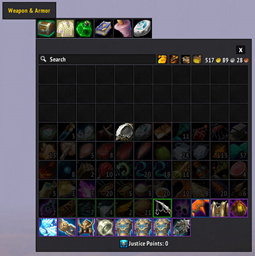
- Bags, bank, Warband bank, mailbox, auctions and equipment of every character
- A list view and a bag view, a filter, and a search over all your characters
Professions
- All recipes and reagents of every character, filtered by type and slot
- Profession cooldowns, with a message when one is ready
- Recipe tooltips: who knows it, can learn it now, or can learn it later
- Item tooltips: which of your characters can craft it
Tooltips
- Item counts per character, guild bank and Warband bank, with totals
- The gems in an item and their color (Retail and BC Anniversary)
- The equipment set an item belongs to (Retail and WoW Forever)
- The item level of your other characters in each equipment slot
- Quest links in chat: which of your characters are on the quest
- Achievement links: which characters earned it or are working on it
- Comparison with the equipment of the character shown in Armory
Search and sharing
- Search items, quests, spells and professions of all your characters
- Alt-click a link in chat to search for it
- Look up other Armory users in your guild or group
- Choose what you share yourself
And more
- A summary of all your characters, with gold, item level, played time and more
- The guild bank of every guild you're in, kept up to date by guild members
- Armory's layout in the game's character frame (Retail and WoW Forever)
- Minimap button, addon compartment, LibDataBroker support and key bindings
- Movable frames that you can scale with the mouse wheel
- Pauses its updates while you're in combat
What's in each version
| Retail | WoW Forever | Classic Era | BC Anniversary | |
|---|---|---|---|---|
| Character, inventory, professions, quests, spells, talents, reputation, summary | ✓ | ✓ | ✓ | ✓ |
| Guild bank | ✓ | ✓ | ✓ | |
| Warband bank | ✓ | |||
| Achievements and statistics | ✓ | ✓ | ||
| Currencies and equipment sets | ✓ | ✓ | ||
| Skills, pet happiness and loyalty | ✓ | ✓ | ✓ | |
| PvP rank | ✓ | ✓ | ||
| Arena teams | ✓ | |||
| Legacy trees | ✓ |
Support for WoW Forever is new in v20 and not everything has been confirmed in the game yet. If something doesn't work as described, please open a ticket.
Getting started
Open Armory with any of these:
/armoryor/ar- the minimap button, or the addon compartment where the game has one
- a LibDataBroker display addon
- a key binding (Key Bindings > AddOns > Armory)
Armory stores what the game shows you. Some information only appears after you've opened the window for it once on that character: the bank, the mailbox, the auction house, each profession, and the guild bank.
Switch characters with the arrows under the portrait or with the dropdown. There are key bindings for the previous, next and current character, and for each Armory frame.
Paper doll
Hover an equipment slot to see the items in your bags that fit it, and the item level of your other characters in that slot. In Retail, the sockets box counts your gems per color. In Burning Crusade Anniversary, click the resistances to see your gems instead.
Searching
The inventory has a search box and a filter. Alt-click an item in your bags, or Shift-click a chat link, to paste its name into the search box. The Options menu next to the filter lets you switch to the bag layout, search all characters, or combine your bags into one.
You can search by name or in the tooltip text, with the results in chat or in a window. To search everything from the chat line:
/ar find [all|item|inventory|quest|spell|skill] <name>
/ar find <link>
/ar <link>
Examples: /ar find item Hearthstone, /ar find quest "The Missing Diplomat". Put a name with spaces between quotes. With the option Search Alt-clicked link, Alt-clicking a link in chat starts a search right away.
Tooltips
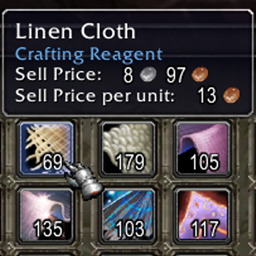
Item tooltips show how many of an item each of your characters, guild banks and the Warband bank have, with totals and per bag slot. You can sort the counts by type, name or amount, include other realms and factions, and choose the colors in the Tooltip options.
Recipe tooltips show which characters know the recipe, can learn it now, or will be able to later.
Equipment comparison
Hold Alt while hovering an item to compare it with the equipment of the character shown in Armory. Armory's comparison appears next to the game's own.
Summary
Hover the minimap button (or the LibDataBroker display) to see a summary of all your characters, or Alt-click it to show the summary right away. It shows level, item level, XP, zone, gold, played time, last online, bag space, mail, quests, saved instances, events, currencies and professions. Click a column name to sort.
Armory can warn you when mail on one of your characters is about to expire, and when a character hasn't opened its mailbox for a long time. /ar check [days] checks right away.
Information sharing
/ar lookup opens the lookup window, where you can look up characters, items, quests and professions of other Armory users in your guild or group. In the Data Sharing options you choose what you share yourself.
Guild bank
The guild bank is a separate addon in the same download: ArmoryGuildBank. Open it with /ar guildbank or /ar gb. It stores the guild bank each time you visit it and can show your guild banks from other realms. Not available in Classic Era.
Guild members who use ArmoryGuildBank keep each other up to date. When one of them visits the guild bank, the others who are online receive the tabs that changed, and when you log in you get what changed while you were away from those who are online. So you see the current guild bank without going there yourself. You need to have visited the guild bank once, and Data Sharing must be on in the Armory Modules options (it is by default).
Commands
| Command | |
|---|---|
/ar |
toggle Armory |
/ar help |
list all commands |
/ar config |
open the options |
/ar find ... |
search, see above |
/ar lookup |
look up other players |
/ar guildbank, /ar gb |
toggle the guild bank |
/ar check [days] |
check mail for items that are about to expire |
/ar cooldown, /ar cd |
list profession cooldowns |
/ar reset frames |
move Armory's frames back to their default position |
/ar reset settings |
reset all options |
Cleaning up
Armory can't tell that a character was deleted or transferred. Remove it yourself:
| Command | |
|---|---|
/ar delete char <name> [realm] |
delete one character |
/ar delete realm <name> |
delete all characters on a realm |
/ar delete gb <guild> [realm] |
delete a guild bank |
/ar delete all |
delete everything |
Example: /ar delete char Warmexx "Argent Dawn".
Bugs and feature requests
Please don't use the comments for bug reports. Open a ticket instead, with the version of the game and of Armory, and the error message if there is one (BugGrabber and BugSack help).
Translations
Armory is translated by its users. If your language is missing something, you can help on the localization page.
Links
Coffee
Armory is free. If you like it, you can buy me a coffee with the Donate button. Curious how it started? Read the background.
Word of thanks
Thanks to everyone who reported bugs, suggested features, tested betas and translated Armory.
Armory Team

Owner