
Ari Auction - GDKP
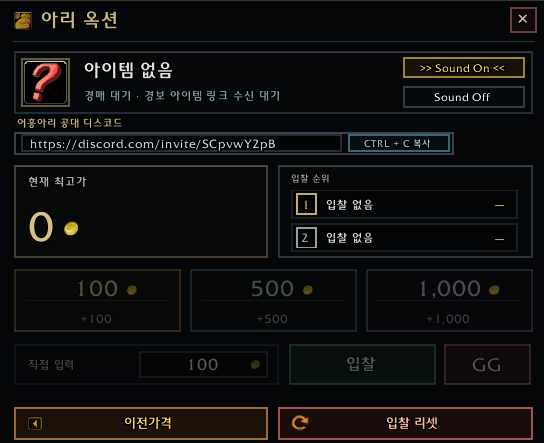
Ari Auction is a lightweight bidder-side GDKP auction helper for WoW Classic.
001.png
003.png
002.png
Description
It detects auction items posted through Raid Warning, displays the item and current bid clearly, and gives bidders fast, readable controls for placing the next bid.
Features
• Automatically detects auction items from Raid Warning messages
• Large item display with mouseover tooltip support
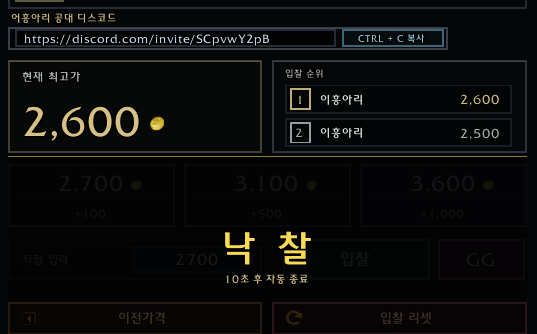
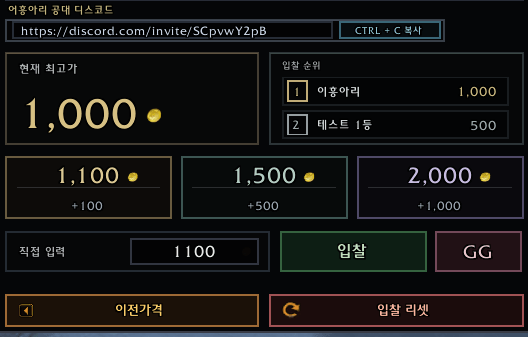
• Tracks 1st and 2nd highest bidders
• Quick bid buttons for +100, +500, and +1,000
• Direct bid input with flexible bid parsing
• Supports Korean and English game clients automatically
• Supports common bid formats such as:
- 10k / 1.5k / 10K
- 100g / 100 gold
- 2천 / 이천 / 만 / 2만
- 1–99 shorthand bids on Korean clients
• Raid Warning countdown support: 5 → 4 → 3 → 2 → 1
• A valid new bid during countdown cancels the current closing sequence
• Sold state remains visible for 10 seconds with a “SOLD” watermark
• Automatically refreshes when the next auction item is posted
• Previous Price and Bid Reset controls for auction correction
• Optional button sounds with configurable Sound On / Off mode
• Randomized bid sounds for quick bid buttons
• Rival bid alert sounds when another bidder changes the ranking
• Compact movable UI
• Minimap button controls:
- Left Click: Toggle GUI
- Right Click: Enable / Disable addon
- Ctrl + Alt + Shift + Left Click: Open test mode
Bid Sounds
• +100 bid: random sound from 001 and 004–020
• +500 bid: random sound from 002 and 004–020
• +1,000 bid: random sound from 003–020
• Direct bid: random sound from 003–020
• GG: random sound from 0001–0005
• Rival bid alert: random sound from 0006–0008
Installation
1. Extract the folder into:
World of Warcraft/_classic_/Interface/AddOns/
2. Make sure the folder name is exactly:
AriAuction
3. Restart the game or type /reload.
Ari Auction - GDKP Team

