
Argus Watch
- By
Spots nearby enemy players and warns you instantly, with Kill on Sight lists, group and "targeting you" alerts, party sharing, and a Flat or Blizzlike look.
s5.png
a1.png
Description
Argus Watch
See enemy players before they see you, with your whole faction watching too. Argus Watch spots enemy players around you on WoW Forever and warns you the moment one shows up: who they are, how hurt they are, how close, whether they're on your Kill on Sight list, and whether they're coming for you. Your guild shares one Kill on Sight list, and every Argus Watch user of your faction shares what they see, so you hear about the players you're hunting even when they're on the other side of the world.
Two looks to choose from: a clean Flat style and a gold-trimmed Blizzlike style.
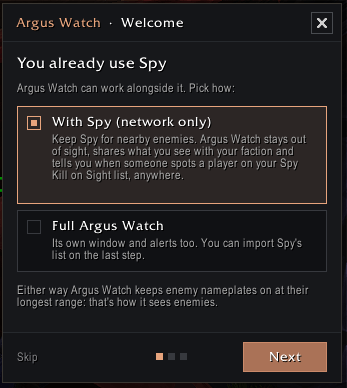
Already use Spy? Keep it.
Argus Watch has a With Spy mode: Spy stays your main addon for nearby enemies, and Argus Watch runs quietly next to it with no second window and no double alerts. It shares what you see with your faction and tells you, with a marker on the map, when another Argus Watch user spots a player on your Spy Kill on Sight list. It reads your Spy list as it is: nothing to import or set up.
What's new in 2.12
- With Spy mode: keep Spy and add Argus Watch just for the faction network (see above). Pick it in the welcome or in Settings › General › Mode
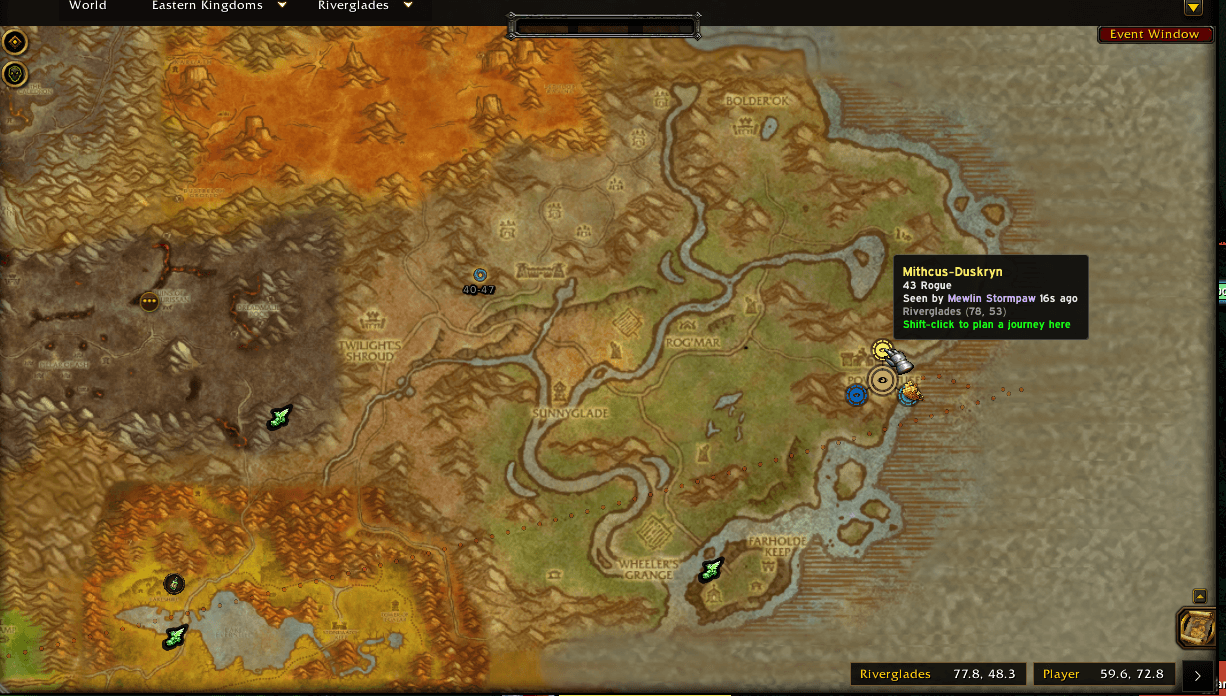
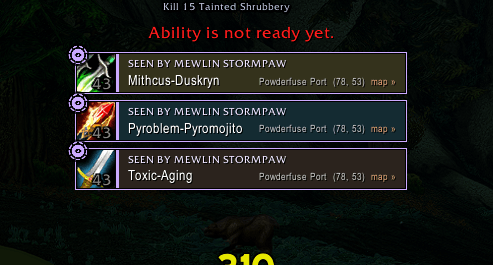
- Map markers: Kill on Sight players show on the world map where they were last seen, by you or by your faction. Click a faction sighting banner to open the map on the spot
- Locations everywhere: sightings carry coordinates, shown in History, the Enemies list and network alerts
- Welcome and tips: a short setup on your first login (alert loudness, window layout, sharing, Spy) and one-time tips the first time you meet each feature
- Distance on the bars: how close each enemy is, worked out from your own spells' ranges
- Smoother Kill on Sight: right-click adds right away, with a small card to pick reasons and an Undo; removing asks first
- Quiet in neutral towns: mute sounds (or banners too) in Booty Bay, Gadgetzan and the other neutral towns
Features
The window
- Nearby, Recent and Kill on Sight tabs. Each enemy is a bar showing class, level, guild, health, distance, and how long ago you saw them
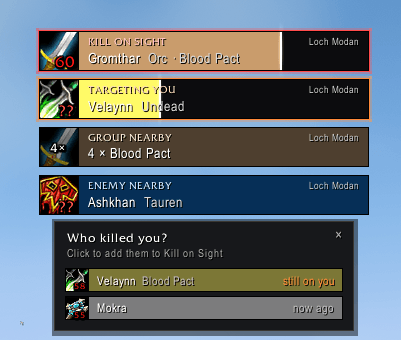
- Kill on Sight players glow red, and anyone targeting you glows orange
- Compact layout, or Bars Only: just the bars, with the header appearing when you hover over it
- Drag the corner grip to change the width and the number of rows
- Fade or hide the window when nobody's nearby; it comes back by itself when someone shows up
Alerts
- New enemies, Kill on Sight players, guildmates of Kill on Sight players, enemies targeting you, and groups from one guild (one alert instead of five)
- Stealthers: a Rogue, Druid or Night Elf who vanishes right next to you is flagged and stays lit in the list
- Every alert can have a banner, a sound, or both. Use Argus Watch's own sounds or the game's
- Quiet in neutral towns, so Booty Bay doesn't ping all day
- Test Alerts button to preview them all
Kill on Sight
- Right-click any enemy (in the list or on a banner) to add them, then pick reasons on a small card, or Undo
- Removing someone asks first, and for players you added, why: Got revenge, Forgave or Added by mistake
- After you die, Argus Watch suggests who killed you, so you can add them in one click
- Spy: import your whole Spy Kill on Sight list with reasons, or let Argus Watch follow it live
The faction network
- Argus Watch users of your faction share the enemies they see. When someone spots a player on your Kill on Sight list, you get a banner saying who saw them and where (your zone only, or anywhere), and a marker on the map
- Other players you've met get their "Last Seen" updated quietly
- Users online in Settings and the minimap tooltip
The map
- Kill on Sight players appear on the world map where they were last seen, by you or by your faction. Markers fade with age; hover one for who, when and where
- Markers in the same spot fold into one with a count, and spread out when you hover them
Your guild
- Shared Kill on Sight list: adds and removals go both ways between guildmates running Argus Watch
- Sync Now catches everyone up. Players you removed yourself never come back through a sync
- A small pill at the top of the screen when a guildmate adds or removes someone, with their reason, and when someone kills (or helps kill) a player on a guildmate's list
- Block a guildmate whose additions you don't want
- Update notice: when a guildmate or a faction-mate is running a newer version, you'll know
Your group
- Group sharing: party and raid members running Argus Watch see the enemies you see, marked "via Name"
- Shift + left-click an enemy to post a one-line report to your party or raid
History and the Enemies tab
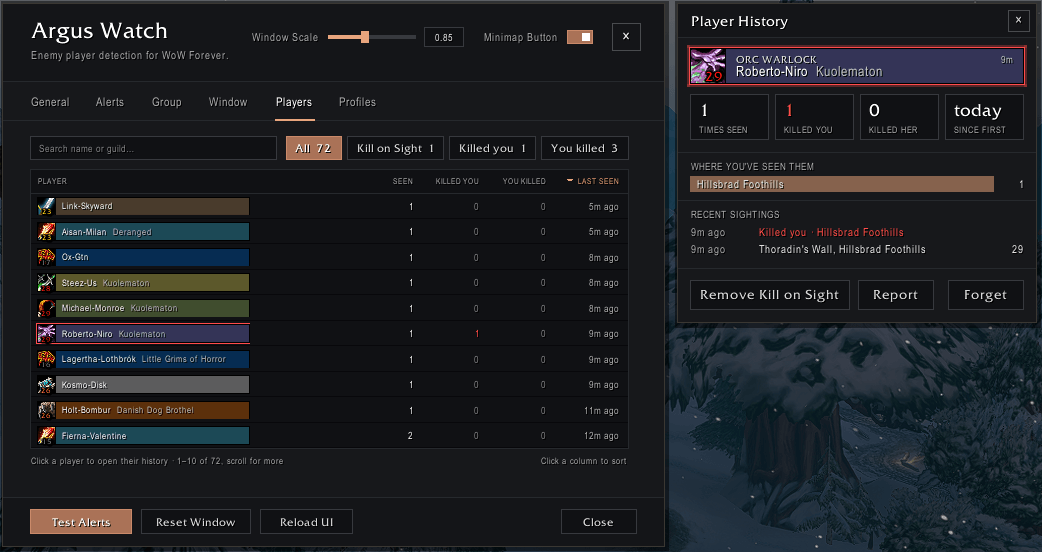
- Every enemy you meet gets a history: times seen, where (with coordinates) and when, who killed whom, and their Kill on Sight reasons. Click a line to open the map there
- Enemies tab in Settings with filters: Notable, All, Kill on Sight, Killed you and You killed. Search by name or guild, sort any column
- Kills from the game itself: "You Killed" counts your own killing blows (or your pet's). Honor credit without the killing blow is an assist
- Old one-off sightings clear themselves out after a while (you choose how long). Kill on Sight players are never forgotten
And also
- A short welcome on your first login to set it up in about 20 seconds, and
/argus tourto see it again - Keeps enemy nameplates on at the longest range the game allows, since that's how Argus Watch sees enemies (turn it off to keep your own settings)
- Turns itself off in dungeons and raids
- Profiles you can share between characters
- Names in Cyrillic, Korean or Chinese show properly on English clients
- No libraries needed
Mouse shortcuts
| On an enemy in the list | Does |
|---|---|
| Left-click | Target them |
| Shift + left-click | Report them to your party or raid |
| Right-click | Add to or remove from Kill on Sight |
| Shift + right-click | Hide them from the lists |
| Ctrl + click | Open their history |
| On an alert banner | Does |
|---|---|
| Left-click | Target them (a faction sighting: open the map where they were seen) |
| Right-click | Add to Kill on Sight |
| Shift + right-click | Dismiss it |
Commands
/argus or /aw
| Command | Does |
|---|---|
/argus |
Show or hide the window (in With Spy mode: open settings) |
/argus config |
Open settings |
/argus tour |
Show the welcome again |
/argus kos [name] [reason] |
Add or remove a player from Kill on Sight (or your target) |
/argus history [name] |
Open a player's history (or your target's) |
/argus ignore / unignore <name> |
Hide or unhide a player |
/argus block / unblock <guildmate> |
Ignore or accept a guildmate's Kill on Sight shares |
/argus importspy |
Import Spy's Kill on Sight list |
/argus profile [name] |
Show or switch profile |
/argus clear |
Clear the Recent list |
/argus lock / reset |
Lock the window, or move it back to its starting spot |
/argus test |
Preview the alerts |
Good to know
- No combat log on Forever. The game doesn't let addons read it, so Argus Watch sees enemies through nameplates, your target, focus and mouseover. If an enemy has no nameplate, it can't see them. Group and faction sharing fill the gaps.
- Stealth warnings are a best guess. A vanish is only called when someone disappears right next to you or drops out of your target.
- What's shared:
- Your guild gets your Kill on Sight list and reasons.
- Your group gets who's near you right now.
- Your faction gets the enemies you see and where you saw them (zone and map position).
- Your own history, kill counts and Kill on Sight list never go to the faction. You can turn faction sharing off and still receive.
- Faction sightings are other players' reports, not something you saw yourself.
- Spy: Argus Watch only reads Spy's Kill on Sight list. It never changes Spy's data and never sends your list anywhere. Argus Watch isn't made by or affiliated with the Spy authors.
Built for WoW Forever.
AI Disclaimer: Argus Watch is developed with AI assistance. Most of the code, the changelogs and this description were written with Claude (Anthropic), working from my designs and feedback; I test every release in game and I'm responsible for the code. The window icons (menu, close, resize grip) were generated with Google Gemini and edited for the addon.
Argus Watch Team

