Find arena partners with a cleaner, more informative group finder. Review ratings, arena records, PvP titles, player details, and group members before deciding who to climb with.
🔄 Automatic Rating Updates — New in 1.3.0
Arena LFG Data companion addon to automatically load available player ratings for your realm and faction after login.
Keep both addons updated through CurseForge. You can still use Update Ratings to request missing or outdated information through ArenaLFG.com.
On CurseForge App right click over Arena LFG - Data and select Install Settings > Update settings > Automatic
🚀 Getting Started
Open Arena LFG from the minimap or type /alfg
⚔️ Features
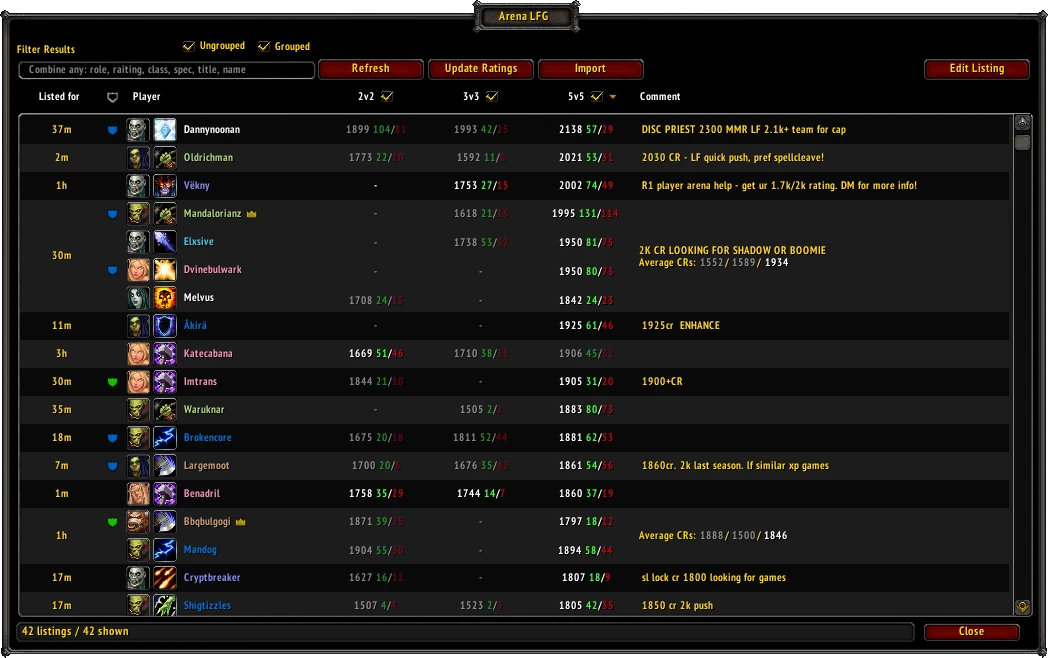
- View 2v2, 3v3, and 5v5 ratings, season records, and group average ratings.
- See race, specialization, PvP title, item level, listed roles, and selected brackets.
- Identify group leaders with a crown beside their name.
- Filter by rating, name, race, class, specialization, role, or PvP title.
- Combine filters, such as 2100 gladiator healer undead priest.
- Choose which brackets to display and toggle Grouped or Ungrouped listings.
- Sort listings by age, player, PvP title, or bracket rating.
- Contact, invite, or send a Who query through the player context menu.
- Save private notes and blacklist players.
- Open Blizzard's native listing interface with List Self or Edit Listing.
🌐 Updating Ratings Manually
Without the companion addon—or whenever you need another update:
- Press Update Ratings.
- Copy the generated URL and open it in your browser.
- Copy the import data from ArenaLFG.com.
- Return to the game, press Import, and paste it.
Only players in your current LFG results are requested. The Update Ratings button pulses when a significant portion of those players need updated information.
📝 Notes and Blacklisting
Right-click a player to add a note or blacklist them. Hover over their note icon to read it.
Listings containing a blacklisted player are hidden. Use Annotations to review, edit, or delete saved entries.
Player information is saved between sessions. Private annotations stay local and are never sent to ArenaLFG.com.
💬 Feedback and Links
Bug reports and suggestions are welcome in the CurseForge project comments.
Arena LFG is an independent community project and is not affiliated with or endorsed by Blizzard Entertainment.
Arena LFG Team