


ArcLight
Capture d'écran 2026-09-12 204737.jpg
Description
ArcLight
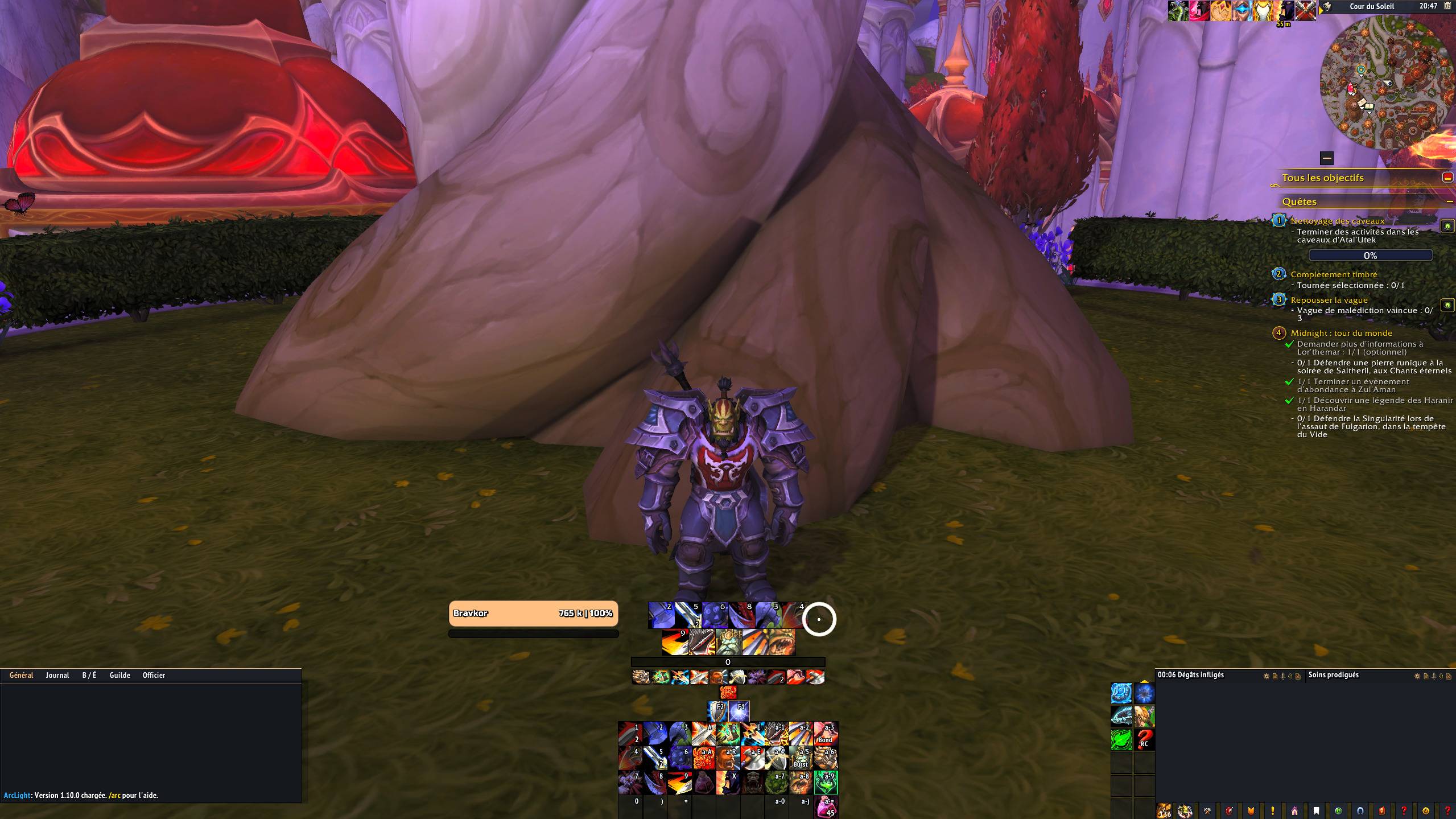
A lightweight, dependency-free World of Warcraft interface built to enhance the default UI without completely replacing it.
ArcLight brings the different parts of Blizzard's interface together under one cohesive visual style while keeping the addon lightweight, configurable, and respectful of the game's systems.
No ElvUI-style complete replacement.
No Ace3.
No LibStub.
No external dependencies.
✨ Features
⚔️ Action Bars
- Five fully configurable action bars
- Complete action bar pagination
- Stance and form bar
- Vehicle, possession and flight support
- Proc glow
- Custom cooldown and charge displays
- One-button Assistant support
- Pet and action menus
- Class-colored active state
- 80 declared keybindings
- Blizzard keybinding inheritance
🐺 Pet Bar
- Dedicated pet action bar
- Automatic cast support
- Customizable size, spacing and direction
- Blizzard keybinding inheritance
- Automatically shown only when a pet is available
🖼️ Unit Frames
- Player, target, focus, pet and target-of-target frames
- Class and reaction-based colors
- Customizable health values and percentages
- Class resource display
- Cast bars
- Raid, PvP and combat indicators
- Configurable opacity states
- Mirrored target frame
- Rounded corners and customizable borders
🪧 Nameplates
ArcLight uses a hybrid approach designed around the restrictions introduced by WoW 12.x.
- Custom health bars
- Custom names and indicators
- Class, reaction and threat colors
- Raid markers, quest and elite indicators
- Custom cast bar appearance
- Aura styling
- Threat display based on your role
- Open-world ally nameplate styling
- Live configuration preview
🧿 Player Auras
- Blizzard buffs and debuffs restyled to match ArcLight
- Custom borders and fonts
- Configurable icon layout
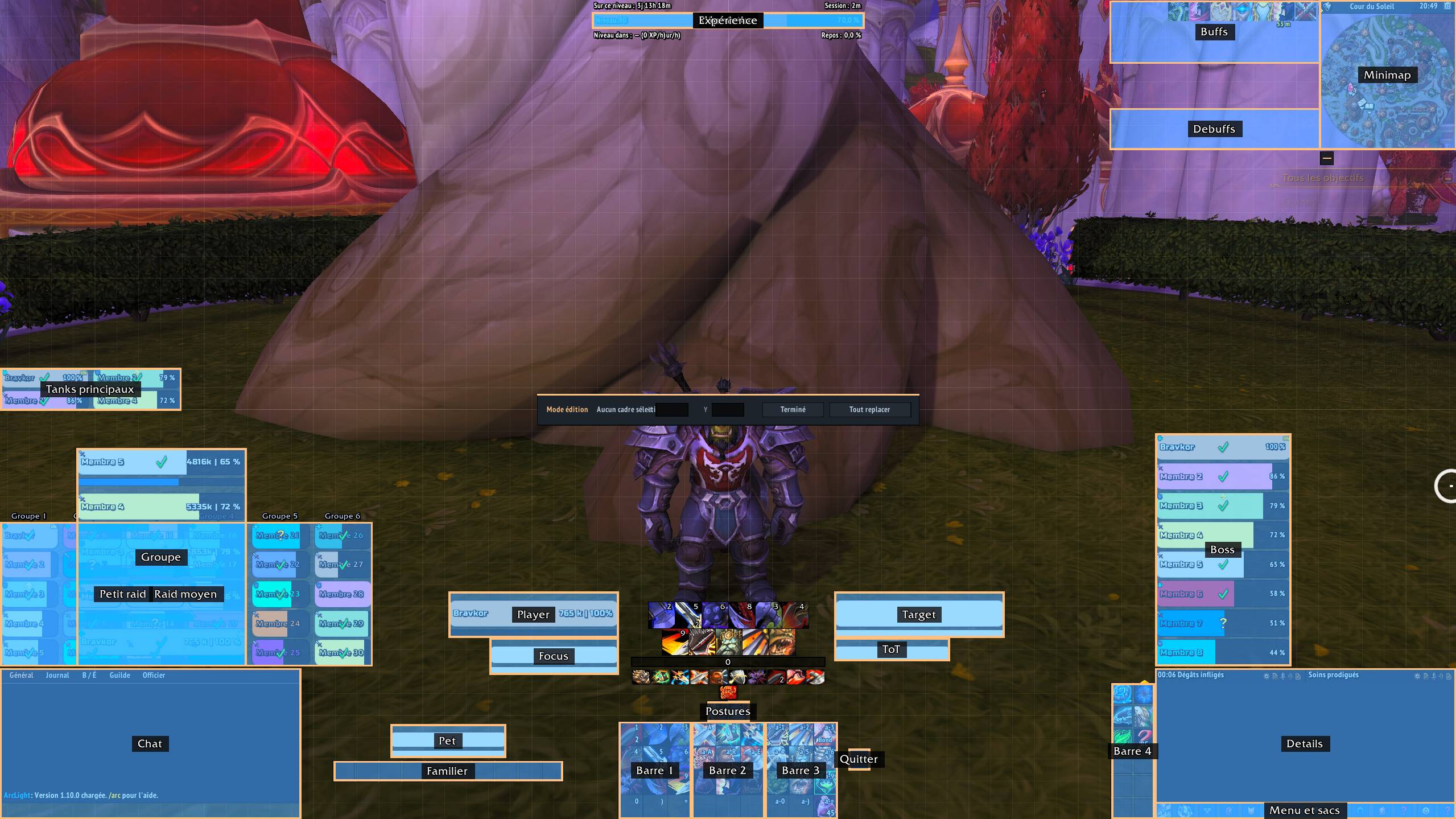
- Dedicated positioning through the ArcLight move mode
- In-game aura inspection tool
💬 Chat
ArcLight keeps Blizzard's chat system instead of replacing it.
- Custom chat panel
- Class-colored tabs
- New message animation
- Improved tab alignment
- Custom input field and cursor
- Custom scrollbar
- Combat log filters
- Optional hiding of Blizzard chat buttons
💡 Tooltips
- ArcLight-styled tooltip frame
- Class-colored border
- Custom health bar appearance
- Supports multiple Blizzard tooltip frames
- Can be enabled or disabled without
/reload
🗺️ Minimap
- Circular or square shape
- Custom border and class-colored accent
- Restyled zone information bar
- Configurable addon button organization
- Difficulty and queue indicators
- Integrated positioning through
/arc move
📊 Progress Bars
Three independent progress bars:
- Experience
- Honor
- Reputation
Each bar supports its own size, scale, text and statistics.
📈 Details! Integration
ArcLight provides an optional visual integration with Details!.
- Two Details! windows inside an ArcLight frame
- ArcLight skin
- Optional profile
- Configurable spacing and toolbar area
- Single mover for the entire frame
ArcLight does not calculate combat statistics itself. Details! remains responsible for the actual data.
🧭 Menu & Bags
- Custom micro-menu
- Character portrait
- Single button to open all bags
- Free bag slot counter
- Blizzard functionality remains intact underneath
⚙️ Configuration
- Custom configuration panel
- Character-specific or shared profiles
- Profile copying
- Edit mode with grid and alignment guides
- Manual positioning and scaling
- Individual Blizzard UI element toggles
- Dedicated settings for each ArcLight module
- Custom color picker with hexadecimal input
🧱 Built for WoW 12.x
ArcLight is designed around Blizzard's current API restrictions and secret values.
The addon does not attempt to read protected combat data that Blizzard no longer exposes to addons.
Where the game restricts addon access, ArcLight works with Blizzard's own frames and systems instead of trying to bypass those restrictions.
This allows ArcLight to remain functional while keeping its UI consistent.
📦 Installation
- Download the latest version of ArcLight.
- Extract the
ArcLightfolder into:
World of Warcraft/_retail_/Interface/AddOns/
- Start or reload the game.
⌨️ Commands
All commands use /arc or /arclight.
| Command | Description |
|---|---|
/arc |
Display the help |
/arc config |
Open the configuration panel |
/arc move |
Unlock frames for positioning |
/arc move reset |
Reset frame positions |
/arc bind |
Configure bindings by hovering buttons |
/arc info |
Display version and interface information |
/arc plates |
Inspect saved nameplate information |
/arc plates cast |
Inspect the next nameplate cast |
/arc plates apercu |
Preview two fake casts |
/arc plates chat |
Display the nameplate report in chat |
/arc details |
Inspect the Details! integration |
/arc details peau |
Install and apply the ArcLight Details! skin |
/arc details profil |
Import and apply the ArcLight Details! profile |
/arc details export |
Export the current Details! profile |
/arc debug |
List session errors |
/arc debug <n> |
Display detailed information about error #n |
/arc debug all |
Include errors from other addons |
/arc debug clear |
Clear the error log |
/arc debug test |
Trigger a test error |
🌍 Localization
ArcLight currently supports:
- English
- French
📜 License
ArcLight is released under the GPL-3.0-or-later license.
ArcLight Team
