
Combat Alert / Crosshair Indicator / Strealth Indicator 战斗提醒 / 定位准星 / 潜行提示

Skyriding charges / Speed bar / Whirling Surge cooldown / Second Wind Charges 驭空术充能 / 速度条 / 回旋急冲冷却 / 复苏之风充能
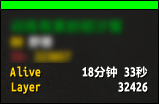
Layer ID / NPC Alive Time 位面ID / NPC存活时间
Description

AQoL Tools includes various combat and utility features. Use /aqol command to configure.
Settings can be found in "Options -> AddOns". ElvUI users can configure it within ElvUI.
AQoL便捷工具内置多项战斗与辅助功能,使用 /aqol 命令进行设置
设置在“选项-插件”中,ElvUI用户可在ElvUI中设置
Combat Modules
Combat Alert: Alert when combat start / end.
Crosshair Indicator: Display a custom crosshair at the center of the screen. You can also enable aim line in the settings.
Stealth Indicator: Show text when stealthed.
Utility Modules
Skyriding HUD: Displays Skyriding charges, speed bar with dynamic colors, and cooldown bars for Whirling Surge and Second Wind.
Layer Info: Display layer ID and NPC alive time.
Auction Alert: Sound alerts when auction successful / failed / expired.
Order Alert: Sound alert when receive a crafting order.
Auto Filter: Automatically enable 'Current Expansion Only' filter in Auction House & Crafting Order
Material Sim: Simulate 9999 materials in the Professions, and add a Crafting Orders button in the Auction House.
战斗模块
战斗提醒:提醒战斗开始/结束
定位准星:在屏幕中心显示自定义准星,还可以在设置中启用瞄准辅助线
潜行提示:潜行时显示文本提示
功能模块
驭空术HUD:显示驭空术充能、动态颜色速度条,以及回旋急冲和复苏之风的冷却条
位面信息:显示位面信息和NPC存活时间
拍卖提醒:拍卖成功/失败/过期时播放声音提醒
订单提醒:接收订单时播放声音提醒
自动过滤:自动在拍卖行和制造订单中启用“仅限当前内容更新”过滤器
材料模拟:在专业技能中模拟9999材料,并在拍卖行中添加制造订单按钮
AQoLTools Team