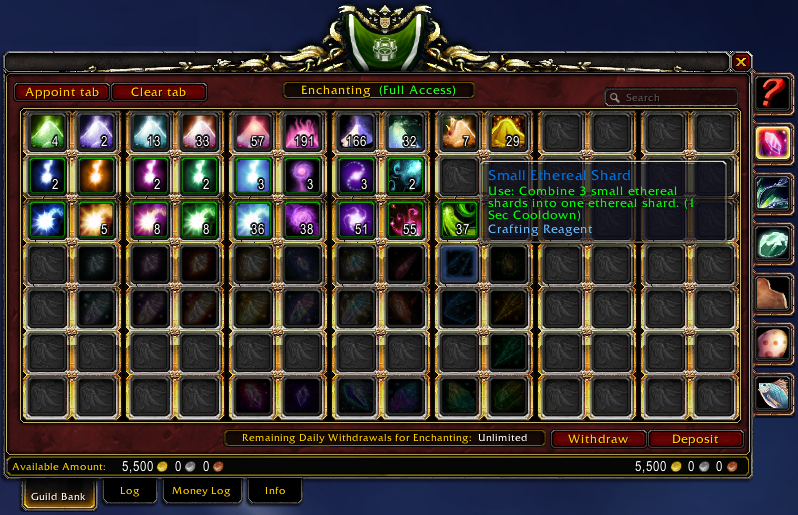
Items in guild bank tab with appointed slot tooltip.
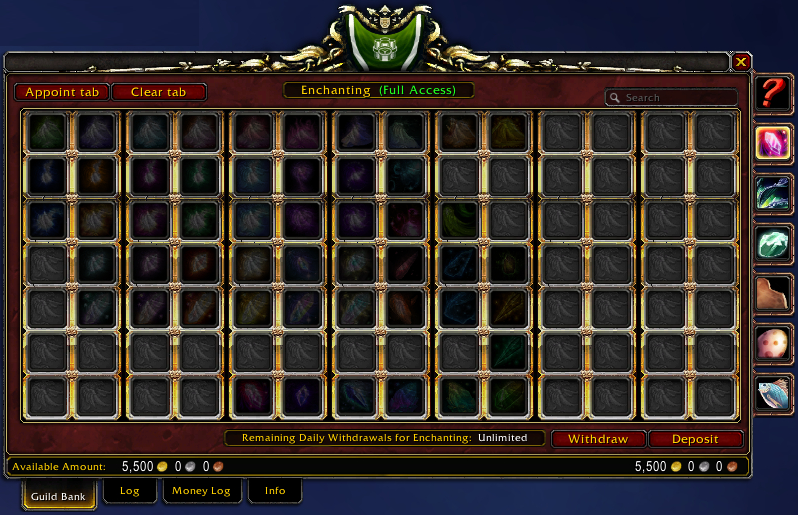
An empty guild bank tab with appointed slots.
Description
Appoint an item to a guild bank slot so you can find its place when it runs out.
Usage
- Alt left click an item in the guild bank to appoint it to that slot.
- Control left click an item in the guild bank to clear an appointed slot.
- Alt right click to open a menu with options to either appoint or clean an appointed slot.
- The "Appoint tab" button in the guild bank will appoint all items in the current tab to their slots.
- The "Clear tab" button in the guild bank will clear all appointed slots in the current tab.
- All actions modify the guild bank tab information.
Requirements
- Your guild role needs permission to deposit items.
- Your guild role needs permission to modify guild bank tab information.
- If your guild role doesn't have those permissions you can still view the appointed guild bank slots.
Current functionality
- Appointing and clearing guild bank slots.
- Appointing and clearing guild bank tabs.
- Hover over an empty appointed slot to show the tooltip of the appointed slot item.
The Appointed Team