ApplicantScout: LFG & Party Overlay
- By
Warcraft Logs and RaiderIO for Mythic+ and raid applicants and your current group. Requires the free Windows companion.
applicantscout-curseforge-mplus-overlay.jpg
applicantscout-overlay-alpha.png
applicantscout-curseforge-mplus-overlay.jpg
applicantscout-curseforge-raid-party-overlay.jpg
Description
ApplicantScout
Check applicants before you invite.
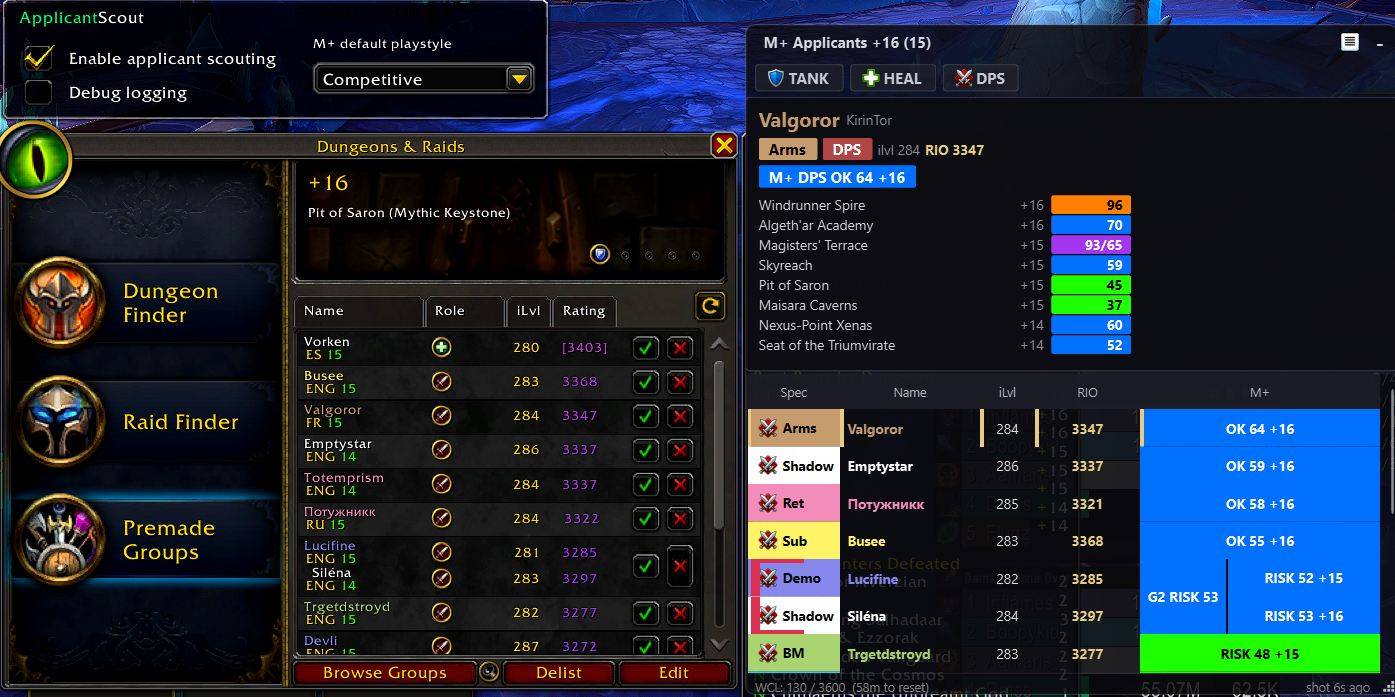
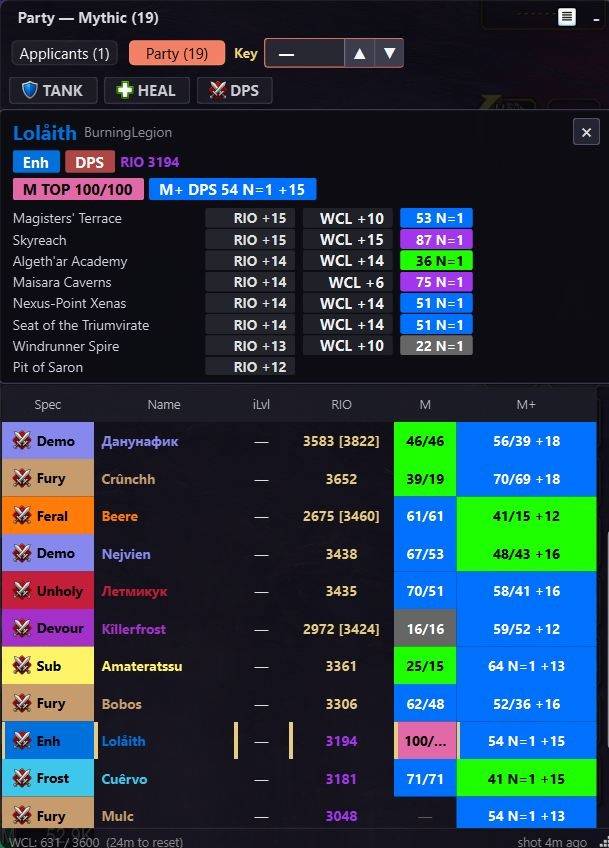
Compare Warcraft Logs results, RaiderIO scores and experience for Mythic+ and raid applicants — or review your current party in one overlay.
You need both: the WoW addon + the free Windows Companion. The Companion displays the results; keep it running while you use the addon.
Download Windows Companion · Illustrated setup guide
Installation
- Install the addon. Enter WoW and type
/apscoutto open the built-in setup guide and settings. Choose your preferred language. - Install the Windows Companion. On the linked release page, choose Windows installer:
ApplicantScoutCompanionSetup-*.exe. Launch it from the Start menu. - Connect Warcraft Logs. Create a free WCL account and API client using the illustrated guide. Add its Client ID/Secret in Companion Settings and click Test WCL.
- Choose your Screenshots folder. Point Companion Settings to your active WoW client's
_retail_\Screenshotsfolder. - Check a player. Host a Mythic+ or raid listing, or join a group and select Party. Click the small Companion window to expand the results.
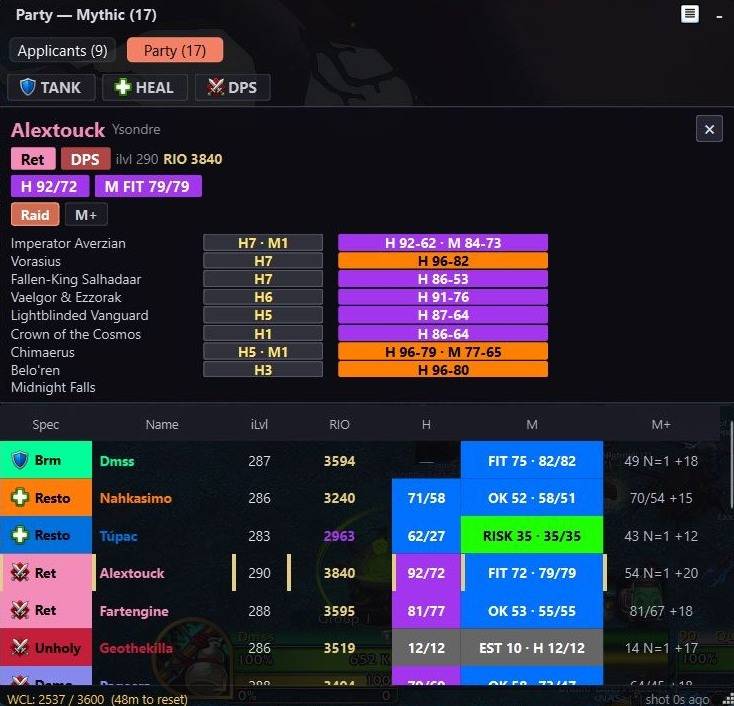
Applicant and party details
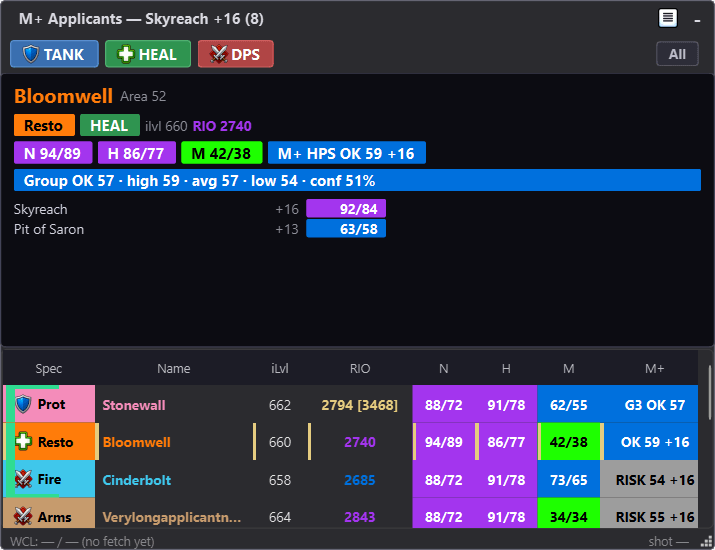
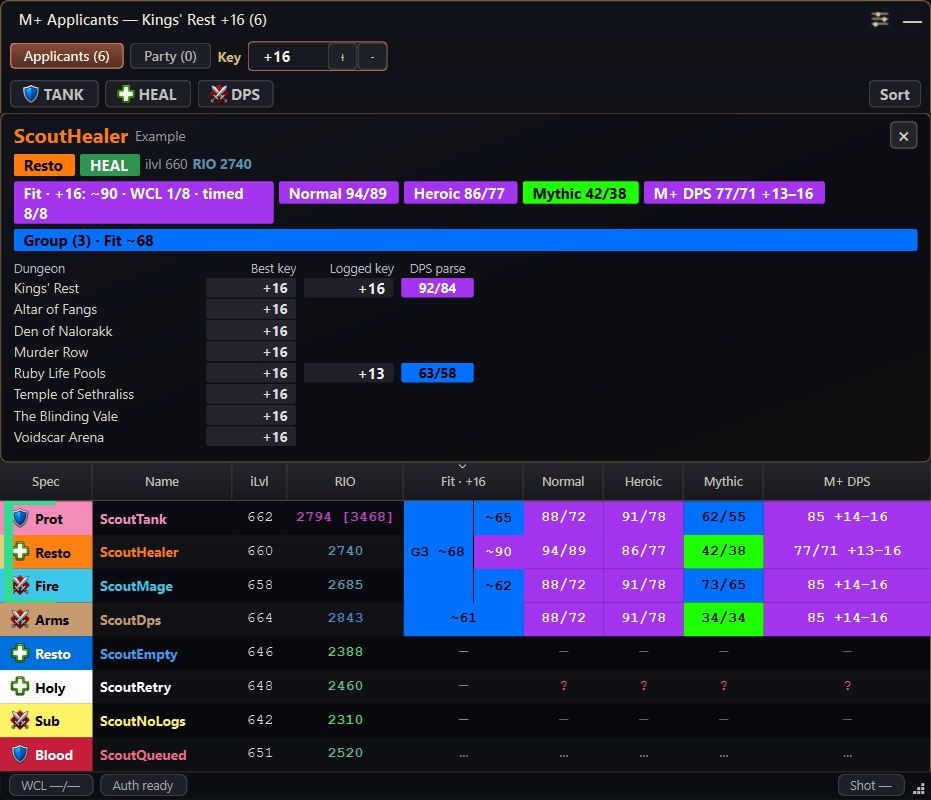
- Applicants: WCL results for the applying specialization, RaiderIO scores, roles and item levels.
- Grouped applications: see each player and the group's combined Fit estimate.
- Party: review the players already in your party or raid.
- Experience: dungeon history, raid progress and available past-season RaiderIO ratings. Local RaiderIO data is optional.
Click a column heading to sort; click again to reverse. Grouped applicants stay together. Players with missing results are labelled in the overlay.
Read Fit as an estimate. A coloured estimate such as ~65 combines applying-spec WCL damage near the target key with verified in-time experience for M+, or describes available raid output evidence. Untimed completions and rating alone do not establish timed experience. Missing evidence stays unknown, and incomplete groups show partial. Applications default to Fit; click WCL or RIO to compare those results. Hover for sources, recorded coverage and sample counts. Fit is not an overall skill rating or success probability.
M+ WCL results measure damage for every role, including healers and tanks; they do not measure healing, survival or utility.
How it works
Addon → QR screenshot → Companion → Warcraft Logs results.
The addon briefly displays a QR image and takes a normal WoW screenshot. The Companion reads it and updates the overlay. Capture pauses in combat, during an active Mythic+ run and during raid boss encounters; it resumes between raid pulls.
Screenshot quality and JPG format are changed only during capture, then restored. /apscout off or /reload also restores them after an interrupted capture. Screenshots can remain if the Companion is stopped, interrupted or watching the wrong folder; avoid sharing or syncing QR captures before cleanup.
Nothing appeared?
- No overlay: keep the Companion running and check its Screenshots folder. Outside combat, use
/apscout statusand open your listing or the Party tab. - No WCL results: click Test WCL in Companion Settings and check your API credentials.
Setup & help
The in-game guide appears on login until you choose Don't show on login. The close button postpones it; /apscout always opens it again. Setup and addon settings support all current Retail client languages.
| Need help with… | Start here |
|---|---|
| Setup or addon settings | /apscout |
| Other commands | /apscout help · Full documentation |
For WoW Retail: Midnight. Classic is unsupported. PTR compatibility has not yet been tested in-game. Keep both parts updated. The addon can default new M+ listings to Competitive; choose another playstyle or turn it off in addon settings. Greetings are optional.
Report an addon issue · Companion / installation help
Include both versions and reproduction steps. Remove credentials, tokens, player details and private paths from logs or QR screenshots; never attach entire config/cache folders.
Privacy & source code
- Source code: addon code and Companion code. No WoW memory reading, code injection or automated gameplay; no Blizzard password required. This is an independent project, not an official Blizzard app.
- Local credentials: your WCL credentials are stored locally. Current Windows builds are unsigned; SmartScreen may warn. Download from the linked release. Checksums verify file integrity, not publisher identity.
- Usage sharing: optional statistics stay off until you opt in. Existing choices are preserved. Reports contain a random installation ID, version and daily milestones, excluding names, screenshots and credentials. Disable sharing in Companion Settings. Privacy details.
ApplicantScout is free to use. Future copies carrying the Antrakt Attribution and CurseForge Rewards License 1.2 may be modified and shared without asking first.
For a public fork, port or substantial reuse of my original feature code, keep the license, credit antrakt92, and name and link to ApplicantScout. If that derivative earns CurseForge Reward Points, share at least 10% of that project's points with antrakt92 through Members. One share covers all my projects reused in it; each separate derivative has its own 10% requirement.
Small snippets, independent code and translations, compatibility patches, dependencies and collection links require no share by themselves. Earlier MIT and 1.0/1.1 grants remain; the single-share permission also applies to earlier custom versions. Third-party material keeps its own terms.
More by Antrakt: StatsPro · Do You Need It?
ApplicantScout: LFG & Party Overlay Team