


AnyCheck
- By
A more generic replacement for ReadyCheck with arbitrary number of options and a message.
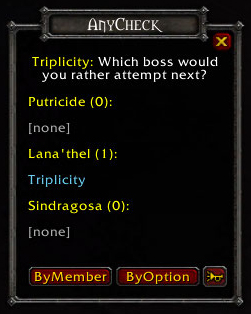
Poll window after the player has voted. Results sorted by voting options.
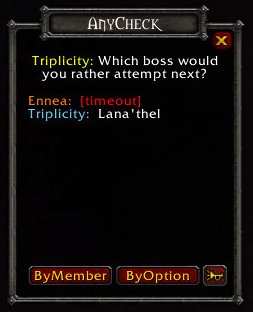
Poll window after the player has voted. Results sorted by members of the group.
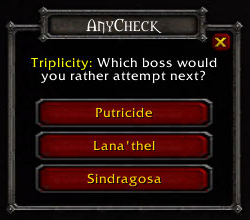
The poll window shows the poll message and buttons for each poll option.
Description
AnyCheck does exactly what ReadyCheck does, but in a more generic fashion. Instead of always giving you only two options "yes" or "no", a generic poll can be issued to members of the party or raid. An arbitrary message can be associated with a poll (e.g "Which boss would you rather attempt next?") and an arbitrary number of options can be given (e.g. "Putricide", "Lana'thel", "Sindragosa"). After voting, the statistics of the poll can be observed, sorted either by voting members or poll options.
Usage
You can issue polls when you are in a party, raid or even solo for testing purposes. Besides the person issuing the poll, at least the group leader must have the addon installed.
You start a poll by typing the following command into the chat window:
/anycheck "Message here" option1, option2, option3
You can replace "Message here" with any kind of message you want. You can issue a poll without any message by only giving the option list. A typicall ReadyCheck could be issued with the following command.
/anycheck yes,no
The option list can contain as many options as you want, separated by commas. An example of a poll with many options might be:
/anycheck yes,no,maybe,later,or,not
You cannot issue a poll while the previous poll is still in progress. A poll is automatically closed when everyone has voted or after 20 seconds. Players that haven't voted within 20 seconds are marked as timed out.
Other commands
Note that /ac is the short version of /anycheck command and can be used instead to save typing. To display a list of all the possible commands simply type the /ac command without any parameters given.
/ac poll will show the poll window after it's been closed.
/ac config will show the configuration window.
Players without addon
By default, the poll options and results are being reported to the group chat as well. This way members of the group that do not have the addon installed are still able to see the polling progress. For example a message like this will appear in the chat:
<AnyCheck> === Which boss would you rather attempt? ===
<AnyCheck> 1. Putricide
<AnyCheck> 2. Lana'thel
<AnyCheck> 3. Sindragosa
Note that for the convenience of everyone using the addon, these message are automatically filtered out of their chat by default. Please, refer to the configuration section to disable filtering of these message when you have the addon installed.
To vote via the group chat, a member needs to type a single number into the group chat, indicating the option they wish to vote for as it appears on the option list reported to the chat. The numbers will be automatically parsed by the addon of the group leader and converted into votes.
After the poll is closed, the poll report will be sent to the group chat. To send additional poll reports click the report button in the bottom-right corner of the poll window.
Configuration
To open the configuration window use the /ac config command. Here is the list of options and their description:
Only leader and assist can issue polls This option will prevent anyone else from the group to issue polls unless they are the group leader or raid assistant.
Auto report to chat when poll closed A poll report will be sent to the group chat for everyone without the addon automatically as soon as the poll is closed. If disabled, only a short message will be sent instead, indicating that the poll is closed. Additional reports can be sent using the report button.
Filter chat poll messages All the poll-related messages sent to the group chat for players without the addon will be hidden in your own chat.
The AnyCheck Team


