Screenshot 2026-02-14 at 9.52.05â¯PM.png
Screenshot 2026-07-28 at 11.28.41â¯AM.png
Screenshot 2026-02-14 at 8.33.46â¯PM.png
Description
AngryEra
AngryEra is a modern fork of AngryAssignments for WoW Classic Era, Hardcore, Season of Discovery, and Burning Crusade Anniversary. It combines a fast shared assignment display with nested pages, reusable variables, automatic raid markers, encounter-driven page advancement, import/export tools, and WeakAuras integration.
Supported game clients:
- Classic Era 1.15.9
- Burning Crusade Anniversary 2.5.6
[!IMPORTANT] BREAKING CHANGE FROM PRE-v3.1: Protocol 3 releases cannot share assignments or displayed pages with older AngryEra or AngryAssignments versions. AngryEra v3.2.2 features—including priority assignments, group layouts, variable families, imported raid-role variables, automatic raid-tank and raid-assistant assignments, and the Key=Value
$true/$falseboolean literals—require v3.2.2 or newer on every client that must interpret them. Pages using only features common to v3.1 remain compatible with v3.1.x clients. Existing local pages and settings are migrated automatically for the v3.1 data model, but Key=Value automation flags are not rewritten: replace legacy=trueand=falseflag values with=$trueand=$false, respectively. Downgrading across the v3.1 data migration requires restoring a SavedVariables backup.
Before upgrading, export important categories as Encoded AA or copy your AngryEra SavedVariables file. For a production raid that uses any v3.2 feature, update every participating client to AngryEra v3.2.2 or newer.
What is new
- Fast, ordered shared displays: page changes arrive quickly, rapid navigation publishes the final selection, and older delayed changes cannot replace the newest page.
- Automatic recovery: late joiners and reloaded clients retrieve the leader's current page, and display control follows a raid-leader change.
- Safer shared editing: only the current leader commits shared changes. Qualified raid assistants can submit edits to the exact active page without directly overwriting it.
- Inherited variables: variables flow through nested categories to their pages, with the closest category or page value winning.
- Composable variable families: combine numbered class, role, or assignment lists into reusable outputs such as
HEALER1...NandMELEE1...N. - Assigned-role import: take an on-demand snapshot of Blizzard's Tank, Healer, and Damage assignments as numbered
RAID_TANK1...N,RAID_HEALER1...N, andRAID_DPS1...Nvariables. - Automatic raid roles and permissions: inherited
$TANKSand$ASSISTSlists let the leader keep Blizzard's assigned Tanks and actual raid assistants synchronized with the displayed page. - Page metadata:
$variables can drive automatic raid markers, encounter advancement, WeakAuras, and other addons. - Automatic raid markers: display a page and AngryEra can mark the assigned players.
- Boss-kill auto-advance: after a successful encounter, the leader can automatically display the next page in the category.
- Displayed-note API: WeakAuras and other addons can read the active note, resolved variables, metadata, and hierarchy.
- Safer restore workflow: choosing an older page version loads it as a draft; nothing changes until you click Save.
- Safer imports and migration: imported data is bounded and validated, and existing pages and settings are migrated automatically.
- Flexible Encoded AA transfers: complete exports include variables and metadata by default, while content-only transfers can intentionally omit them.
- Priority assignments:
Primary > Backupselects the first listed player who is present and alive. - Pinned page library: local favorites stay above a clear divider, and the first v3.2 upgrade pins existing locally owned category roots when no pin choices already exist.
- Optional received-page cleanup: remove pages received from other leaders at login or on demand while retaining protected local data.
- Optional hover auto-hide: fade the assignment away when idle and reveal it on hover or whenever displayed content changes.
- Optional combat fade: keep a visible assignment at 10% opacity in combat without changing its manual visibility or interrupting the current auto-hide and page-reveal state.
- Raid group layouts: build inherited, roster-aware subgroup plans, render them inside notes, and apply or safely queue validated layouts—including leader-only display-transition application through
$AUTOAPPLYLAYOUT.
Quick start
For every raider
- Install the same AngryEra release as the rest of the group.
- Type
/aeto open the addon settings. - Set a keybinding for Toggle Display under Angry Era in the game's keybinding menu.
- Use
/ae lockor the Toggle Lock keybinding to show the display mover. - Drag the display into position, resize it from the red strip, choose whether it grows upward or downward, and lock it again.
When the group leader displays an assignment, it appears automatically. Reloading, reconnecting, or joining late retrieves the current page again.
For raid and party leaders
- Open the editor with
/ae windowor the Toggle Window keybinding. - Create pages and categories from Menu, or load one of the included raid templates.
- Select a page and click Send. Double-clicking a page in the tree does the same thing.
- Use the Previous Page, Next Page, and First Page keybindings to navigate the category containing the actively displayed page.
- Use Menu > Clear Page or
/ae clearto clear the shared display.
Only the current party or raid leader selects and clears the shared display. Leadership transfers automatically when the group leader changes.
For raid assistants
Raid assistants can output assignments to chat. Qualified assistants can also edit the exact active shared page when the leader's permission settings accept them and manually apply a validated raid layout. Raid assist alone does not enable either action by default. See Shared pages and permissions.
Shared pages and permissions
What AngryEra shares
AngryEra shares the active assignment page and the category-variable context needed to render it correctly. This context includes inherited metadata such as $LAYOUT; it does not broadcast your category records or entire page library.
Your local pages, categories, placement, imports, exports, and private organization remain yours. To give someone a complete page or category for their own library, use Export > Encoded AA and have them import it.
If a displayed page is new to your installation, it appears unfiled. You may organize or delete that received page locally; later shared revisions preserve your local placement. If the leader displays a page you deleted, AngryEra can receive it again.
To keep a received page during cleanup, right-click it and choose Pin. You can also pin a category, which protects received pages anywhere in that category's subtree. Pinning is local to your installation and does not change shared data; right-click the item again and choose Unpin to remove that protection.
On the first upgrade to v3.2, AngryEra automatically pins your topmost locally owned categories if you have not already used pins. It does not pin pages, received categories, or redundant locally owned categories nested beneath another one. Existing prerelease pin choices are left unchanged. If you used a prerelease build, you can safely replay the additive step with /ae migratepins; it never removes an existing pin.
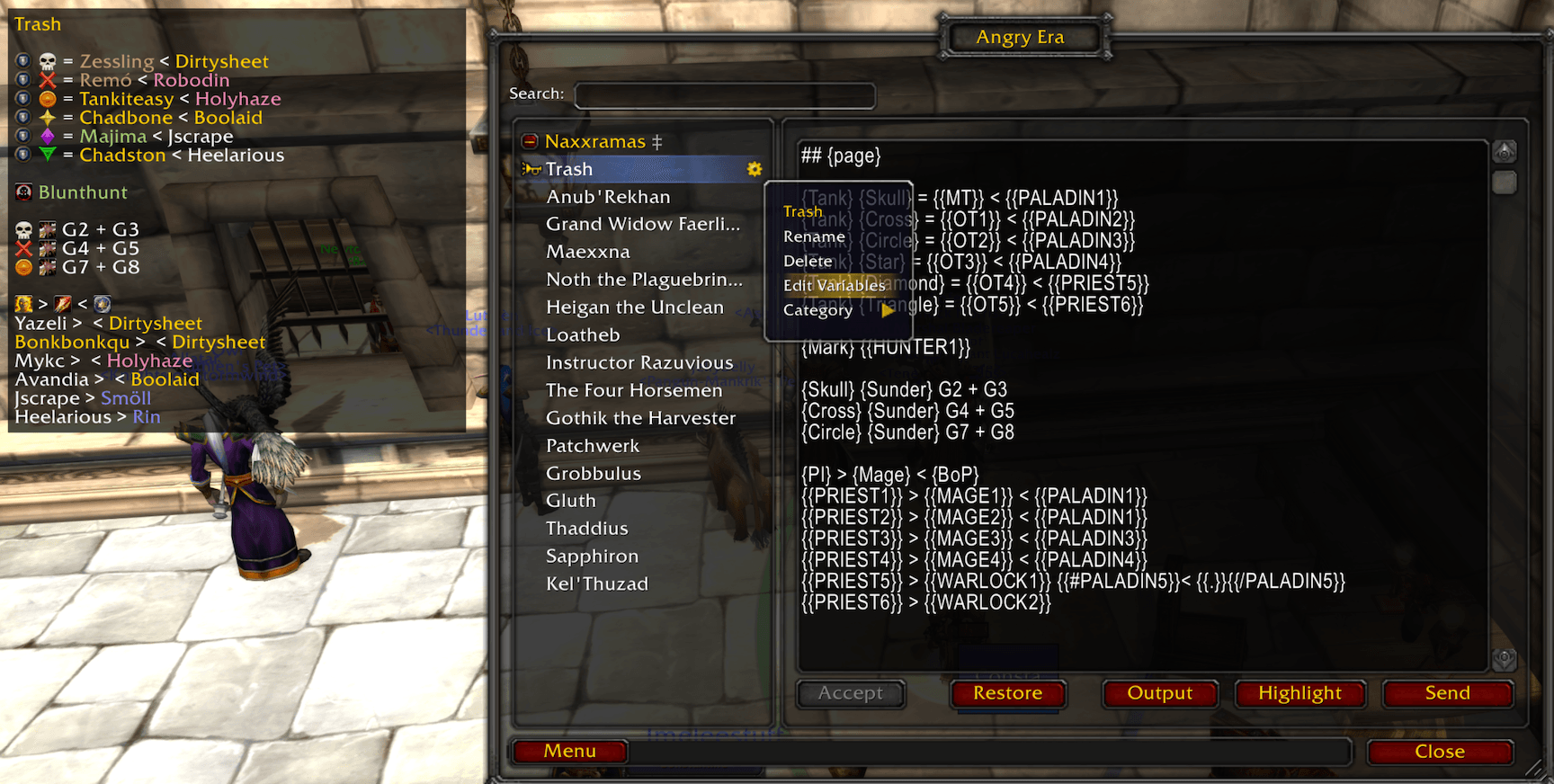
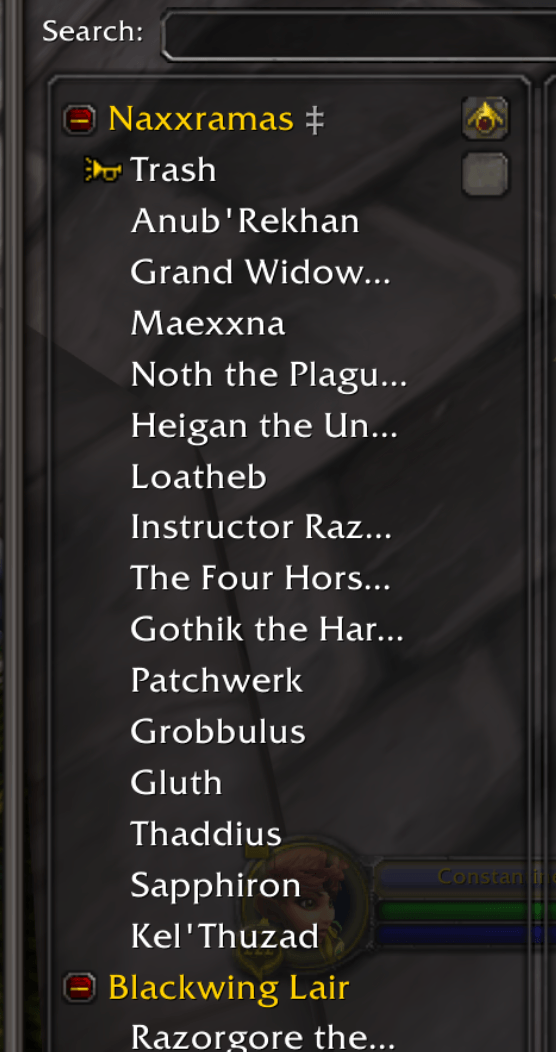
Every pinned item carries a gold favorite-star icon. At each level of the tree, pinned categories appear first, followed by pinned pages, then a divider and the remaining unpinned items in their existing manual order. Nested pages remain inside their categories. The gray ‡ suffix means that an item has variables or metadata; it is not the pin indicator. Pin or unpin an item before dragging it across these fixed sections; dropping into a category remains available. Pin sorting changes only the library view—Previous, Next, and First continue to follow the saved manual page order.
Shared page changes are fast and ordered. If the leader rapidly presses Previous and Next, followers move to the final selection instead of replaying obsolete intermediate pages.
Who may change a shared page
The current leader is always the final authority. A raid assistant may submit a non-destructive edit only to the exact page currently displayed. Under the default policy, that assistant must also be one of the following:
- a guild officer or higher in the leader's guild;
- listed in the leader's Trusted Assistants setting; or
- covered by the leader's Allow All Raid Assistants option.
Officer status without raid assist is not enough. Raid assist alone is not enough by default, and a name in Trusted Assistants still needs raid assist.
The leader processes simultaneous edits in order and shares each accepted result. If the active page changes, the leader changes, or another edit wins, AngryEra keeps the assistant's text visible as a recoverable draft instead of silently discarding it.
Assistant edits are limited to the active page's name, variables, and contents. They do not grant permission to select or clear the display, edit categories or background received pages, reorder shared data, or perform shared deletions. Party sharing is leader-only because parties do not have a raid-assistant role.
$TANKS and $ASSISTS are privileged metadata because they can change Blizzard raid roles and raid authority. A qualified assistant's proposal cannot change either effective value, including through an ordinary variable referenced by one of them. The current raid leader must make those changes directly.
Permission settings
Open /ae and find Permissions:
- Leader + Qualified Assistants is the default. It accepts the leader plus assistants who meet the rules above.
- Leader Only rejects assistant edits. The leader still controls the shared page normally.
- Ignore Shared Changes keeps this installation private and ignores group-shared page changes and displays.
- Allow All Raid Assistants trusts every raid assistant for non-destructive active-page edits. It is off by default and should be used carefully when assist is handed out broadly.
- Trusted Assistants accepts
Name-Realmentries separated by spaces or commas. Prefer full names when players may be from different realms.
These settings never let an assistant select or clear the shared display.
Editor guide
Open the editor with /ae window or Toggle Window. The left side contains a searchable page tree with drag-and-drop ordering and nested categories. Right-click pages and categories for their management menus.
Main menu
The Menu button provides:
- Add Page
- Add Category
- Load Raid Template
- Import > Encoded AA / JSON / Markdown
- Manage Pages
- Wipe Unpinned, which permanently removes every unpinned page and category after confirmation
- Clear Page, which clears the current display
Wipe Unpinned applies to the complete local library, including pages you created or imported—not only pages received from other players. A pinned page is kept. A pinned category keeps its complete nested category/page subtree, even when descendants are not pinned individually. If a kept pin sits beneath an unpinned category that is removed, AngryEra moves that kept item to the nearest surviving category or the library root.
Right-click a page or category to rename it, delete it, edit variables, export it, or change its category placement. Categories can also be saved as reusable templates. A saved template retains that category's variables and each page's variables, including a category layout and page-specific layout overrides.
Editor controls
| Control | What it does |
|---|---|
| Save | Saves the editor draft. Local pages save locally; on the active shared page, the leader commits the change and a qualified assistant submits it to the leader. |
| Revert | Discards the visible draft and reloads the current stored page. |
| Restore | Opens up to ten prior content versions. Selecting one loads only its contents as an unsaved draft; click Save to keep it. |
| Output | Sends the page selected in the editor to group chat without changing the shared display. |
| Highlight | Inserts class-color codes around recognized raid and guild names and saves the updated page immediately. |
| Send | Displays the page selected in the editor. While grouped, only the current leader can use it. |
If another update arrives while you are editing, AngryEra warns you and leaves your draft visible. Click Revert to load the received version, or keep working and Save again.
Local and shared editing
- Your locally owned pages remain editable while solo or grouped.
- A leader can edit and republish shared pages.
- An assistant can edit only the exact active shared page and only when the leader accepts that assistant.
- Received background pages and received categories remain read-only.
- Private category placement and organization remain local.
Page navigation and chat output
Keybindings under Angry Era:
- Toggle Display
- Show Display
- Hide Display
- Previous Page
- Next Page
- First Page
- Toggle Lock
- Toggle Window
- Output Assignment to Chat
Previous, Next, and First Page start from the actively displayed page and stay within its category. First Page jumps to the first page in that category; pressing it again returns to the page it left when possible.
While grouped, only the leader's navigation changes the shared display. Rapid navigation is coalesced so the group settles on the leader's latest choice.
The output source depends on how you invoke it:
- The editor's Output button outputs the page currently selected in the editor.
- The Output Assignment to Chat keybinding and
/ae outputoutput the actively displayed page. - Output automatically chooses the appropriate available group chat channel.
- Leaders and raid assistants may output while grouped.
Use Chat Output Format in /ae to choose spell names or acronyms.
Variables and inheritance
Right-click a page or category and choose Edit Variables. Variables accept either Key=Value lines or a JSON object.
MT=Zessy
OT1=Zessling
HEALER1=Kwayteow
HEALER2=Eblis
The Edit Variables window owns its own Escape key: pressing Escape or its close button leaves the main AngryEra window open. If the current draft differs from the last opened or successfully saved value, AngryEra asks before discarding it. Its primary button reads Close while the draft is clean and changes to Save after an edit. A successful save keeps the window open and changes the same button back to Close.
In Key=Value storage, booleans use the exact lowercase literals $true and $false. Plain true, false, True, and False are strings so they remain valid player names. An exact whole-value reference to a boolean, such as $AUTOADVANCE={{ENABLED}}, keeps the boolean type; a boolean embedded in other text renders as true or false. JSON keeps its native boolean syntax: use true or false without quotes for a boolean, and quotes for a string or player name. The new Key=Value literals require AngryEra v3.2.2 or newer on every client that needs to interpret them.
Use them in page text with Mustache syntax:
Main Tank: {{MT}}
Off Tank: {{OT1}}
Healers: {{HEALER1}}, {{HEALER2}}
Category inheritance
Variables are merged in this order:
- outermost category;
- each nested category;
- the page.
The nearest value wins. Put raid-wide defaults on an outer category, encounter defaults on a nested category, and exceptions on individual pages.
References resolve after all layers are merged. This lets a category define a reusable expression that picks up a page override:
OffTank={{OT1}}If a page later sets OT1=Roselea, {{OffTank}} resolves to Roselea.
Variable families
Raid composition changes more often than the assignment structure. Variable families let pages and layouts consume stable role positions such as HEALER1, HEALER2, and MELEE1 while you maintain the changing people in class-, role-, or task-specific source lists.
The mental model is:
- Maintain numbered source variables such as
PRIESTS1andDRUIDS1. - Declare how those sources combine with
HEALER*=PRIESTS*,DRUIDS*. - Use the generated
{{HEALER1}},{{HEALER2}}, and later values throughout descendant notes and layouts.
For example:
PRIESTS1=Kwayteow
DRUIDS1=Eblis

HEALER*=PRIESTS*,DRUIDS*
This creates the effective variables HEALER1=Kwayteow and HEALER2=Eblis. The declaration HEALER* itself is not a template variable. Its numbered results appear in the Group Layout editor's Variables column and otherwise behave exactly like variables you wrote individually.
[!IMPORTANT] The
*expands variable names only while declaring a family.{{HEALER*}}does not expand inside a note or occupy multiple layout seats. Use the numbered results—{{HEALER1}},{{HEALER2}}, and so on. Selectors name variables, not literal players; definePRIESTS1=Kwayteow, then selectPRIESTS*.
Selectors are comma-separated and read from left to right. Braces are optional there, so HEALER*={{PRIESTS*}},{{DRUIDS*}} is equivalent. A wildcard matches only the same case-sensitive prefix followed by a positive number without leading zeroes, and matches use numeric order: PRIESTS1, PRIESTS2, PRIESTS10. Sparse source numbers are compacted into a dense destination family.
Families may be composed:
MELEE*=FURY*,ROGUE*
RAID*=HEALER*,MELEE*
The nearest inherited declaration wins. An empty declaration such as HEALER*= disables an inherited family, while an explicit HEALER2=Name on the same or a nearer layer overrides that one generated position. Repeating a source selector does not repeat the same source key. Two different source keys may still hold the same player, but after either is placed the Group Layout editor hides every other variable that currently resolves to that target.
Family names use letters, numbers, and underscores, must start with a letter or underscore, and cannot end in a number before *. Each declaration collects at most 40 string source members; numeric, boolean, structured, and $ metadata values are not collected. Missing selectors contribute nothing, explicitly empty string members retain their numbered position, and cyclic or oversized family definitions are rejected before an Edit Variables save.
Families reorganize existing string variables; they do not inspect the raid, infer a specialization, or update a roster automatically. Use Import Assigned Raid Roles when Blizzard's manually assigned Tank, Healer, and Damage roles are the source you want.
Importing assigned raid roles
Classic Era's group UI can assign Tank, Healer, and Damage roles manually. AngryEra can turn those assignments into variables without trying to infer anyone's specialization:
- Assign roles in Blizzard's party or raid UI.
- Right-click the page or category that should own the role list and choose Edit Variables.
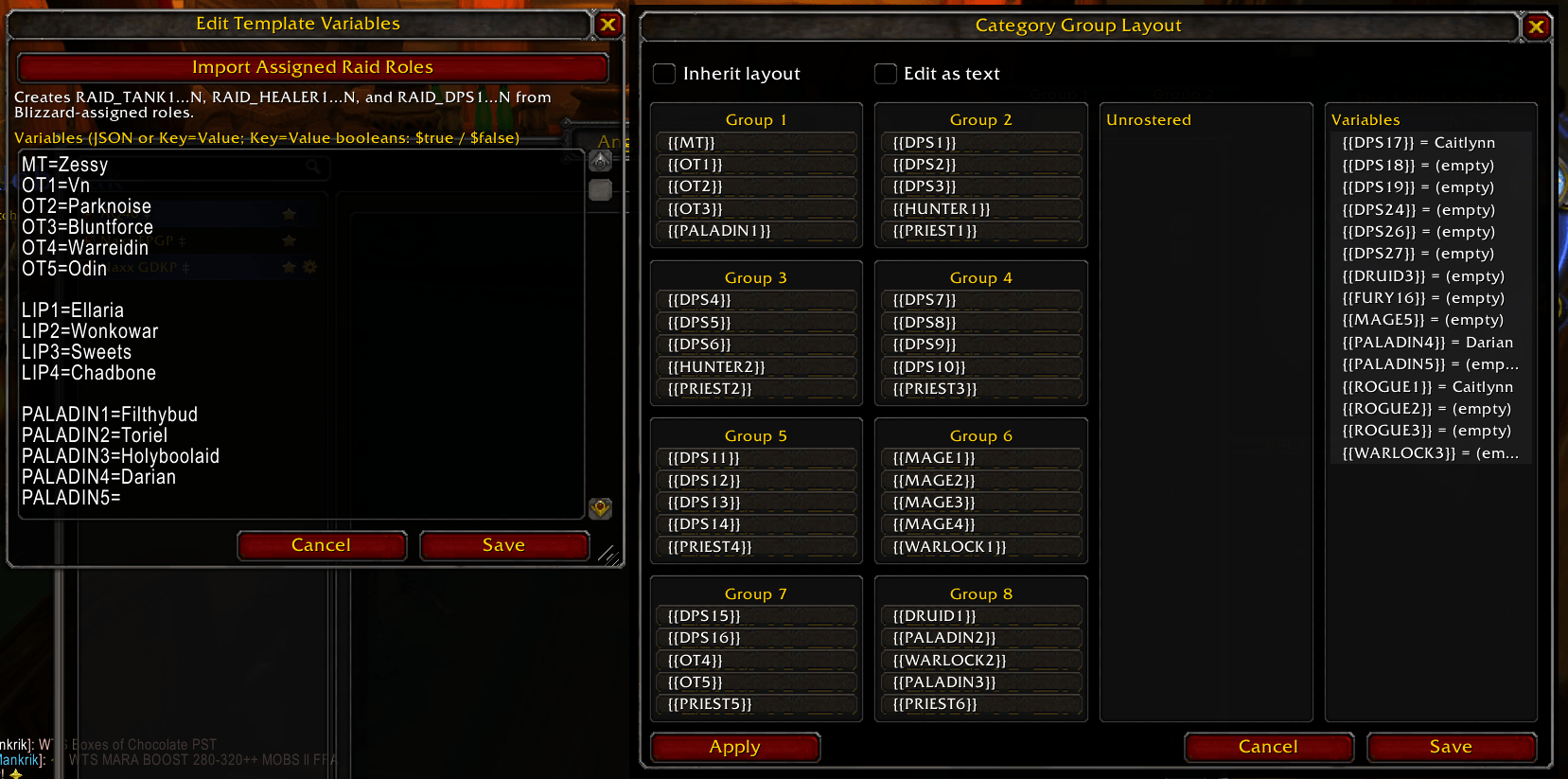
- Click Import Assigned Raid Roles.
- Review the imported counts and variable source, then click Save.
Import only changes the open draft until you save it. It never assigns or changes Blizzard roles, and it does not refresh automatically when the roster or its roles change. Import again and save when assignments change.
The import creates effective numbered variables:
RAID_TANK1=Zessy
RAID_HEALER1=Kwayteow
RAID_HEALER2=Eblis
RAID_DPS1=Zessling
RAID_DPS2=Roselea
Blizzard's DAMAGER role is exposed as RAID_DPS; players with no assigned role are skipped. Names normally omit -Realm. If two current group members have the same short name, AngryEra keeps Name-Realm for the ambiguous assignments instead of guessing. Re-importing preserves the relative order of members who remain in the same role and appends newly assigned members. Numbering stays dense, so later members shift down when an earlier member leaves that role.
Use these variables directly, drag them from the Group Layout editor's Variables column, or compose them into your own families:
TANK*=RAID_TANK*
HEALER*=RAID_HEALER*
DPS*=RAID_DPS*
The visible $AE_RAID_ROSTER line/object is managed by the importer and owns all three RAID_ role families at that variable layer. A nearer page import replaces an inherited category import as one complete snapshot. An explicit numbered value such as RAID_HEALER2=Backup on the same or a nearer layer remains an intentional override. Do not also declare RAID_TANK*, RAID_HEALER*, or RAID_DPS* beside the managed snapshot; compose them into differently named families as shown above. Delete $AE_RAID_ROSTER to remove that layer's imported snapshot and resume normal inheritance.
The imported variables remain an on-demand snapshot even when $TANKS later changes Blizzard's live Tank assignments. Re-import and save if RAID_TANK1...N should reflect the new live roles; AngryEra does not silently rewrite a reviewed variable draft.
A role import knows only Tank, Healer, and Damage. Build narrower families such as melee, ranged, priests, or mages from your own variables because Blizzard's assigned group role does not identify a remote player's specialization.
For a reusable raid template, import roles on the raid's category so every descendant page sees the same snapshot. Import on an individual page only when that page intentionally needs a complete replacement role snapshot.
Putting roles, families, and layouts together
One role import updates every encounter
Suppose every encounter uses the same basic subgroup shape, but the people change each raid. Import the assigned roles on the raid category, then add stable aliases beside the managed snapshot:
TANK*=RAID_TANK*
HEALER*=RAID_HEALER*
DPS*=RAID_DPS*
$AUTOAPPLYLAYOUT=$true
Build this category layout visually, or put its full Key=Value line in Edit Variables:
$LAYOUT=Core/1: {{TANK1}}, {{TANK2}}, {{HEALER1}}, {{DPS1}}, {{DPS2}}; Group 2/2: {{HEALER2}}, {{DPS3}}, {{DPS4}}, {{DPS5}}, {{DPS6}}Every descendant page now inherits the structure. Add {layout} to a note to show the resolved groups. On the next raid, assign Blizzard roles again, click Import Assigned Raid Roles, review, and save; the same pages and layout positions resolve to the new roster without editing every encounter. A generated position that does not exist, such as TANK2 in a one-tank raid, leaves that layout slot empty.
The aliases are optional—you may use {{RAID_TANK1}} directly—but they give downstream pages a stable vocabulary. A nearer page can replace TANK* with a curated source without rewriting the inherited layout.
Add information Blizzard roles do not have
Blizzard can identify Damage, but not the melee, caster, interrupt, or soak team you intend. Maintain those source lists yourself and combine them into generic families:
INTERRUPT1=Zessling
SUNDER1=Roselea
DISPEL1=Kwayteow
DECURSE1=Eblis

MELEE*=INTERRUPT*,SUNDER*
CASTER*=DISPEL*,DECURSE*
This generates MELEE1...2 and CASTER1...2 in the authored selector order. A reusable layout can mix those curated families with imported roles:
$LAYOUT=Windfury/3: {{RAID_TANK1}}, {{MELEE1}}, {{CASTER1}}; Support/4: {{MELEE2}}, {{CASTER2}}If one encounter needs the Sunder assignment first, put only this nearer declaration on that page:
MELEE*=SUNDER*,INTERRUPT*The page still inherits the same $LAYOUT, but its generated MELEE1...N order changes for that encounter. This is the main benefit of families: pages and layouts describe stable jobs and positions, while smaller source lists decide who fills them.
Drive the note, marker, and layout from one assignment
Generated family members are ordinary variables, so one value can feed every consumer:
TANK*=RAID_TANK*
HEALER*=RAID_HEALER*
MAIN_TANK={{TANK1}}
BACKUP_TANK={{TANK2}}
$SKULL={{MAIN_TANK}}
$LAYOUT=Tanks/1: {{MAIN_TANK}}, {{BACKUP_TANK}}, {{HEALER1}}
The page can use the same values:
Main tank: {{MAIN_TANK}}
Backup: {{BACKUP_TANK}}

{layout Tanks}
After re-importing and saving changed roles, the written assignment, automatic Skull marker, and rendered layout update from the same source; the next manual or automatic Apply uses those values for the live subgroup. Families do not hide mistakes: if two layout slots actually resolve to the same player, or a used generated name cannot be matched uniquely in the raid, layout validation rejects the entire apply instead of guessing.
Priority assignments
A priority assignment uses > to select the first listed player who is both present and alive. It re-resolves when the roster or player state changes:
MAIN_TANK=Zessy > Zessling > Roselea
$SKULL={{MAIN_TANK}}
Use Name-Realm when two group members may share the same short name.
Roster templates
Common Mustache examples:
You: {{me}}
{{#classes.WARRIOR}}{{name}}{{/classes.WARRIOR}}
{{#groups.1}}{{name}}{{/groups.1}}
Player names are class-colored automatically in the on-screen assignment display.
Page metadata and automation
A variable whose name starts with $ is metadata. Metadata inherits and resolves references like ordinary variables, but it is intended to describe what AngryEra, WeakAuras, or another addon should do.
Metadata can also appear in page text. It is excluded from automatic word highlighting and is exposed to integrations without the $ prefix.
| Metadata | Purpose |
|---|---|
$STAR through $SKULL |
Assign raid target markers when the page is displayed. $X and $CROSS are aliases. |
$AUTOADVANCE |
Enable or disable boss-kill advancement for the effective page. |
$ENCOUNTER / $ENCOUNTERID |
Bind an auto-advance page to an encounter name or numeric ID. |
$LAYOUT |
Define the effective named raid subgroup layout. |
$AUTOAPPLYLAYOUT |
After the initial display state is recorded, let the raid leader apply a different destination page's effective layout. |
$TANKS |
Keep Blizzard's assigned Tank role equal to an inherited comma-separated list. |
$ASSISTS |
Keep actual raid-assistant rank equal to an inherited comma-separated list. |
Other custom $KEY values |
Expose inherited metadata to WeakAuras or another addon. Importer-managed $AE_RAID_ROSTER remains private. |
Automatic raid tanks and assistants
$TANKS and $ASSISTS let the raid leader apply the roles and authority required by the exact displayed page:
MT=Zessy
ASSIST1=Zessling
ASSIST2=Roselea
$TANKS={{MT}}
$ASSISTS={{ASSIST1}},{{ASSIST2}}
$TANKS means Blizzard's modern assigned Tank role. It does not set Blizzard's separate Main Tank flag: the dedicated Main Tank raid-frame row and its target/target-of-target frames will remain unchanged, and the context menu may still offer Promote to Main Tank. Blizzard protects that flag behind a secure player action, so an automatic page update cannot apply it. $ASSISTS means actual raid-assistant rank, with the same permissions as assigning Assist through Blizzard's raid UI; it does not mean a Main Assist raid-frame flag. One player may appear in both lists.
Both values inherit like other metadata. Put the normal roster on a category and override it only on pages that need different assignments. The nearest page or category value wins independently for each key:
- When a key is absent throughout the effective hierarchy, AngryEra leaves that dimension unmanaged.
- When a key is present, its comma-separated names are the exact desired set.
- An explicit empty
$TANKS=clears every assigned Tank by setting only those players to None; existing Healer and Damage roles are left unchanged. - An explicit empty
$ASSISTS=clears every raid assistant.
When $TANKS is present, AngryEra assigns Tank to the listed players and removes Tank from unlisted players. It never replaces an unlisted player's existing Healer or Damage role. When $ASSISTS is present, AngryEra first turns off Blizzard's Everyone Is Assistant option, then promotes listed players before demoting unlisted assistants until the list matches exactly.
Names may be literal or come from resolved variables. A short name is accepted only when it identifies exactly one current raid member; use Name-Realm for a rare duplicate. If any requested name is missing or ambiguous, AngryEra does not guess. If any ancestor or page variable source cannot be resolved completely, both privileged actions fail closed instead of using a page-only fallback. Do not include the current raid leader in $ASSISTS; the leader already has raid authority and cannot also hold assistant rank.
Only the current raid leader performs this automation. An already-correct roster stays silent. If the display changes repeatedly, unissued work is superseded by the latest exact page and inherited context. A Blizzard change that was already issued may settle, but AngryEra rechecks and compensates against the newest exact display before continuing. Changes that cannot run during combat wait until combat ends, then apply only if that same page and context are still current; another page replaces or cancels the older unissued request.
RAID_TANK1...N variables created by Import Assigned Raid Roles are still a manual snapshot. Changing live Tanks through $TANKS does not rewrite them; import again and save when you want a fresh snapshot.
Automatic raid markers
Supported marker keys are case-insensitive:
$STAR
$CIRCLE
$DIAMOND
$TRIANGLE
$MOON
$SQUARE
$X
$CROSS
$SKULL
$X and $CROSS refer to the same marker. A value may be a player name, an ordinary variable, or another metadata variable.
MT=Zessy
$MT={{MT}}
$SQUARE=$MT
$SKULL=Roselea-OtherRealm
When the page is displayed, AngryEra resolves the assignments and applies the requested markers:
- An exact
Name-Realmmatch wins. - A short name is used only when it uniquely identifies one group member.
- Ambiguous short names are skipped instead of guessed.
- Only the leader or a raid assistant applies automatic markers in a raid.
- Any party member may apply them in a party.
- Missing roster members are retried when roster information changes.
When the display changes or clears, AngryEra removes only stale markers that it assigned. It does not remove a matching marker that already existed, and it does not fight a marker someone changes manually.
Automatic encounter advancement
To advance assignments after boss kills:
- Put the encounter pages in the desired order inside one category.
- Right-click the category, choose Edit Variables, and add:
$AUTOADVANCE=$true- Name each page after its encounter, or add an explicit page binding:
$ENCOUNTER=PatchwerkYou may instead use a numeric encounter ID:
$ENCOUNTERID=1112- To stop after a particular page, override the inherited setting on that page:
$AUTOADVANCE=$falseOnly the current group leader advances the shared display. Successful kills advance; wipes do not. Auto-advance uses locally owned sibling pages inside one category; it does not infer a sequence from root-level, unfiled, or received remote-owned pages. Advancement stops when there is no next page. Duplicate encounter names or IDs are treated as ambiguous and do not advance.
Group layouts
A $LAYOUT names the eight raid subgroups and the player slots in them — resist groups, spore rotations, chains, trash groups. It renders wherever you place a {layout} tag, updates as the roster changes, and can rearrange the actual raid.
It is metadata like any other, so it inherits. Put the raid's standard arrangement on the category and every page under it has it, then give a page its own only where the fight moves people. The nearest one wins, so a page's layout replaces its category's for that page alone.
For examples that connect imported roles, generated families, inherited layouts, and encounter-specific overrides, see Putting roles, families, and layouts together.
In Key=Value Edit Variables storage, $LAYOUT is one line. In JSON storage, use a "$LAYOUT": "..." string property. The dedicated Group Layout text view avoids either storage syntax and edits only the value. Groups are separated by ;; each group is Label: slot, slot, ..., and Label/N is raid subgroup N. A group written without one takes the lowest subgroup still free, so naming every group is enough to lay out a raid. A slot is a name, a priority list A > B > C (first present-and-alive), a class fill *MAGE or *MAGE x2, or group:2 (the current members of subgroup 2). Auto-fill never assigns the same player twice.
A raid has eight subgroups of five. The parser keeps the first eight groups and admits slot expressions only while their current seat weight fits: a name uses one seat, *MAGE x3 uses three, and group:2 uses five. Variables may change that weight after parsing, so saving a custom layout and every Apply validate the fully expanded result and reject the whole plan before moving anyone if a subgroup would exceed five.
A layout may intentionally cover only part of the raid. Only members produced by its slots receive target subgroups; everyone else has no assigned destination, although Blizzard may move an unassigned member as the other half of a required subgroup swap.
$LAYOUT=Tanks/1: {{MT}}, {{OT1}}; Spores: Kwayteow > Eblis, *WARLOCK x2; Kite/8: group:3A slot may also be a {{Variable}}, so one name change updates the note and the layout together. The variable is read first and what it holds is classified afterwards, so MT=Zessy places Zessy, MT=Zessy > Zessling > Roselea picks the first one present and alive, and Soakers=*WARLOCK x3 fills three warlocks. A variable that is not set anywhere leaves its slot out rather than placing a player of that name.
MT=Zessy > Zessling > Roselea
$LAYOUT=Tanks/1: {{MT}}, {{OT1}}
Show it in the note with {layout} (all groups) or {layout Spores} (one group):
Spore soakers:
{layout Spores}
Edit it from the page's or the category's right-click menu → Edit Group Layout. The editor opens on a fixed visual grid: all eight raid subgroup boxes stay visible in two columns. Unrostered is the third column, and Variables is the fourth column to its right; each list scrolls independently when needed without moving the subgroup boxes.
Escape and the close button dismiss only the Group Layout editor, leaving the main AngryEra window open. If its layout or inheritance choice has unsaved changes, AngryEra asks before discarding them; canceling keeps the draft intact. As in Edit Variables, the primary button reads Close for a clean draft, changes to Save after any layout edit, and returns to Close without closing the window after a successful save.
The Variables column shows the unused effective string variables inherited by the page or category being edited. For an actively displayed received page, AngryEra uses the leader's authoritative shared inheritance context rather than that page's placement in your local tree. Dragging one into a subgroup stores its exact token, such as {{MT}}, rather than the player name it currently resolves to, so the layout stays dynamic when that variable changes. Once a token is used, it disappears from the column; other variables that currently resolve to the same assigned player disappear too. Moving the slot keeps those entries unavailable, while removing it makes eligible variables available again. Manually typed and text-mode layouts are validated against the same no-duplicate rule when saved. Numeric variables are not offered as whole-slot entries, but remain available inside expressions you type manually, such as *MAGE x{{Count}}.
Drag an unrostered name into a box to place it, drag between boxes to move or swap a slot, and drag onto another member to insert ahead of them — or to swap, if the destination subgroup is already full. Drag a member back onto the Unrostered list, drop them outside the window, or right-click them to take them out; releasing on empty space inside the window cancels instead, so a misaimed drag never quietly removes anyone.
You can also type instead of drag. Click a box title to name that group — Spores, Resist, Kite — click a member to edit their slot expression, and click an empty row to add one — a name, a priority list, a class fill, or a {{Variable}} — so a layout can be built solo, before there is any roster to drag from. Right-clicking a box title removes the group after a confirmation.
Slots hold the expression, not the resolved player, so *MAGE x2 and A > B keep auto-filling after you rearrange the grid. Tick Edit as text to switch the same layout to one group per line, which is also where roster names insert at the cursor. This dedicated text view edits only the layout value: omit the $LAYOUT= prefix and put one group on each line. AngryEra joins those lines into the single stored $LAYOUT value when you save. Groups left empty are dropped unless you named one—naming Spores before anyone is dragged into it is the point of naming it.
Tick Inherit layout to preview and use the nearest ancestor category layout. The inherited layout remains visible but read-only. Checking the box changes only the editor state; nothing is removed until you save. Saving a previously custom layout while checked removes only this page or category's local $LAYOUT override, making the inherited default effective again. Uncheck it to create an editable custom override, initially copied from the inherited layout.
Save changes the stored layout choice; it does not rearrange the live raid. On a displayed page, Apply saves first and then attempts to rearrange the raid. While Inherit layout remains checked, neither action creates a page override, so later category changes continue to flow through. The category record remains local, but when one of its pages is displayed, AngryEra includes the inherited layout in that page's rendering context so the raid sees the same result.
Apply moves resolved members into the bound subgroups. AngryEra validates the whole plan before moving anyone: ambiguous or missing names, duplicate assignments, and resolved expansions that overfill a subgroup are rejected. It then moves one identity at a time, waits for Classic to acknowledge the change, and resolves fresh raid indices before continuing so roster renumbering cannot redirect a later move.
In a full 40-player raid, AngryEra rearranges full subgroups with swaps instead of attempting to add a sixth member. It prioritizes reciprocal exchanges that place both players at once, then the shortest remaining subgroup cycles, before using an unbound roster member as a filler. This reduces protected raid calls while keeping every intermediate subgroup valid.
The raid leader may always apply it. A raid assistant must also be an officer in the current raid leader's guild, be listed in Trusted Assistants on that installation, or have Allow All Raid Assistants enabled there. This local check means routinely granting assist to an entire raid does not enable the action for everyone by default.
The editor button saves and applies only the exact page currently displayed. After editing a category layout, display a descendant page that inherits it and use /ae applylayout, or open that displayed page's layout editor. /ae applylayout always applies the layout resolved by the actively displayed page.
Raid subgroup changes are protected during combat. If you use Apply or /ae applylayout in combat, AngryEra queues that exact displayed page instead of attempting the move. Displaying another page, receiving a newer revision, or changing the inherited layout context cancels the queued request; returning to the page later does not revive it. When combat ends, AngryEra resolves the layout again against the live roster, rechecks permission, and applies it once.
To apply layouts automatically as pages change, right-click a page or category, choose Edit Variables, and add:
$AUTOAPPLYLAYOUT=$true$AUTOAPPLYLAYOUT inherits like $LAYOUT and is off when absent or $false. Put it on a category to enable automatic layouts for its descendants, or set $AUTOAPPLYLAYOUT=$false on a page or nearer category to disable it there. When a different page with an effective $true value becomes the shared display, the raid leader automatically requests that destination page's effective layout using the same combat queue and validation.
AngryEra first records an initial display state. After that, transitioning from no displayed page or another page to a page with a different identity can apply the destination layout. The initial state itself does not rearrange the raid, and saving, rerendering, or receiving a new revision of that same page does not trigger automatic application. After editing the current layout, use Apply if it should move the raid immediately. A destination page without an effective $LAYOUT is a quiet no-op. Qualified raid assistants remain manual-only and must use Apply or /ae applylayout.
During combat, only the exact current page, revision, and inherited context remain queued. Selecting another enabled page discards the older queued layout and queues the newer one; selecting a page where $AUTOAPPLYLAYOUT is false cancels the older request without replacing it.
AngryEra preserves slot order in the editor and rendered {layout} output. Blizzard exposes subgroup move and swap operations, but no direct safe operation for choosing a physical position within one subgroup. Applying a layout therefore guarantees subgroup membership, not the row order shown by Blizzard's raid frame.
Custom metadata
Other custom $ keys are available to WeakAuras and addons. Importer-managed $AE_RAID_ROSTER is consumed internally and is not exposed:
$PHASE=2
$CALL=spread
$NOTE=swap fast
See WeakAuras and addon integration.
Smart Marker keybindings
The AngryEra | Smart Markers section in the game's keybinding menu contains:
- Star, Circle, Diamond, Triangle, Moon, Square, X, and Skull for your current target;
- the same eight markers for your mouseover unit; and
- Clear All Raid Targets.
Assigning a marker that is already on the selected unit leaves it in place rather than toggling it off.
Mouseover keybindings mark a live hostile unit under the cursor and fall back to your current target when the mouseover is not valid. Enable Allow Friendly Smart Markers in /ae if you intentionally want those bindings to mark friendly players too.
Importing, exporting, and backups
Import
Open the editor and choose Menu > Import:
- Encoded AA imports an AngryEra page or recursive category export. Import variables and metadata when included is checked by default so variable families, assigned-role snapshots, group layouts, raid-tank and raid-assistant automation, marker assignments, encounter automation, and custom
$metadata round-trip with the content. - JSON imports structured page or category data.
- Markdown imports plain assignment text. Lines beginning with
#create pages inside a category.
Imports are validated and bounded before they change local data. If a matching page or category name exists, AngryEra asks before replacing it.
Uncheck Import variables and metadata when included to import only names, page contents, ordering, and hierarchy. A new item then starts without directly defined variables or metadata. Replacing an existing page keeps that page's current direct values; replacing a category keeps the matched root category's values, while its deleted-and-recreated descendants receive none. An export created without variables and metadata is also recognized as content-only. Content-only exports require AngryEra v3.2.2 or newer to import; older clients reject them rather than risk clearing an existing setup. Complete exports remain compatible with earlier AA Encoding importers.
Read-only received data is protected: choosing Replace for an item you cannot edit creates a uniquely named local copy instead. Importing into the exact active shared page follows the same leader and qualified-assistant rules as editing it.
Export
Right-click a page or category and choose Export:
- Encoded AA is the best format for transferring or backing up complete AngryEra data. Its export window has Include variables and metadata checked by default; uncheck it when you intentionally want to share only the assignment content and organization.
- JSON is useful for structured interchange.
- Markdown is convenient for Discord, documents, or manual editing.
- Output resolves templates and produces chat-ready text.
A standalone page export contains only variables and metadata declared directly on that page; inherited category values are not flattened into it. A category export applies the option recursively to that category, every nested category, and every page, preserving their inheritance structure. Values inherited from above the selected category are not included, so export the highest category whose context the recipient needs.
In this option, metadata means $ values stored with page or category variables. Encoded AA does not export account settings, trusted-assistant lists, ownership or synchronization identity, pin state, or page history.
For a release upgrade or downgrade backup, keep Include variables and metadata checked and export important categories as Encoded AA, or copy the addon's SavedVariables file. /ae backup only refreshes a legacy per-page backup field; it does not populate the Restore history menu and is not a portable backup.
Page history
When page contents change, AngryEra retains up to ten previous non-empty versions. Use Restore to load one as a draft. Restore affects page contents only; the current page name and variables remain unchanged.
Markdown and assignment tags
The on-screen display supports:
## Headerfor a gold header;- Itemfor a bulleted list;**Bold**for bold text; and*Italic*for italic text.
Use {icon spell_holy_sealofprotection} to insert a game texture. The following shortcuts are also available.
Raid targets and navigation
{star},{circle},{diamond},{triangle},{moon},{square},{x},{cross},{skull}{rt1}through{rt8}{left},{right},{up},{down}{+},{-},{positive},{negative}{page}for the rendered page name
Class and utility shortcuts
- Warrior:
{Sunder},{AoE},{Mock},{Pummel},{Taunt},{Demo},{Thunder},{SW},{LS},{Reflect} - Priest:
{MC},{PI},{FW},{Shackle},{Dispel},{PW:S},{Renew},{Fort},{Spirit},{Shadow},{Fade},{MDS} - Druid:
{FF},{Innerv},{BR},{Remove},{Rejuv},{Abolish},{GOTW},{Thorns},{Bark} - Paladin:
{JoL},{JoW},{BoP},{DI},{BoF},{JoJ},{Sac},{DS},{Cleanse},{LoH},{BoK},{BoW},{Salv},{Sanc},{BoL} - Mage:
{CS},{Sheep},{Decurse},{AI},{Dampen},{Amplify},{Block} - Warlock:
{CoE},{CoS},{CoR},{SS},{Banish},{HS},{Seed} - Hunter:
{Tranq},{Mark},{MD},{Trap} - Shaman:
{ES},{WF},{Tremor},{BL},{Hero} - Rogue:
{Kick},{Feint},{Cloak},{Blind} - Consumables:
{LIP},{Stone},{FAP},{Petri} - Bosses:
{rag},{nef},{ony},{hakkar},{cthun},{kt},{sapph},{patch},{4hm},{twins},{gruul},{mag},{vashj},{kael},{illidan} - Faction:
{alliance},{horde} - Other:
{hs},{healthstone},{bl},{bloodlust}
Named raid targets become native {rt1} through {rt8} tokens when output to chat.
Display settings
Open /ae to configure:
- highlighted words and the special
Groupkeyword; - optional Fade in Combat, which caps a visible assignment at 10% opacity and restores its exact prior visibility, opacity, auto-hide, and page-reveal state after combat;
- optional hover auto-hide, with a three-second reveal after page or displayed-content changes;
- editor scale;
- display backdrop and colors;
- update-notification glow color;
- font face, size, outline, colors, and line spacing;
- whether the edit box uses the display font;
- chat output format;
- whether Smart Marker mouseover bindings may mark friendly units; and
- automatic or on-demand cleanup of received pages.
Adding Group to Highlight emphasizes your current group token, such as G2, when it appears in a displayed assignment.
Slash commands
| Command | Action |
|---|---|
/ae |
Open settings. |
/ae help |
List available commands. |
/ae window |
Toggle the editor window. |
/ae toggle |
Toggle the assignment display. |
/ae lock |
Show or hide the display mover. |
/ae send <exact page name> |
Display a page by its exact name. |
/ae clear |
Clear the shared display as leader, or the local display otherwise. |
/ae first |
Toggle to or from the first page in the active category. |
/ae output |
Output the actively displayed page to group chat. |
/ae applylayout |
Apply the exact displayed page's validated group layout. In combat, queue it until combat ends and cancel it if that page, revision, or inherited context changes. |
/ae migratepins |
Safely re-run the additive locally owned category pin migration. Existing pins are never removed. |
/ae version |
Check AngryEra versions in the current party or raid. Available to the leader and raid assistants. |
/ae resetposition |
Reset the assignment display position and size. |
/ae defaults |
Restore configuration defaults after confirmation. |
/ae deleteall |
Permanently delete the local page library after confirmation. |
/ae debug [on|off|status] |
Control session-local sharing diagnostics. |
Debug is off by default and resets to off after a UI reload. It never prints page contents or variable values, but it does include character names and message, page, and revision identifiers. Review debug output before sharing it publicly.
Troubleshooting
A raider does not receive the displayed page
- Confirm every client is running protocol 3 (AngryEra v3.1 or newer). If the page uses any v3.2 feature, confirm every client that must interpret it is running AngryEra v3.2.2 or newer.
- Confirm the sender is the current party or raid leader.
- On the affected client, confirm Receive Shared Page Changes is not set to Ignore Shared Changes.
- Have the leader or a raid assistant run
/ae versionin the group. - Reload the affected client. It should request the active page automatically.
- If needed, enable
/ae debug on, reproduce one page change, then disable it with/ae debug off.
An assistant's edit is rejected
Confirm that the player:
- currently has raid assist;
- is a guild officer or higher, is listed in the leader's Trusted Assistants, or is covered by Allow All Raid Assistants; and
- is editing the exact active shared page.
Also confirm the leader is using Leader + Qualified Assistants, not Leader Only.
A variable family is empty or rejected
- Use the generated numbered variables such as
{{HEALER1}};{{HEALER*}}is not a template or layout expansion. - Confirm each selector names an existing variable or numbered family.
HEALER*=Kwayteow,Eblislooks for variables namedKwayteowandEblis; it does not treat those words as player values. - Wildcard prefixes are case-sensitive and match only positive numeric suffixes without leading zeroes:
PRIEST1andPRIEST10matchPRIEST*;Priest1,PRIEST0, andPRIEST01do not. - Remove family cycles and keep each generated family to 40 string source members.
- If the sources come from Blizzard roles, click Import Assigned Raid Roles again and save the draft. Imports are snapshots, not a live role feed.
- Do not declare
RAID_TANK*,RAID_HEALER*, orRAID_DPS*beside an imported role snapshot. Compose them into differently named families.
A group layout does not apply
- Confirm you are in a raid and the page whose effective layout you want is the exact shared display.
- Save stores the layout but does not move anyone. Use Apply or
/ae applylayout. - Confirm the caller is the raid leader or a qualified raid assistant.
- Ensure every explicit or priority-selected name resolves uniquely in the current raid. Use
Name-Realmwhen a short name is ambiguous. - Ensure the same player is not produced twice and every subgroup remains at or below five players after variables, class fills, and
group:Nslots resolve. - A layout whose numbered variables are all missing resolves to no members and has nothing to apply.
- In combat, wait for the queued apply. Changing the displayed page, its revision, or inherited context cancels that exact request.
Automatic group layouts do not run
- Add
$AUTOAPPLYLAYOUT=$trueto the destination page or one of its ancestor categories; this is metadata, not an account setting. - Confirm the destination page also has an effective
$LAYOUT. - Only the raid leader applies layouts automatically. Qualified assistants remain manual-only.
- After AngryEra records its initial display state, transition from no page or another page to a page with a different identity. Saving, rerendering, and receiving a newer revision of the same page do not auto-apply.
- If the page is displayed during combat, keep that exact page active until combat ends. A later page replaces or cancels the queued request.
Automatic markers do not appear
- Confirm the local client may place markers: leader or assistant in a raid.
- Prefer
Name-Realm, or verify that the short name is unique in the group. - Confirm the metadata key begins with
$. - Confirm the displayed page inherited the expected variable value.
Automatic raid tanks or assistants do not apply
- Confirm the client displaying the page is the current raid leader; qualified assistants never apply these privileged changes.
- Confirm
$TANKSor$ASSISTSis present on the page or an ancestor category. An absent key intentionally leaves that dimension unmanaged. - Use comma-separated names. Verify each short name is unique in the current raid, or use
Name-Realm. $TANKSassigns the ordinary Tank role; it cannot populate Blizzard's protected Main Tank raid-frame row. Seeing Promote to Main Tank in the context menu does not mean the ordinary Tank role failed.- If Classic enforces hard class-role limits, every listed Tank must be eligible according to Blizzard's role API.
- Remove the current raid leader from
$ASSISTS; the leader cannot also hold assistant rank. - If Everyone Is Assistant was enabled,
$ASSISTSdisables it before reconciling the exact list. - During combat, keep the same exact page active until combat ends. A newer page or inherited context replaces or cancels the queued request.
- Re-import Assigned Raid Roles if
RAID_TANK1...Nshould reflect changes made by$TANKS; imported variables do not refresh automatically. - Run
/ae debug on, redisplay the page, and look forraid-assignment-planandraid-assignment-role-call. A zero-operation plan means the ordinary roles already match; a role call reports the selected API, raid unit, requested role, call status, and returned value without printing the assignment contents.
Auto-advance does not run
- Confirm the encounter ended successfully; wipes never advance.
- Confirm the current client is the group leader.
- Confirm the page is inside a category with a next sibling page.
- Confirm the displayed page inherits
$AUTOADVANCE=$true. - Match the page name to the encounter or add
$ENCOUNTERor$ENCOUNTERID. - Remove duplicate encounter bindings.
WeakAuras and addon integration
AngryEra exposes the actively displayed note through the global AngryEra object.
WeakAuras event
ANGRYERA_NOTE_UPDATE fires whenever the displayed note changes and once when it clears. WeakAuras receives it as a custom event with:
syncId, pageName, categoryNameExample WeakAuras trigger:
- Choose Custom trigger type.
- Choose Event.
- Enter
ANGRYERA_NOTE_UPDATEas the event. - Use:
   function(event, syncId, pageName, categoryName)
       local meta = AngryEra:GetDisplayedMeta()
       return meta and meta.ENCOUNTER == "Patchwerk"
   end
Metadata keys are returned without $ and retain the case used when they were defined.
Public getters
AngryEra:GetDisplayedNote()returns the displayed page snapshot, including raw and rendered text, resolved variables, metadata, revision information, and ancestor identities.AngryEra:GetDisplayedVars()returns resolved template variables with metadata excluded.AngryEra:GetDisplayedMeta()returns metadata with the$prefix removed.AngryEra:IsDisplayedNull(value)recognizes JSON null markers returned inside snapshots.AngryEra.NOTE_API_VERSIONandAngryEra.NOTE_UPDATE_EVENTsupport feature detection.
Successful getters return detached copies so consumers cannot mutate AngryEra's stored display state. A category name may be unavailable when that category does not exist in the local library.
Other addons should declare AngryEra as an optional dependency and feature-detect the API:
local available = type(AngryEra) == "table"
    and type(AngryEra.NOTE_API_VERSION) == "number"
    and AngryEra.NOTE_API_VERSION >= 1
    and type(AngryEra.GetDisplayedNote) == "function"
Credits
AngryEra is based on AngryAssignments by Ermad.
Maintained by Eblis/Zessy/Kwayteow on Pagle (Classic Era).
AngryEra is distributed under the BSD 3-Clause License.
AngryEra Team