Angry Assignments Plus
Angry Assignments+ is a fork of the original Angry Assignments addon, it gives your raid leaders and officers a shared set of assignment pages that can be edited, synced across the guild, and displayed on screen during encounters.
AA+2.jpg
AA+1.jpg
Description
Angry Assignments+
A complete overhaul of the classic Angry Assignments addon for World of Warcraft. Give your raid leaders and officers a shared set of assignment pages that can be edited, synced across the guild, and displayed on screen during encounters. Whether you're organizing cooldown rotations, healing assignments, or interrupt orders, AA+ keeps everyone on the same page.
Works on TBC Classic 2.5.5, I currently only play TBC Classic, so there is minimal validation in other versions.
New in AA+
Built-in Raid Templates
Pre-written, role-based assignment templates for every raid encounter, built right into the addon. Templates are organized by raid tier and version-gated to your game client. TBC Classic includes 51 boss templates across all 9 raids. Browse them under the "Templates" category in the page tree, preview any boss in read-only mode, then right-click to duplicate a single encounter or an entire raid's worth of assignments into your own editable pages. Templates are always available as a reference and can never be edited or deleted.
Note: these are only available for TBC classic right now.
Tokens & Roster Panel
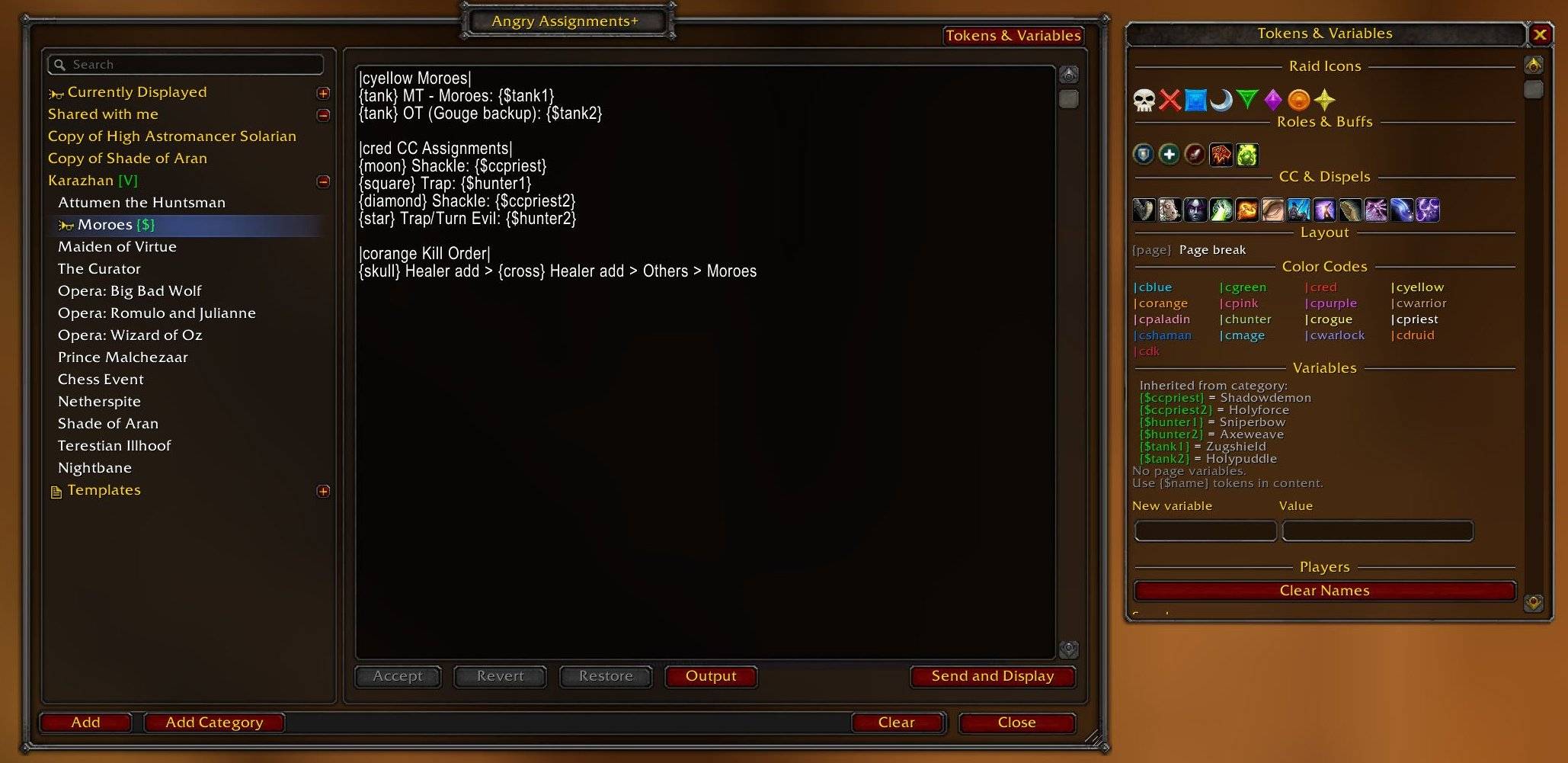
A new side panel in the edit window with clickable shortcuts for raid icons, role icons, buff icons, color codes, and a searchable player roster. Click any item to insert it directly into your assignment text, no more memorizing token syntax. New in this version is a player tag that includes class based colors.
Share Pages
Right-click any page to share it with your raid or party. Shared pages appear in a dedicated "Shared with me" section on the receiver's page list, tagged with the sender's name. Duplicate content is automatically detected and skipped. You can also right-click a category and choose "Share All Pages" to share everything inside it at once.
Simplified Color Syntax
Close a color section with | instead of |r. For example, |cblue text| instead of |cblue text|r. The old syntax still works.
Clear Names
One click strips all player names from the current page while keeping raid markers and structure intact. Great for reusing assignment templates week to week without manually clearing names.
Currently Displayed
A pinned entry at the top of the page tree so you can always find the active assignment at a glance.
Minimap Button
Left-click to open the edit window, right-click to toggle the display. Can be hidden in settings.
Expanded Permissions
New "Allow Raid Leader" and "Allow Raid Assistants" toggles let you accept assignments from non-guild raids without enabling "Allow All."
*Thanks to the authors of the Angry Girls fork of the original addon for the inspiration of a few of these features.
v2.1.1
Pagination
Assignment pages can now be split into multiple pages using the {page} token. Insert {page} anywhere in your content to create a page break. When viewing the display, left-click to go forward and right-click to go back. A page counter (e.g. "2/3") appears in the top-right corner of the display. The current page resets to 1 whenever the displayed assignment changes.
Variable Substitution
You can now define reusable variables and reference them in your assignment text using {$variableName} tokens. Variables support two scopes:
- Category variables apply to all pages within that category. Useful for things like tank names or healer assignments that are shared across multiple boss pages.
- Page variables are specific to a single page and override any category variable with the same name.
Variables are resolved before display, so {$tank1} gets replaced with whatever value you set. If a variable value matches a raid member's name, it automatically gets class-colored in the display.
Variables sync to raid members along with page content, so everyone sees the same resolved assignments.
Pages that use variable tokens show a {$} indicator in the tree, and categories with defined variables show a [V] marker.
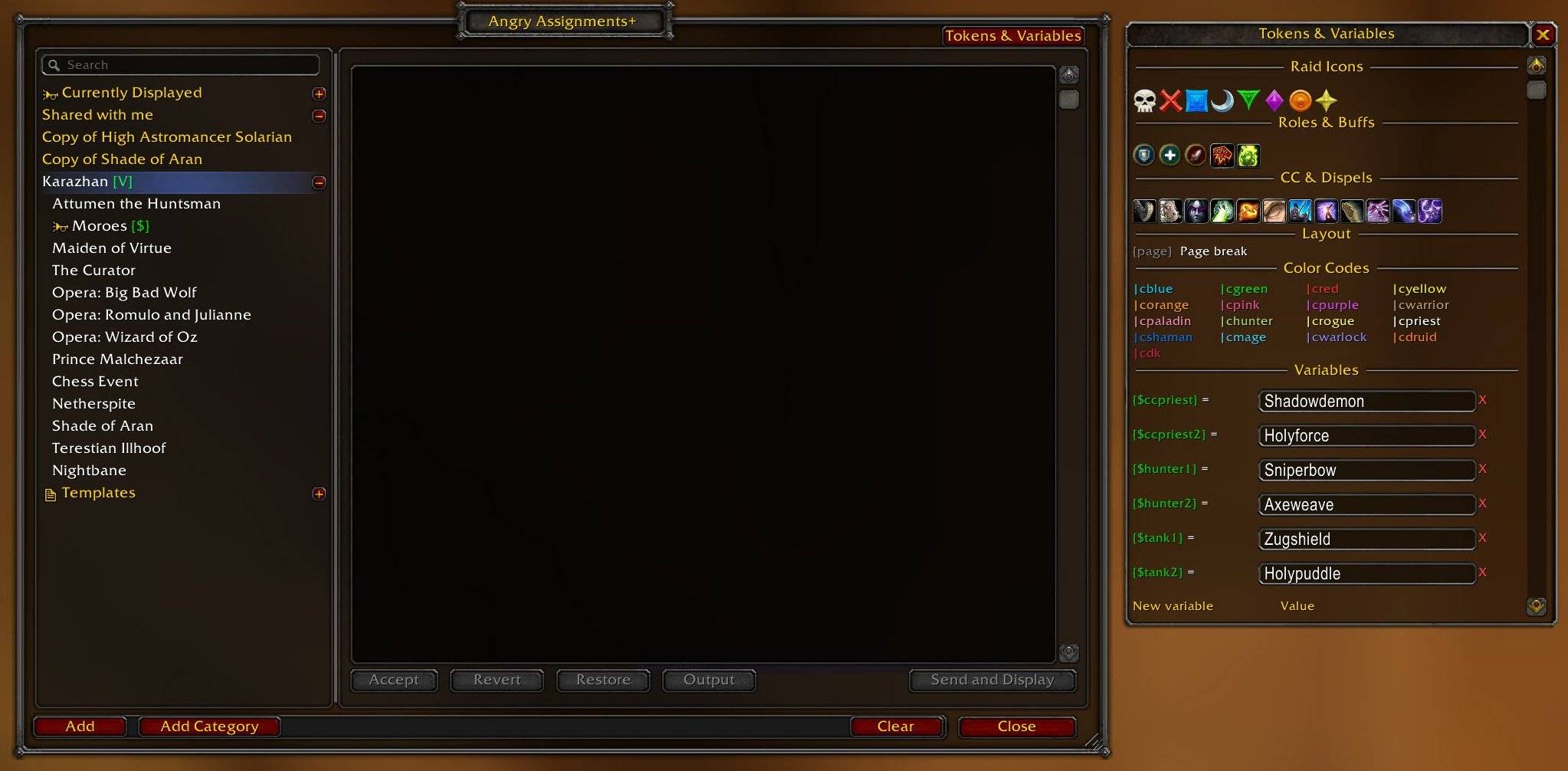
Tokens & Variables Side Panel
The side panel has been redesigned to combine tokens and variables in one place. Open it with the "Tokens & Variables" button in the top-right of the editor window.
The panel now includes:
- Raid Icons - All 8 raid markers
- Roles & Buffs - Tank, Healer, DPS, Bloodlust, Healthstone
- CC & Dispels - Quick-insert icons for commonly assigned abilities: Kick, Polymorph, Fear, Banish, Shackle Undead, Hibernate, Repentance, Purge, Soothe, Tranquilizing Shot, plus Spellsteal and Mass Dispel (TBC+)
- Layout - The
{page}page break token - Color Codes - Standard and class color shortcuts
- Variables - View and edit variables for the selected page or category. Inherited category variables are shown as read-only with the option to click to insert. All variable labels and inherited rows are clickable to insert the token at your cursor.
- Players - Searchable raid/guild roster with class-colored name insertion
Clicking any token or variable inserts it at your cursor position in the editor. Tokens cannot be inserted when a category is selected (only when editing a page).
Drag-and-Drop Reordering
You can now drag pages and categories in the tree to reorder them. Drag within a category to reorder, drag between categories to move, or drag onto the Templates section to save a personal copy. Visual feedback shows where the item will be placed (a blue line for above/below, highlight for drop-into). Sort order is saved locally and persists across sessions.
User Templates
When you drag a page or category into Templates, a read-only copy is saved to your personal template library. User templates appear alongside the built-in templates and can be duplicated into your assignments or deleted, but not edited directly. This lets you save assignment layouts you want to reuse across raids.
More Options
- Sound on Update Play an audio cue when assignments change
- Show After Combat Automatically re-show main window when combat ends
- Display Max Lines Control how many lines the display can show (10–200)
- Duplicate Page Right-click any page to create a copy with all its content
Slash Commands
| Command | Description |
|---|---|
/aa |
Open the edit window |
/aa config |
Open the settings panel |
/aa toggle |
Toggle the on-screen display |
/aa show / /aa hide |
Show or hide the display |
/aa lock |
Toggle lock on the display anchor |
/aa send <name> |
Display a page by name to the raid |
/aa output |
Output assignments to chat |
/aa clear |
Clear the displayed page |
/aa version |
Run a version check across your raid |
Under the Hood
- Complete modular refactor of the original monolithic codebase
- Replaced LibCompress with LibDeflate for more efficient communication
- Communication protocol bumped to version 2
- Dedicated TOC files for every WoW version (currently only tagged as supporting 2.5.5 game version)
- All code passes luacheck with zero warnings
Authors
Ermads: Thanks to the original author of Angry Assignments.
praxxisparadox: Thanks to the author of the Angry Girls fork of the original project for feature inspiration.
Ariailis: Angry Assignments +
The Angry Assignments Plus Team