Ammo Gauge
- By
Your ammo or weapon's throws left displayed in a clean way, turning gold and red when it's time to restock.
Description
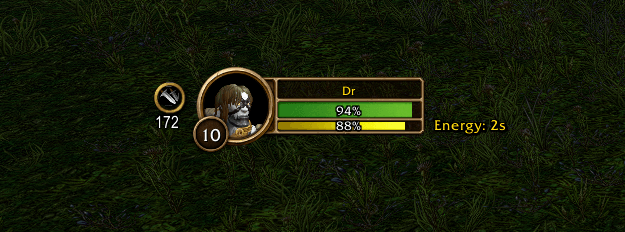
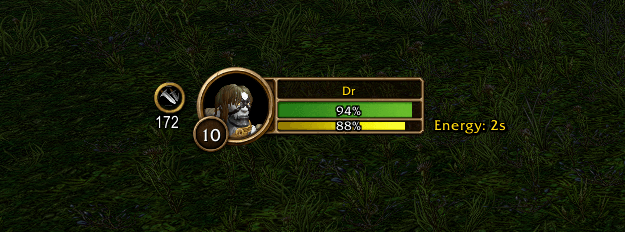
📌 Ammo Gauge shows your ammo (or your throwing weapon's throws) right by your player frame, so you never run dry in the middle of a quest again. After every fight it peeks out from behind your portrait to show how many shots you have left, then tucks itself away. When it's time to restock, it lets you know once.
🔥 Features
✅ Peek after combat – After each fight the badge slides out from behind your player frame for a few seconds, then slides back. Hover it to keep it out. Prefer it always on screen? One setting.
✅ Ammo badge – Your equipped ammo's icon in a round Blizzard ring, with the shots left under it. The same number as your character sheet.
✅ Gold, then red – The count turns gold below 200 and red below 50 (both adjustable). Red stays out until you restock, so the warning never hides.
✅ One warning per dip – A single on-screen message when you go gold, one when you go red and one when you're out, with an optional sound. Never in chat.
✅ Everything at a glance – Hover for every arrow or bullet type in your bags and your quiver or ammo pouch fill ("14 / 18 slots · 2,400 arrows").
✅ One-click swap – Click the badge to pin the list, then click a row to equip that ammo (out of combat).
✅ Throwing weapons too – Rogues and warriors see the throws left on their throwing weapon (its durability), with the same peek and warnings. Repair to restock.
✅ Only when it matters – It shows only with a bow, crossbow, gun or throwing weapon equipped. Other classes never see it.
✅ Your side – Peek direction: Auto (left when there's room), Left, Right, Below or Above. It follows your player frame in Edit Mode.
✅ Blizzard-native – The game's own ring, fonts and tooltips, and a settings page under Options > AddOns > Ammo Gauge. Slash command /ammogauge (or /agauge). Addon Compartment entry on WoW Forever.
✅ Works on WoW Forever, Titan Reforged, TBC Anniversary and Classic Era.
✅ Lightweight & dependency-free – Just install and play!
Donations at buymeacoffee.com/foofiaddons support further feature development
Ammo Gauge Team

Owner