AmbientLFG
Background Group Finder alerts - get pinged the moment a premade group matching your criteria appears, without sitting in the browse window.
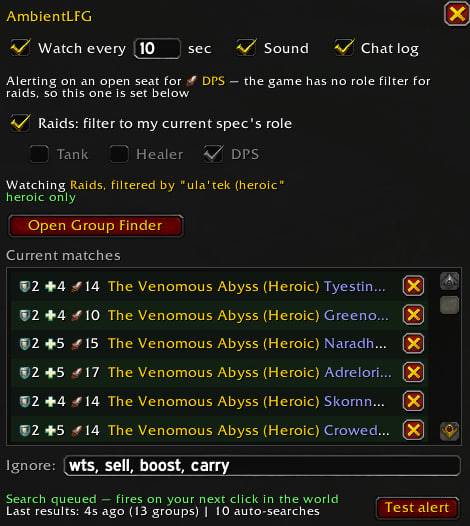
photo_2026-09-19_21-28-55.jpg
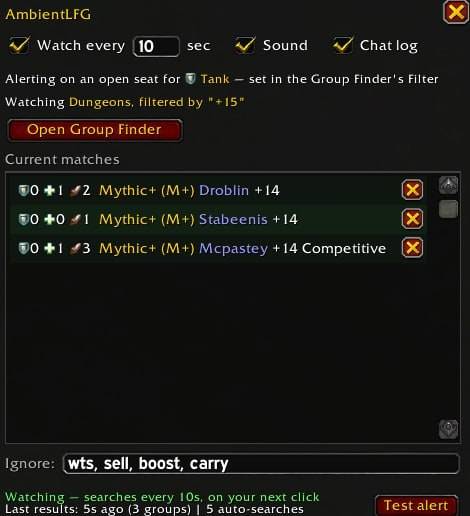
photo_2026-09-19_21-38-35.jpg
Description
Stop refreshing the Group Finder. AmbientLFG watches it for you and alerts you the moment a premade group matching your criteria appears.
Features
- Rules: "alert me for Mythic Lura groups that still need a tank" - words match the boss/activity and are spelling-tolerant ("Lurra" matches "lura"). Rules can target Raids or Dungeons, a difficulty, and which roles must be open.
- Alerts: raid-warning banner, sound, and a flashing taskbar icon if you're alt-tabbed.
- Background watching: optional auto-search keeps checking the Group Finder while you play. It pauses while you browse the Group Finder yourself and resumes when you close it.
- Live matches list: the settings window shows every currently-listed matching group with its tank/healer/dps counts, boss, difficulty, and title.
- Seller filtering: boost/carry advertisers are recognized and hidden automatically; block any leader forever with one click.
Usage
- Type /alfg to open the settings window
- Add a rule (section, difficulty, words, roles that must be open)
- Enable auto-search
- When the alert fires, open the Group Finder and sign up
Signing up stays a manual click (Blizzard requires it), so pairing AmbientLFG with a one-click-apply addon like SmartLFG works well.
AmbientLFG Team