Amber Bank
- By
A modern cached bank browser for Personal, Warband, and Guild Banks with account-wide character search, offline browsing, tooltip counts, minimap access, and saved character inventory views.
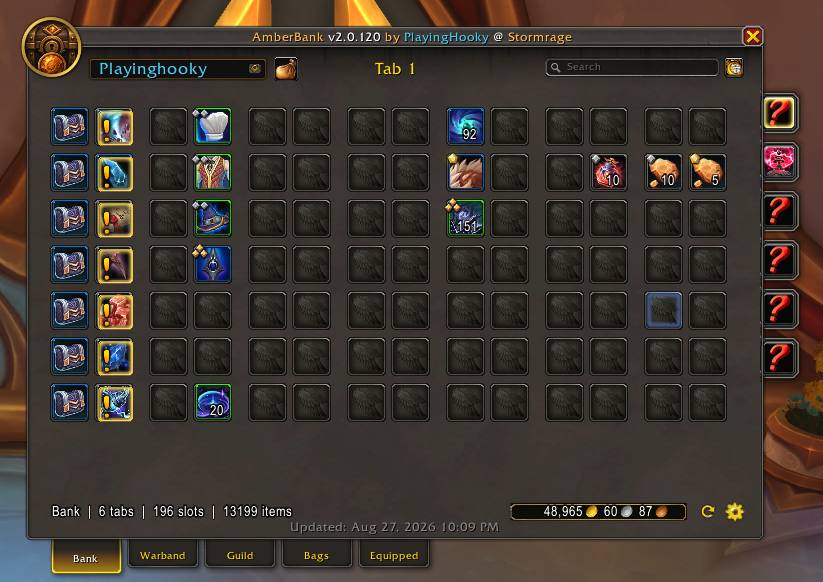
AB_01_MainPanel.jpg
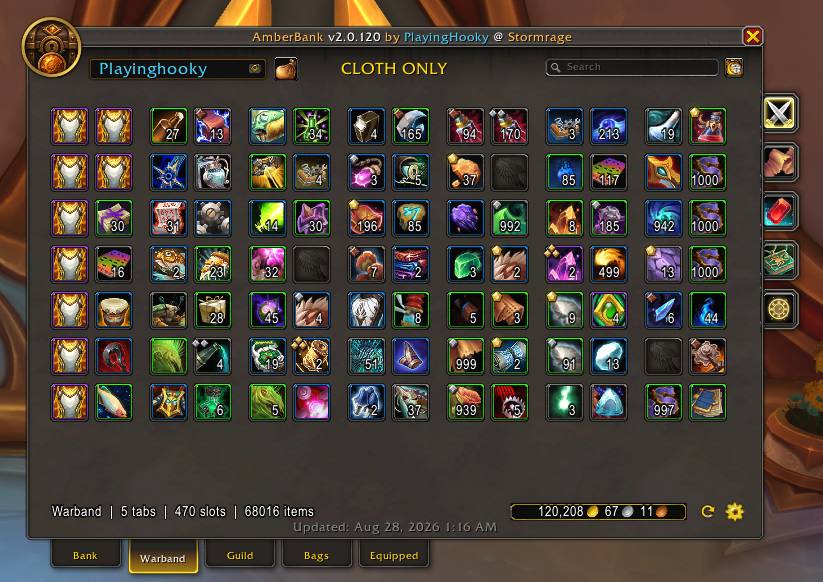
AB_02_Warband.jpg
Description
AmberBank
AmberBank is a Blizzard-style cached bank, inventory, and character browser for World of Warcraft. Browse and search Personal Bank, Warband Bank, Guild Bank, Bags, Equipped gear, and saved character information — even while that character or storage is offline.
✨ NEW IN v2.0.120 — MAJOR INTERFACE OVERHAUL
- Blizzard-style Bank / Warband / Guild / Bags / Equipped interface
- live tab search counters and dim/highlight behavior
- cached Equipped Character view
- cached Gold, Level, Spec, Professions, Reputation, and Currency
- real bag geometry + Sidecar Bags
- improved class-colored character selector and /abs
🏦 Blizzard-Style Cached Browsing
- Modern main window with Bank, Warband, Guild, Bags, and Equipped tabs
- Browse cached Personal Banks, Bags, and Equipped gear from eligible offline characters
- Warband/Guild pages use right-side image tabs with search totals; physical bag layouts are preserved
- Optional movable Sidecar Bags shows all cached bags together; context-sensitive timestamps and cached gold are retained
🔎 Smart Account-Wide Search
- Search character Bags, Personal Banks, Equipped gear, Warband, and Guild storage
- Exact, prefix, substring, item ID, item link, quoted, and [bracketed] searches
- Matching items stay highlighted, non-matches dim, and yellow aggregate counts appear on storage/page tabs
- Dedicated Search Results window with Recent Results, Quick Filter, persistent cache, relevance ordering, and class colors
👤 Cached Character View
- Blizzard-style Equipped pane with equipment slots, character model, level, specialization, and item level
- Attributes/enhancements follow Blizzard-style class/spec visibility and item-level coloring
- Cached Professions grouped by WoW expansion, plus cached Reputation and Currency pages
- Character selector uses class colors, cached level, and optional primary-profession display
📦 Better Item Information
- Rich tooltips show ownership across Bags, Personal Bank, Equipped, Warband, and Guild storage
- Per-character ownership uses class colors and clickable item links
- Crafting quality/rank indicators, quest-item markers, and retained item charges when Blizzard exposes them
👥 Character Control
- Per-character inventory opt-in / opt-out with OPT-IN All / OPT-OUT All controls
- Current character first, alphabetical alternates, scrollable selector, and optional new-character prompts
- Tooltip character sorting: alphabetical, class, or highest count
⚙️ Quality of Life
- Optional minimap launcher, Blizzard Bank launcher, Sidecar auto-open, and Escape-key close behavior
- Blizzard Settings integration with Refresh, Settings, diagnostics, and cache/database maintenance controls
- Optional account-wide silence for the login-scan completion message
💻 Slash Commands
/ab — Open/close AmberBank | /ab cfg — Configuration | /ab scan — Refresh accessible storage
/ab personal | /ab warband | /ab guild | /ab bags | /ab equipped
/ab s <search> — Smart global search | /abs <search> — Direct search alias
💾 Caching Note
AmberBank learns character Bags, Equipped gear, gold, professions, reputation, currencies, and character-sheet data while that character is logged in. Visit Personal, Warband, and Guild Banks when available to fully refresh those storage caches.
🛠 Active Development – Open to Suggestions
AmberBank is actively developed and feedback is welcome. If you encounter a bug or have a feature suggestion, leave a comment on the CurseForge project page or contact the author through CurseForge messaging.
For detailed ChangeLog see `AmberBank-ChangeLog.txt`. For command examples, search behavior, troubleshooting, and database maintenance, see `AmberBank-Help.txt`.
Amber Bank Team