


Alts Lockout Tracker
- By
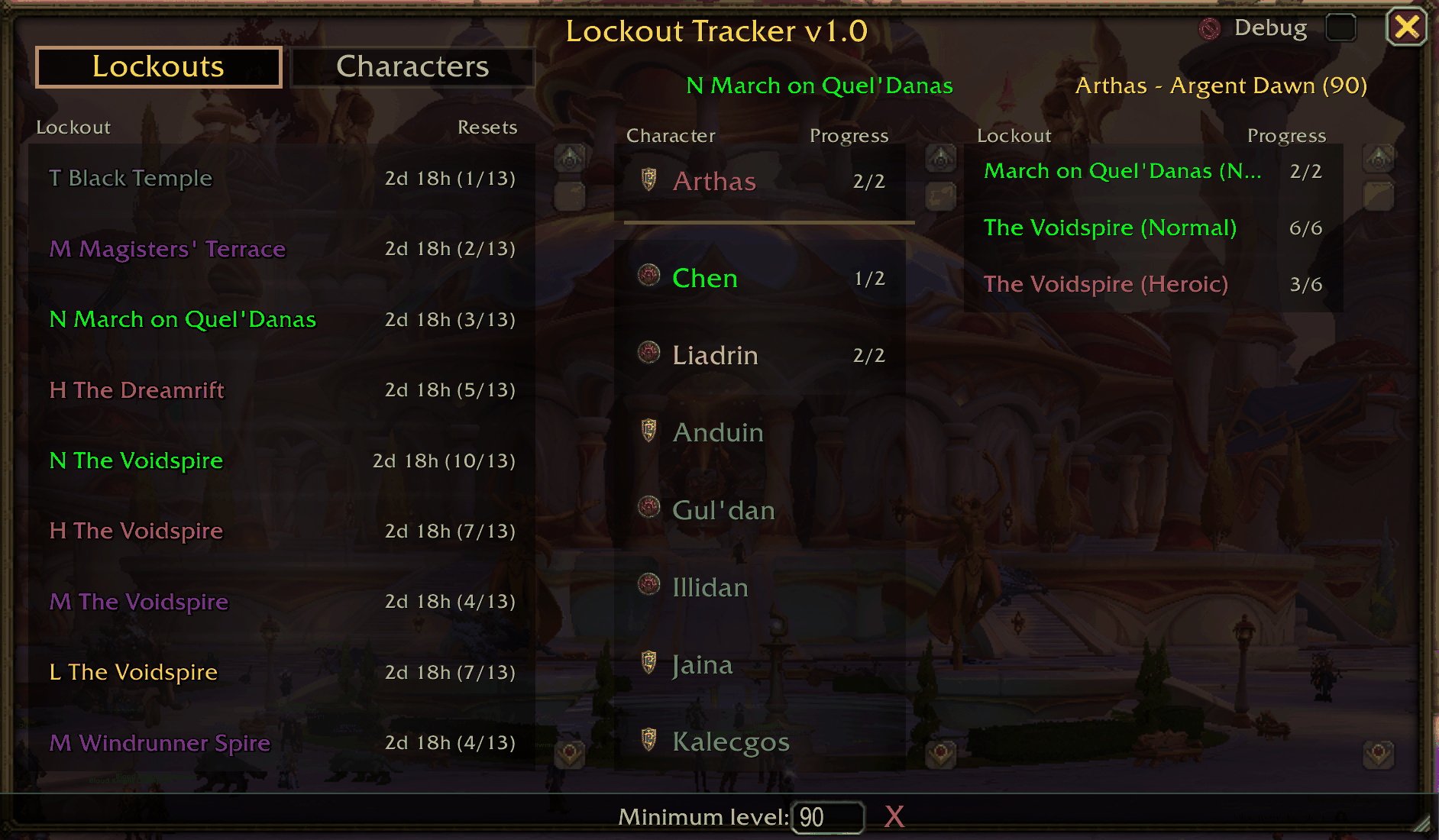
Clicking an instance lists all your characters in the middle column. Locked characters come first in class colors with their boss progress.
Description
Lockout Tracker
Addon for tracking raid and dungeon lockouts (cooldowns) across all your characters.
🤖 AI-Generated Addon Warning
This addon was entirely coded by AI and has not been written or reviewed by a human developer. While the addon has been tested and functions as intended, users should be aware that it was created through an AI-assisted development process. Use at your own discretion.
Features
- View All Characters with Active Cooldowns - See which characters have active raid/dungeon lockouts at a glance
- View All Instances with Active Cooldowns - Browse by instance to see which characters are locked
- Boss Progress Tracking - See boss kill progress in "X/Y" format (e.g., "4/7" for Firelands)
- Dual-Tab Interface
- Lockouts Tab - Browse by instance to see which characters have lockouts
- Characters Tab - Browse by character to see all their lockouts
- Current Character Highlighting - Your active character appears at the top with a golden separator line
- Class-Colored Names - Character names display in their class colors
- Time Until Reset - Displays time remaining until each lockout expires
- Level Filter - Show only characters at or above a minimum level
- Resizable Window - Drag the bottom-right corner to scale the window
- Keybindable - Assign a hotkey to toggle the window in WoW's keybindings settings
Reading the Window
Each lockout is colored by difficulty. In the left column the instance name also gets a letter prefix:
| Letter | Difficulty | Color |
|---|---|---|
| L | LFR (Raid Finder) | Orange |
| N | Normal | Green |
| H | Heroic | Pink |
| M | Mythic (raids and Mythic dungeons) | Purple |
| T | Timewalking | Blue |
Numbers on the right:
- Lockouts tab, left column -
2d 18h (3/7): time until reset, then how many characters are locked to the instance out of all your characters (respecting the level filter) - Characters tab, left column - number of active lockouts for that character
- Middle and right columns - boss progress, e.g.
4/6bosses killed
Usage
Install as usual.
/ltor/lockouttracker- Toggle the Lockout Tracker window/lt char- Print the current character's lockouts to chat/lt reset- Reset window position and size/lt debug- Toggle debug mode on/off
You can also bind a key to toggle the window in ESC > Keybindings > AddOns (look for "LockoutTracker Window").
Made with ❤️ for World of Warcraft
Alts Lockout Tracker Team
