AltProfLib
- By
Account-wide profession and recipe roster library for World of Warcraft Midnight **12.0.7+**
Screenshot 2026-08-09 181216.png
Screenshot 2026-08-09 181155.png
Description
AltProfLib
Version 1.0.1 — Account-wide profession and recipe roster library for World of Warcraft Midnight 12.0.7+ (forward-compatible with 12.1.0).
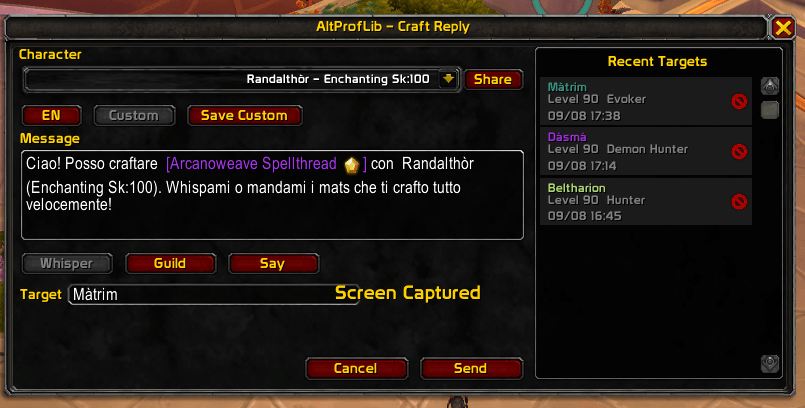
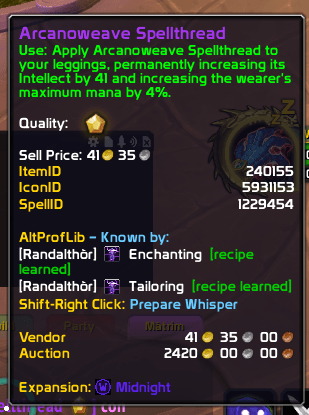
AltProfLib scans professions and learned recipes on each character you log into, builds a local crafter database, and shows who can craft an item directly in tooltips. It also includes a Craft Reply panel to prepare chat responses for crafting requests.
Description
Log each alt once and open their profession windows to populate the roster. After that, hovering craftable items or recipes shows which of your characters know them. Shift-right-clicking an item link opens Craft Reply so you can send a whisper, guild, or say message with the right crafter details.
Features
- Account-wide profession and recipe tracking
- Automatic scans on login, skill changes, and profession UI updates
- Tooltip owners for craftable items and recipes (gathering professions excluded)
- Craft Reply panel with EN / Custom message templates
- Recent Targets list with class-colored names, level, and short timestamps
- Share selected crafter name to the active chat channel
- Optional compatibility with Profession Shopping List load order
- Public Lua API for other addons
Installation
- Extract the archive.
- Copy the
AltProfLibfolder into:World of Warcraft/_retail_/Interface/AddOns/ - Restart WoW or type
/reload. - Log each alt and open their profession window at least once.
- Verify with
/apl rosterand/apl owners.
Commands
Primary slash commands:
| Command | Description |
|---|---|
/apl help |
List commands |
/apl scan |
Force profession scan and scan open profession recipes |
/apl roster |
Show saved characters and professions |
/apl owners |
Show crafters by profession |
/apl recipes |
Show known recipe counts for the current character |
/apl recipe <RecipeID> |
Show which characters know a recipe |
/apl item <ItemID> |
Show which characters can craft an item |
/apl draft <RecipeID> [target] |
Open Craft Reply for a recipe |
/apl draftitem <ItemID> [target] |
Open Craft Reply for an item |
/apl tooltip on\|off |
Enable or disable tooltip lines |
/apl stats |
Show database statistics |
/apl version |
Show addon version |
/apl debug |
Toggle debug output |
Aliases: /apl and /altproflib.
Slash Commands (extended)
/apl recipesample
/apl inspect <link>
/apl draftpreview <RecipeID> [targetName]
/apl draftitempreview <ItemID> [targetName]
/apl tooltipdebug
/apl linkdebug
/apl chardiag
How It Works
- Profession roster scanning runs on login and on profession skill changes.
- Recipe scanning runs when the profession window updates.
- Manual scan is available with
/apl scan. - Data is complete only for professions that have been opened and scanned on each character.
Tooltip
The AltProfLib block appears on tooltips for craftable items and recipes:
AltProfLib — Known by:
[Name]  Profession  [recipe learned]
Shift-Right Click:  Prepare Whisper
- Character name colored by class
- Recipe status: green if learned, red if not learned
- Gathering professions excluded (Skinning, Herbalism, Mining, Fishing, Cooking, Archaeology, Scavenging)
The AltProfLib Team