


Altoon
Altoon Gallery 2.jpg
Altoon Gallery 1.jpg
Description
Altoon is a lightweight, clean alt character tracker for World of Warcraft: Midnight. Built from the ground up to be fast, non-intrusive, and easy to read — no bloat, no unnecessary dependencies, just the information you actually need about your alts without having to log into each one.
Features
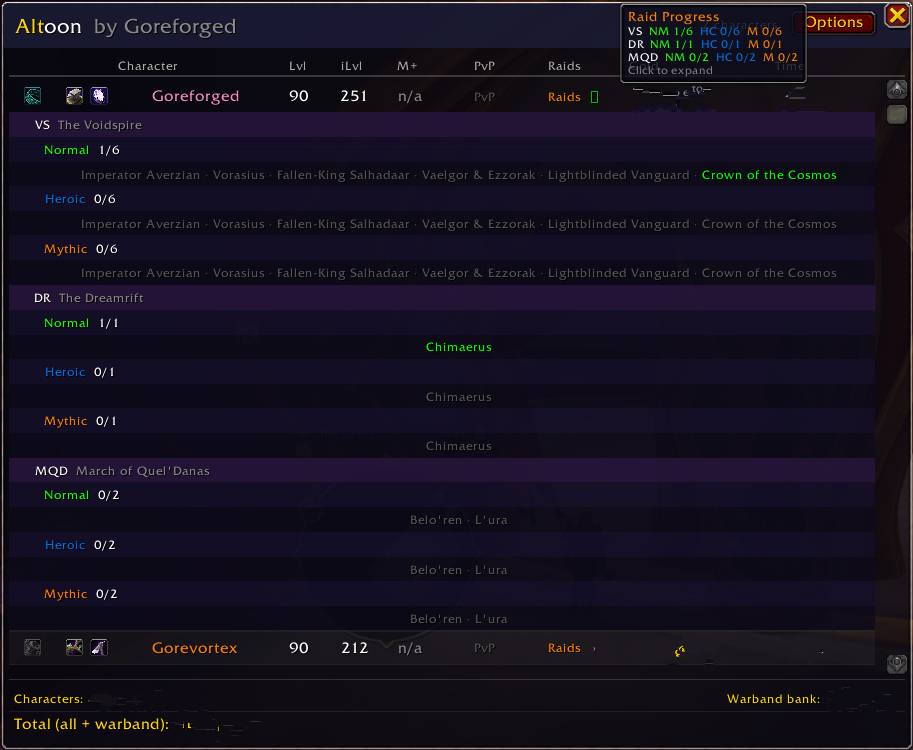
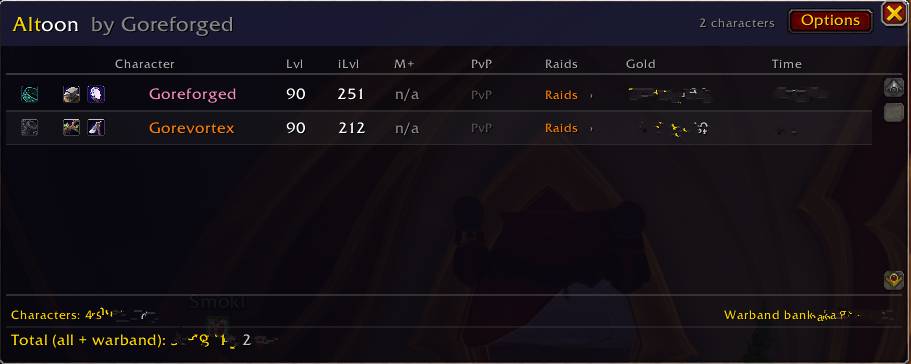
Alt Overview Panel Open a single window that shows all your characters at a glance. Every character you log into is automatically saved and displayed. The panel is movable, scrollable, and auto-resizes to fit your characters and active columns.
Per-Character Tracking For each alt, Altoon tracks and displays:
- Character name with class color
- Realm
- Level
- Item Level (equipped)
- Mythic+ Score
- PvP Ratings — Solo Shuffle, 2v2, 3v3, and Battleground Blitz (expandable)
- Raid Weekly Progress — The Voidspire, The Dreamrift, March of Quel'Danas across Normal / Heroic / Mythic (expandable)
- Gold on hand
- Time Played
Expandable Rows Raid progress and PvP ratings are hidden by default to keep rows compact. Click the Raids ▶ or PvP ▶ button on any character row to expand their full progress inline. Click again to collapse.
Icon Indicators Small icons appear before each character name:
- Great Vault — golden chest if a reward is ready to collect right now, blue chest if a reward is earned for next reset, grey lockbox if nothing earned this week. Hover for details.
- Unread Mail — envelope icon if the character has unread mail waiting. Hover for details.
- Professions — icons for every profession the character has learned. Hover any icon to see the profession name and current skill level (e.g. Blacksmithing 80/100).
Gold Summary Footer The bottom of the window shows:
- Total gold across all tracked characters
- Warband Bank gold
- Combined total of both
Options Panel Right-click the minimap button or click the Options button inside the main window to open the settings panel. Toggle any column on or off — changes apply instantly. Includes a reset button with confirmation to wipe all saved character data and restore defaults.
Minimap Button A minimap button is always created so it works with any button organizer addon (MinimapButtonButton, Bazooka, ChocolateBar, etc.). Left-click to open/close the main window. Right-click to open options. Drag to reposition around the minimap edge — position is saved between sessions.
How It Works
Altoon saves a snapshot of your character's data every time you log in, level up, complete a Mythic+ dungeon, or change gold. Data is stored in WoW's SavedVariables system and persists across sessions. You only need to log into each alt once — after that their data stays until the next time you log into them and it updates automatically.
Commands
There are no slash commands — everything is accessible through the minimap button.
Compatibility
- WoW: Midnight (Interface 120001+)
- No required libraries or dependencies
- Works with all minimap button organizer addons
- Compatible with ElvUI, Bartender, WeakAuras, and all major UI replacements
Notes
- Raid progress, Great Vault status, profession data, PvP ratings, and time played only update when you are logged into that character — this is a WoW API limitation. The data is cached and shown from the last time you logged in.
- If you use MinimapButtonButton, type
/mbb include AltoonMinimapBtnonce to add it to the organizer.
Feedback & Bug Reports
Please use the Issues tab on the project page to report bugs. Include any Lua error text from BugSack or the default Blizzard error frame. Feature requests are welcome.
With the last build raid-boss tracking might not be working with different client languages other than English. Please bear with me as I will fix the addon for other languages.
Created by Goreforged-Silvermoon EU
The Altoon Team
