Altitude
- By
Never fool your friends again! Altitude lets you create a prefixed name appended to your character's chat messages, so that you're recognized on any alt.
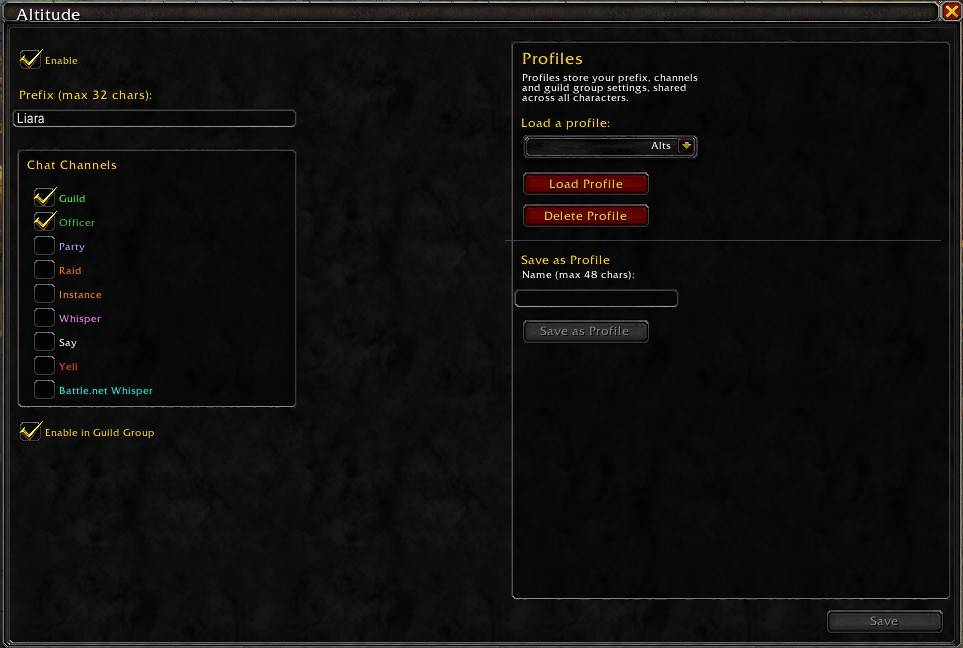
Altitude UI.jpg
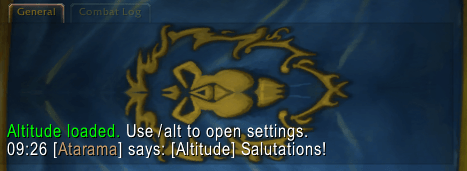
Altitude's chat prefix
Description
Altitude
Altitude allows you to create a chat prefix, which will be appended to each message you send in selected channels. Use profiles to create multiple prefix and channel combos for different realms, guilds, or anything else your altoholic heart desires!
Instructions
Type /alt to open the settings page, where you can set your prefix, select relevant channels, and more (don't forget to save!).
Format
Once saved, each message in the selected channels will append your prefix in the following manner:
[character name]:[prefix] chat message
For example, if your character's name is Thrall (a shaman, naturally) and you're usually known as "DestroyerX" by your guildies and friends, you can type your main's name as the prefix and select the guild channel.
Now, whenever you type in /g, they'll see it as "[Thrall]: [DestroyerX] howdy".
Changelog
1.12.1
- Added 12.1 support.
1.12.0.7_v2
- "Disable if prefix matches character name" - skips the prefix if it's identical to the current character's name.
- Channel overrides - enable specific overrides for specific channels. Works with "enable in guild group" and "disable if prefix matches character name".
1.12.0.7_v1
- Added 12.0.7 support
- "Enable In Guild Group" - you can now set this override, which will automatically apply the prefix when you're in a group (either party, instance or raid) with at least 1 other guildie, even if those channels are disabled by default.
1.12.0.5
- Added 12.0.5 support.
- Added profiles - create and load profiles across your characters for different setups.
- Added addon icon.
0.12.0.1
- Added 12.0.1 support.
- ESC key now closes the window.
- "Enable" is now character specific.
0.1.12
- Added Midnight support.
0.1 - MVP
- Set a prefix.
- Select which channels to append the prefix to.
The Altitude Team