AllClassPlan
Leveling companion for every class in WoW Forever, in one install: talent plans, upgrade check, class alerts, buff watcher, dungeon guide and help for any two professions.
Description
AllClassPlan
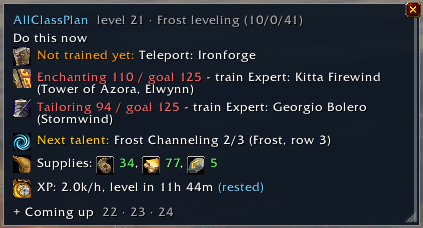
Your leveling companion for every class in WoW Forever, from level 1 to 60, in one install. AllClassPlan tells you what to train, which talent to take, which gear is better and where to go next, so you can spend your time playing instead of looking things up. Log in on any character and you get the right plan and tools for its class.
Every class, its own plan and tools
Mage (also /mp): Frost leveling, Frost solo questing, Frost AoE grinding, Fire leveling, Arcane.
- Shatter indicator: tells you when Ice Lance hits hard (target frozen or Fingers of Frost), and shows Frostbolt on a frozen target before you have learned Ice Lance. The game hides enemy auras in combat, so there your own Frost Nova counts as frozen for its 8 seconds (you can switch that off). It also tells you when Ice Barrier is missing.
- Polymorph alerts: warns 5 seconds before your sheep breaks, and when it breaks early.
- Range icon: with an enemy target, a Frostbolt icon (Fireball with the Fire plan) turns red when the target is out of range and full colour when you can cast. Talents like Arctic Reach count.
- Fingers of Frost icon: while the proc is up, its icon sits on your screen with charges and time left, and pings when it lands.
- Supplies line: the icon and count of your best water and food and your mana gems, and once you know a teleport or a portal, your Rune of Teleportation and Rune of Portals too. It warns when you are running low (red when you have none).
- Group bar in a party: one click trades a stack of water to mana users or food to warriors and rogues, the best rank their level can use. It trades your target, or the next party member in range who hasn't had any, and party members who open a trade with you get it too.
- Merchant's Favor goals for Tailoring and Enchanting when you have them.
Shaman (also /sp): Enhancement, Elemental, Restoration.
- Calls out Maelstrom Weapon at 5 stacks, so you never miss an instant Lightning Bolt.
- Calls out Stormstrike the moment it's ready. With Improved Stormstrike every dodge and parry resets it, so you never miss a free Stormstrike.
- Reminds you of a missing Lightning Shield, weapon imbue or Flame Shock.
- Movable and resizable, and you can turn it off with
/acp combat.
Druid (also /dp): Feral, Balance, Restoration.
- In Cat Form it calls out Clearcasting (a free attack) and 5 combo points (Rip or Ferocious Bite).
- Reminds you of a missing Mark of the Wild or Thorns, and Rake on your target.
- Movable and resizable, and you can turn it off with
/acp combat.
Warrior (also /war): Arms, Fury, Protection.
- Calls out Overpower (Arms and Fury) and Revenge (Protection) when they light up.
- Calls out Execute when your target drops below 20% and Victory Rush after a kill.
- Reminds you of a missing Battle Shout, Rend on your target (Arms) or Demoralizing Shout (Protection).
- Movable and resizable, and you can turn it off with
/acp combat.
Paladin (also /pal): Protection, Retribution, Holy.
- Calls out Hammer of Wrath when your target drops below 20%, and Exorcism against undead and demons.
- Reminds you of a missing aura (pick which one in the settings, or Auto), Righteous Fury (Protection), seal or blessing, and when Holy Shield is ready.
- Movable and resizable, and you can turn it off with
/acp combat.
Warlock (also /wl): Affliction, Demonology, Destruction.
- Group bar in a party: one click trades your best healthstone to your target, or to the next party member in range who hasn't had one, and party members who open a trade with you get one too.
- Calls out Shadow Trance (an instant Shadow Bolt from Nightfall), Shadowburn when your target is low, Decimation (a fast Soul Fire) and Conflagrate.
- Reminds you of a missing Corruption, Bane of Agony, Siphon Life or Immolate on your target.
- Tells you to Life Tap when your mana is low and your health is high, to summon your demon, and when you are out of Soul Shards.
- Movable and resizable, and you can turn it off with
/acp combat.
Priest (also /pp): Shadow, Holy, Discipline.
- Calls out Mind Blast (Shadow) and Penance (Discipline) when they are ready.
- Reminds you of a missing Shadow Word: Pain or Vampiric Embrace on your target, and a missing Inner Fire.
- Movable and resizable, and you can turn it off with
/acp combat.
Hunter (also /hp): Beast Mastery, Marksmanship, Survival.
- Ammo tracker: counts the ammo that fits your weapon (arrows for bows and crossbows, bullets for guns), shows your ammo and the next best you carry in the plan window, tells you when vendors sell better ammo for your level, and at a vendor says how many stacks to buy to reach the amount you want to carry (by default what your quiver holds). Warns you out of combat before you run dry (below 200 by default,
/acp ammo 300to change it). - Gear notes tell you when better arrows and bullets come out (levels 10, 25 and 40).
- Pet reminders: tells you when your pet is missing or dead, and when it's low and needs Mend Pet.
- Reminds you of a missing Hunter's Mark or Serpent Sting on your target.
- Survival: calls out Mongoose Bite and Counterattack when they light up.
- Movable and resizable, and you can turn it off with
/acp combat.
Rogue (also /rp): Combat, Assassination, Subtlety.
- Poisons in the buff watcher: an icon for each weapon without poison. Click it and the best poison in your bags goes on that weapon (Instant on the main hand, Deadly on the off-hand). It warns 5 minutes before a poison runs out.
- Calls out 5 combo points (time for Eviscerate or Slice and Dice) and Riposte for Combat.
- Reminds you when Slice and Dice is down, and of Rupture on your target for Assassination.
- Tells you about the level 20 poison quest, so you don't miss it.
- Movable and resizable, and you can turn it off with
/acp combat.
The upgrade check follows your spec, with the stats that matter for it.
Talents
- Talent plan for every level from 10 to 60. When you get a point, a green arrow and a glowing frame point at the next talent in WoW Forever's talent window.
- Your talent window shows the whole plan: the next talent gets the green arrow and frame, every talent still left in your plan gets a yellow frame, and a small green tick in the corner marks the ones you have finished. It also works in replacement UIs like Daylight UI.
- Pick your spec in the settings window or with
/acp plan. The talent plan, the upgrade check and the combat helper switch with it. - Every plan is checked against the live WoW Forever talent tree, so no talent is planned before its row or its prerequisite is open.
- Your own build: make it in Icy Veins' WoW Forever talent calculator (or on wow-forever-forge.com), copy the address of your build and paste it with "Import talents" in the settings (or
/acp import). These links keep the order you clicked the talents in, so it becomes your leveling plan from level 10 exactly as you built it. Links from Wowhead's calculator and talentsforever.com work too (they fill your main tree first). - Put your points somewhere else? Right-click "Next talent" (or
/acp skip) to skip a talent in the plan.
Buff watcher
- A movable row of icons that shows up when one of your buffs is missing (red frame) or running out (yellow frame, with time left). Click an icon to cast the buff. Watches your class buffs (Arcane Intellect, Fortitude, Mark of the Wild, blessings, aspects, poisons, Demon Armor, shields…).
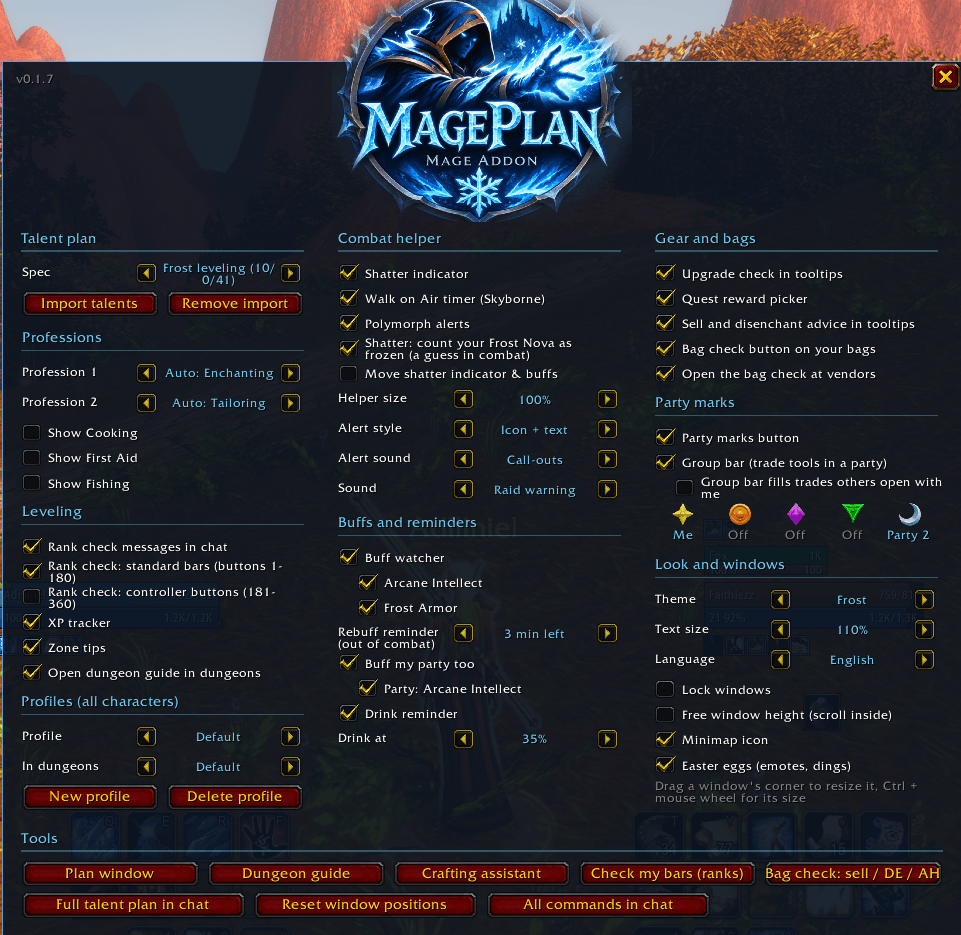
- Rebuff reminder: out of combat it warns you early, by default when a buff has 3 minutes left, with a short message, a pulsing icon and a sound if you want one. Choose 1, 2, 3, 5 or 10 minutes, or off.
- Pick which buffs it watches: every buff has its own tick box under "Buffs and reminders" in the settings.
- Turn on "Move" to drag it and Ctrl + mouse wheel to resize it. Turn it on or off in the quick menu or with
/acp buffs. - Party marks: pick who gets Star, Circle, Diamond, Triangle and Moon in the settings. In a party a small mark button shows: one click puts the marks on, also in combat after the tank's marking took them away.
- Buff your party: party members who are missing your party buff get their own icon with their name on it. Click it to buff them.
- It uses the buff's own range: party members in another zone or out of range get no icon until they come closer, so you never buff yourself by accident.
- Turn it on or off with "Buff my party too", and pick the party buffs one by one.
Spells and ranks
- Trainer list: tells you at login and on level-up which new spells and ranks your class trainer has for you (
/acp train). - Rank check: finds old spell ranks on your action bars, also inside macros, and new spells that aren't on a button yet (
/acp ranks). Spells bound straight to a key or a controller button count too, in the settings you choose whether the standard bars (buttons 1-180), the controller's button sets (181-360) or both are checked, and you can turn its chat messages off.
Gear
- Upgrade check in item tooltips: the plain change in your main stat (spell power, healing or attack power), plus an overall score with all stats weighted for your spec. Choose in the settings to see both, or just one.
- Quest reward picker: marks the best upgrade with a green + and the reward that sells for the most with a gold $. Works in the normal quest window and in DialogueUI.
- Gear and consumable notes at the right level.
Sell, disenchant and junk
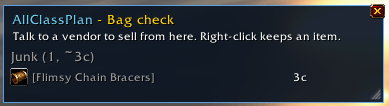
- Bag check window (
/acp de): lists your junk, the gear to sell to a vendor, the gear to disenchant and the gear worth more on the auction house, with what each is worth (AH prices from Auctionator, Auctioneer or TSM if you have one). - Sell from the window: with a vendor open, click a row to sell it, or one button sells your junk and vendor items, 12 at a time so you can still buy them back.
- Disenchant from the window if you have Enchanting: click a row to disenchant it. Shift-click sells anything to the vendor anyway.
- Mage scrolls: if you know Comprehend Scroll, your undeciphered scrolls get their own group. Click a row to decipher it.
- Right-click an item to keep it: it's never sold or disenchanted from the window.
- Opens by itself when you talk to a vendor and have something to sell. You can also open it with the small disenchant icon above your open bags (also with Baganator and other bag addons) or by middle-clicking the minimap icon.
- Sell, disenchant and AH advice also shows in item tooltips.
Dungeons
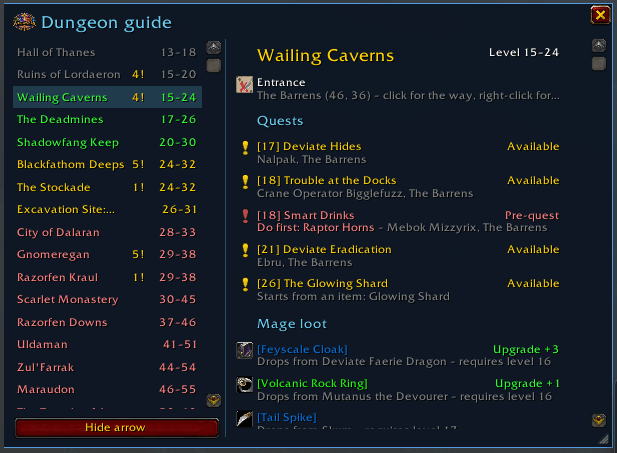
- Dungeon guide: pick a dungeon to see its quests, where to pick them up and the loot for your class from its bosses, ranked with the biggest upgrade for you first.
- Alliance and Horde quests and quest givers, Ragefire Chasm and the new WoW Forever dungeons: Hall of Thanes, Ruins of Lordaeron, Excavation Site: Wetlands, City of Dalaran, The Drowned City, Krol'dok Stronghold, Alcaz Prison, Blackmaw Hold and Shaper's Terrace.
- Waypoint arrow to the quest giver or the dungeon entrance.
- Can open by itself when you enter a dungeon.
Professions
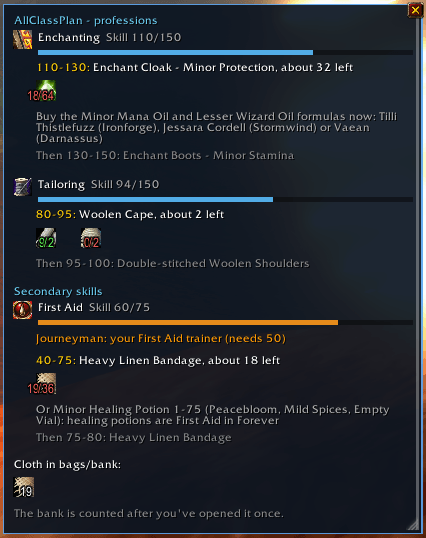
- Pick your own two professions in the settings window, from all nine: Alchemy, Blacksmithing, Enchanting, Engineering, Herbalism, Leatherworking, Mining, Skinning and Tailoring. If you don't pick, the addon uses the professions you have learned, or a good pair for your class.
- Crafting assistant for Alchemy, Blacksmithing, Enchanting, Engineering, Leatherworking and Tailoring: what to craft for every skill bracket and the materials you need, following routes made for WoW Forever.
- Gathering help for Herbalism, Mining and Skinning: which herbs, ore and leather you can gather now and the best zones for your skill.
- Alliance and Horde: trainers, vendors and zones for your own faction, and the trainer for your next profession rank shown right in the window.
- Gear and consumable notes for your professions, and a reminder when it's time to train the next profession rank.
- Cooking, First Aid and Fishing too, without using a profession slot: what to cook or make for every skill range and where to learn or buy the recipe, where to fish and with which lures, and where the Expert books and Artisan quests are. Tick the ones you want in the settings.
And more
- XP tracker with XP per hour and time to level.
- Drink alert: out of combat with low mana, a big "Drink!" with an icon in the middle of the screen (casters and hybrids). It works even though WoW Forever hides your mana from addons.
- Eating and drinking bars: food and drink each get their own countdown, with your health filling up under the food bar and your mana under the drink bar (with the %), and "Full!" when you can get up.
- Bandage bar: counts down your bandaging with your health, in and out of combat, then shows when you can bandage again.
- Walk on Air timer for Skyborne: a big countdown with a bar so you land before you fall.
- Gold goal: turn it on in the settings and type the amount, or use
/acp goal 100 mount. - Zone tips when you enter a zone.
- Where to level: the plan window suggests the zones that fit your level best and the next one coming up, worked out from WoW Forever's own quests. Click for an arrow to the zone's quest hub.
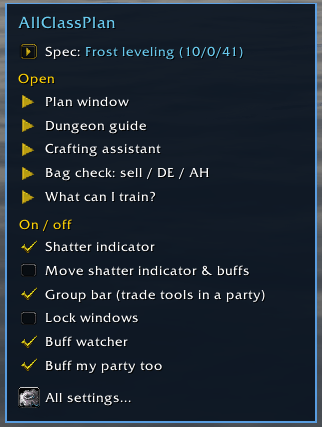
- Minimap icon: left-click for a quick menu (spec and on/off switches, sorted into groups), right-click for the full settings window where everything is sorted into clear groups, and middle-click for the bag check.
- Movable, lockable windows and layout profiles shared by all your characters.
- Windows get out of your way in combat: the plan, crafting, dungeon, settings and bag windows hide when a fight starts and come back when it ends. Prefer them on screen? Tick "Show windows in combat" (or
/acp combatwin). - Make it fit you: drag a window's corner to resize it, Ctrl + mouse wheel to scale it, and right-click the corner to give that window its own text size (80% to 160%). The Text size setting (or
/acp font 120) sets it for all of them. Want taller windows? Turn on "Free window height" (or/acp height) to drag the corner in height too, and scroll inside with the mouse wheel. - Eight languages: English, Svenska, Deutsch, Русский, Français, Español, Português (BR) and Italiano. Until you choose, AllClassPlan uses your game's language when it has it. Change it in the settings or with
/acp lang(or/acp lang de,ru,fr,es,pt,it,sv,en). It also works on non-English game clients: spells, buffs and talents are matched by ID, the upgrade check reads the game's own stat list, and the dungeon guide, zone tips and profession help show quests, NPCs, places and items by the names your game uses (Chinese and Korean clients are not supported yet). - Easter eggs with friends who also run a Plan addon: try /dance, /hug, /train, /chicken or /fart on them, and much more to discover. You can turn them off.
Getting started
Type /acp to open the plan window, /acp config for settings and /acp help for all commands. You can also right-click the minimap icon. Only the part for your character's class is loaded, so AllClassPlan stays light.
Made for WoW Forever. Dungeon quest data comes from QuestieDB (GPL-3.0). Found a bug or have an idea? Leave a comment..
AllClassPlan Team