AllClassAppearances

Preview any transmog set's appearance on every class directly from the Wardrobe with a single click, no more switching your class filter back and forth.
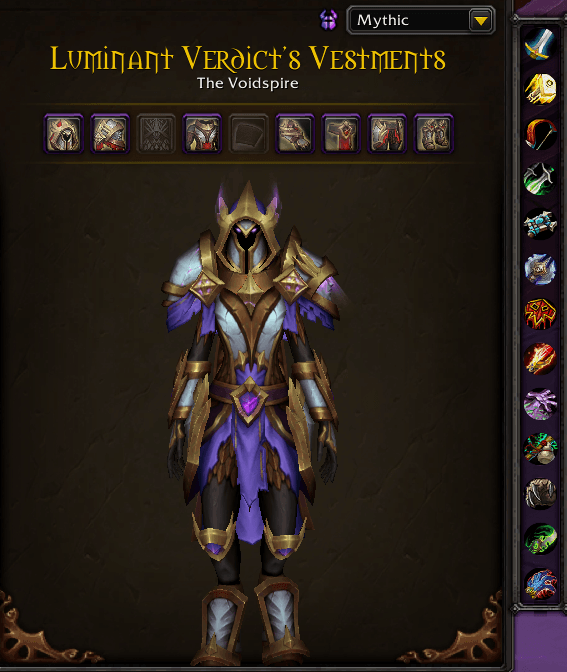
Screenshot 2026-07-13 205219.png

Screenshot 2026-07-13 205219.png

Description

All Class Appearances

See how any transmog set looks on every class, right from the Wardrobe — no more flipping the class filter dropdown back and forth and re-clicking the same set over and over just to compare looks.

Why this exists

Cross-class set previewing already exists inside larger addons like Extended Transmog Sets and Better Wardrobe and Transmog — but there it's one feature among dozens, often behind a settings menu or options toggle, bundled with TSM integration, incomplete-set tracking, faction swapping, and more.

All Class Appearances does exactly one thing: open the Sets panel, click a set, and class icons just appear. No settings menu. No options to configure. No unrelated features loading in the background. If you want a full-featured wardrobe overhaul, those addons are great picks. If you just want the fastest possible way to compare a set across classes with zero setup, this is that.

Features

  • Click any set with multiple class variants (raid tier sets, some dungeon and PvP sets) and a row of class icons appears
  • Click a class icon to instantly preview that class's version of the set on the model
  • Your own class filter stays untouched the whole time — no need to switch it back and forth
  • The currently-previewed class is highlighted with a soft glow
  • Genuinely lightweight: silent on login, no chat spam, single Lua file, nothing else loaded

How to use

  1. Open Collections → Appearances → Sets
  2. Click into any set
  3. If that set has versions for other classes, a column of class icons appears next to the panel
  4. Click any icon to preview that class's look

That's it — no configuration needed.

Known limitations

  • Elite / Gladiator PvP sets are restricted by Blizzard's own game logic to your character's actual class and current season. This is enforced by the game itself, not the addon, so it can't be bypassed here.
  • Sets with no other-class variants (most dungeon greens, quest rewards, etc.) won't show the icon row — there's simply nothing to switch between.

Feedback

Found a set that behaves oddly, or have an idea for an improvement? Leave a comment below or open an issue on the project page.

The AllClassAppearances Team

profile avatar
Owner
  • 1
    Projects
  • 18
    Downloads