


AliasScreenshot1.png
Description
# Alias
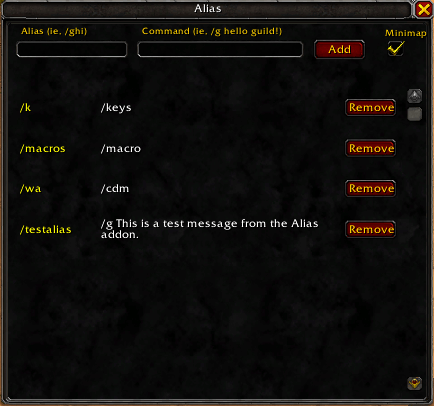
Alias is a lightweight, efficient World of Warcraft add-on that allows you to create custom command aliases, similar to aliases in a Linux terminal.
## Features
* **Custom Aliases**: Map any shortcut (e.g., `/ghi`) to any standard WoW command (e.g., `/g hello`).
* **Persistent Settings**: Your aliases and preferences are saved automatically across sessions.
## How to Use
1. **Open the Manager**: Type `/alias` in your chat window to open the interface.
2. **Add an Alias**: Enter your shortcut in the first box and the target command in the second box, then click **Add**.
3. **Use It**: Simply type your new alias into chat and press Enter. It will automatically execute your mapped command.
## Installation
1. Download the latest version from CurseForge.
2. Extract the `Alias` folder into your World of Warcraft installation directory:
`_retail_\Interface\AddOns\`
3. Launch the game. If prompted, check "Load out of date AddOns".
## License
This project is licensed under the **MIT License**. See the `LICENSE` file for details.
## Support & Feedback
This addon is provided as-is. I am not a devloper and likely won't update functionality or fix bugs unless it's something I want/want to fix.
The Alias Team
