


Awesome Interrupt Rotations
- By
Interrupt Rotation Manager and announcer for raid encounters
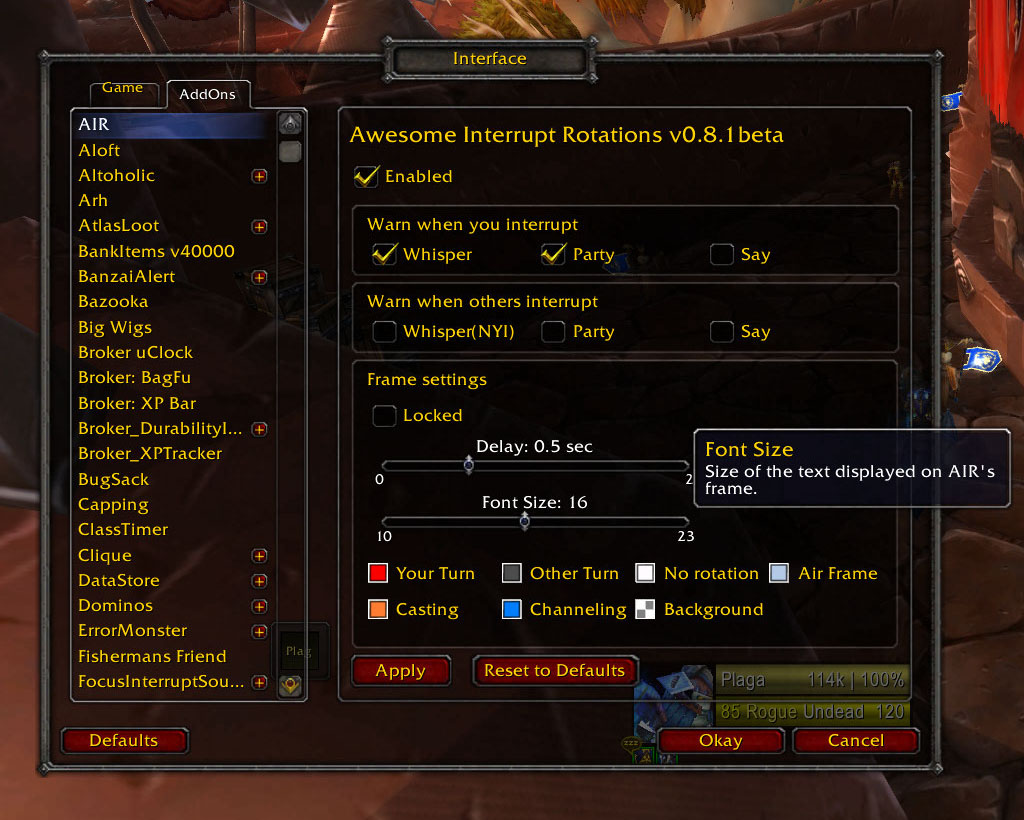
That's the Options Panel as of v0.8.1beta (r122).

This is the Options Panel in v0.9.1 beta, every option has its tooltip explaining exactly what it does.
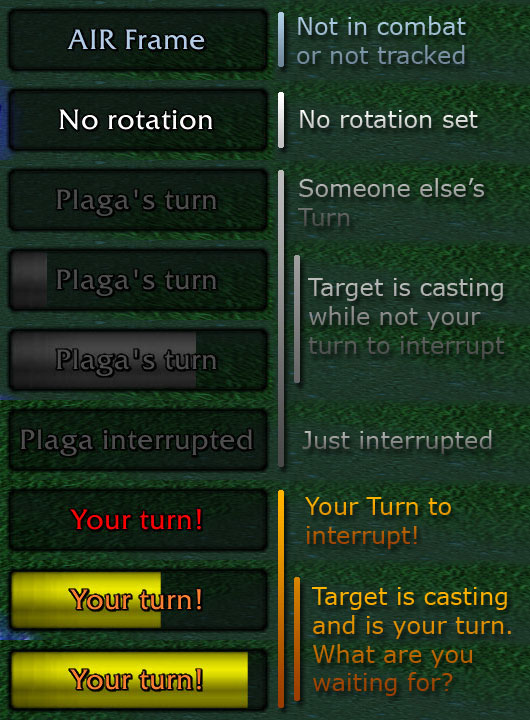
Those are the messages you will see while fighting a tracked mob
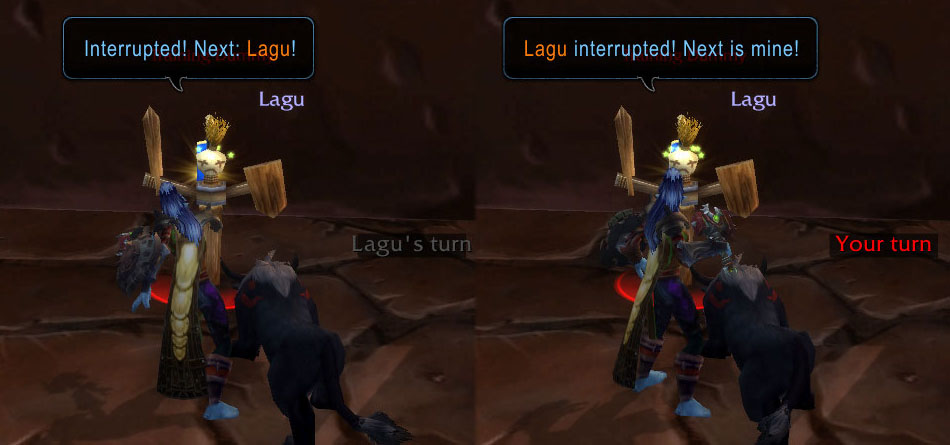
Here you can see the frame and the warning of AIR as of v0.4beta.
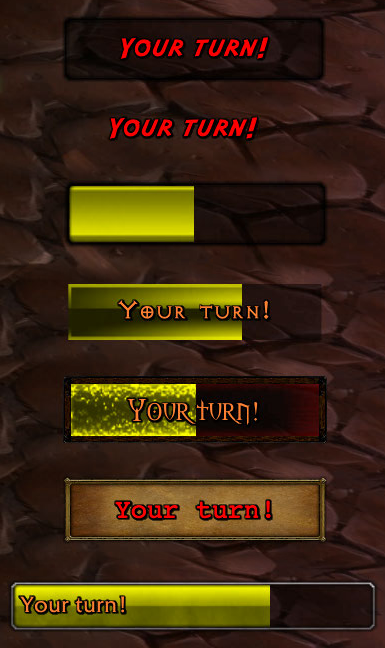
Here you can see an small amount of frame layouts.
Description
Addon Description
In short, AIR is an "Interrupt rotation manager and announcer for raid encounters."
Those involved in this monotonous, yet sometimes tricky task of preventing the raid boss wiping your raid with a big boom spell, will be happy to know that they are not alone, this addon intends to make their lifes a litle easier, managing the interrupt rotations in raid encounters in a simple way, automatizing chat and whisper warnings and showing you relevant information such as if it your target is casting and is or isn't your turn to interrupt.
Keep in mind that this addon is still on its early development stage, but yet, usable (or so I hope).
Feedback and comments will be greatly apreciated.
Features
This addon will replace your good old "/cast kick /p Interrupted, next someone_else" macro, with some interesting benefits:
- it doesn't require to set up a macro, it will announce it automatically when you cast your interrupt
- it should work with all interrupt spells (See note below)
- It will announce it once per interrupt spell cast (so you can spam the kick button without spamming the chat)
- it will fire only in the selected encounters (no more "You are next!" whispers from a guildmate who is in warsong gulch while you are jumping at Orgrimmar's bank), this is, by default, Arcanotron, Halfus ,Nefarian's phase 2 adds, Chogall's Corrupting Adherents, Feludious, Maloriak and Sinestra's Twilight Spitecaller. but you can add/remove enemys to track with a simple chat command
- It's easy to set up who announce to (unlike the old kick macro, it won't be a pain in the ass to change it if you forgot to do it before engaging, you just need to type /air set whoeverisnext).
- Shows in a frame if it's your turn or not to interrupt, You won't hear things like "¿it's your turn or mine?" and "Sorry, didn't know it was my turn" anymore.
- The frame will show visual alerts when your target is casting and it's your turn to interrupt
- Sound alert when you need to interrupt
- It supports complex rotations
- It supports both target and focus tracking
- It works even if you are not the one interrupting (it will keep track of the rotation and cast warning/whisper chats)
- It works even if the other player/s interrupting with you are not using the addon.
- Supports broadcasting to the raid/group to ensure everyone is using the same rotation.
- Suppors backup interrupters in case of death
What's new
v0.9.11beta
- 4.1 Fixes (previous versions won't work).
- Removed some unnecesary notifications caused by automatic addon communication.
- Increased compatibility with special symbols in names.
v0.9.10beta
- Experimental support for Sinestra's adds (right now only works with rogue's Gouges).
v0.9.9.3beta
- Air will now try to get an usable rotation when joining a new group or coming back online.
- Removed the old online/offline detector since it wasn't responsive enough to be usable.
Ingame configuration
The addon is ready to go as you install it, you'll only need to move the frame wherever you want (it appears in the center of the screen by default), and set your rotation.
Setting up the rotation
In most cases you will use a simple rotation with just 2 melees interrupting, or even 3 mages, this can be done with:
/air rotation guy1 guy2
/air rotation guy1 guy2 guy3
However, the addon support more complex rotations, such as having backups for dead people, defining turns with more than one character, etc. You can find examples and explanations on how to do so in the Rotations page.
There's also the posibility of broadcasting the rotation to help setting up the raid rotation in a fast and easy way. To do so, simply replace the rotation with broadcast:
/air broadcast guy1 guy2
If you are promoted and the receivers have not unchecked the autoaccept option, they will autoaccept rotations, otherwise, they'll need to do an /air ok to accept it.
You can see the full list of received and set broadcast with:
/air history -> shows all introduced and received broadcasts
And of course, you can check what rotation is anyone using with
/air checkrotation user -> asks the user for his current rotation
Other commands
/air menu | options -> Open the Option Panel. There you can find all the customization options, including frame layout, visibility and warnings.
/air ? | help -> List all available slash commands
/air addtarget | removetarget | add mob | remove mob -> adds or removes mob from the tracked list.
/air list -> lists the tracked mobs.
/air on | off -> enables/disables the addon.
/air reset -> resets all the options.
/air versioncheck -> Displays who is using AIR in your raid/party, and shows version number. (Only with 0.6.2beta and newer)
/air faketurn -> For solo testing, it will simulate an interrupt from your partner
The frame is unlocked by default, to move it, simply drag it with the left button, rightclick it to lock. By default, once locked, the frame will ignore clicks, you can unlock it by typing /air lock or deselect the Lock checkbox in /air menu.
Visual Alerts
AIR relies in external addons to show visual alerts, for now only Weakauras is supported. Here is the basic alert code, just paste it in weakaura's import tool. You can modify it as you want, as long as you don't change the trigger: (watch out, this is a loooong string)
daKukaqikKQrrbofKYTeQ2Lcfdtv5ycPLPcptHmnGUMsABI4BQKXPGZjG1bj1bvPwifQhQQQmrijxuvvSrHyKuioPa1kvf9skKYmvOu3Kcj7uvYpfidvvvAPuqpL0ufPVQqjJvvv1Cvr2R0FvIbdXHf1IHu9yuzYk6YuTzu1Nf0OfkNMsVgsmBk62aSBq)gQHdOLJYZjA6ixNW2vL67QQmEvHZRIA9kuTFL6gTPvZnTuvz1OJbe9OvbuDwD20Qs3K)VylKQACqPPbzuJ9FIKw9Cq88sNAK4xbadmm8nA03AY6b4v5JdgOAEoTKfdZMleZgg6mztlv9rq88sNAK4xhdxRdFdjdhFdRrblFCWavNUKRQgd)tUrYBKyIqFJyHtlxMWSnYVyo0F7SnY9pxIb4BKGHKZycG0gXqmLjlgk3ieZgg6m5g5mwW2iwi5mMaiTrYMoJgtvMhAXW0Za9QHmSayv)bWmC6ZIEv7S6DWgUrUnDgvQkxt7ROnT6JG45Lo1iXVUgahbgy44ljjjWky5JdUw9Cq88sNAKHKaRhjxdRdxJoabxlFCW1Qmp0IHPNb6vj)bjyE1mhzXqztRkPmJAAvjwaNvvSaopHkmEMNNmIBAYBz(IHz7CjY)x(ZdGMyPfd)whZV87Qt8IelGZIEPsvj)bjyE1GHKZ4ZC(P75edLNglpJYTGLLN(l(NZUfSS0O8PnF6wWYYt3cw(4QQasmByOZAAvoHKWaQYlGCKfd3igG2(5gzJWCsWGBeiM2i3bBiQVnDgzaA7NoCwvaTuvkZcDQuv7S6TLTrgBNN2i3MoJQ(ZoPync4vYxYX3WiWJKR1OjLpoiyvoSjM10(6OV(6RrnY63qcy0bWVJKRRJKKYhF9Qu18CAjlgMnxiMnm0zYMwQAm3ggJAKbqqWKRRarhcmSECKu(4GRvnX5ztRkK(Y4yOx0RkK(c0F7SIE1XXqVQXMzou(zHHBeu5sohsLQsmByOZAAvjq30SQrYSPd3ikkwyvb0F7qQAwq4QCcjHbSqNb6vLuMeYQcOLQszwOtvfsFrc0nnRXvfsFraTunUkNqsyaVYa8Qv5escdOkVaYrwmCJyaA7NBKncZjbdUrUd2quFB6mYa02pD4C)SkxmNdLQcGZm5vPZa9QCcjHbu1F7qQ6)YsQkNqsyalXStVkzb4ZsL6RJMw9rq88sNAeW1vWKKaFGGdddbcKu(4GGvphepV0Pgza8Bf8yDnqY1fysGKYhhCTkZdTyy6zGEvYFqcMxnZrwmu20QskZOMwvIfWzvflGZtOcJN55jJ4MM8wMVyy2oxI8)L)8aOjwAXWV1X8l)U6eViXc4SOxQuvYFqcMxnyi5m(mNF6EoXq5PXYZOClyz5P)I)5SBbllnkFAZNUfSS80TGLpUQkGeZgg6SMwLtijmGQ8cihzXWnIbOTFUr2imNem4gbIPnYDWgI6BtNrgG2(PdNvfqlvLYSqNkv1oREBzBedTHXOnYTPZOQ)StkwJao8D8Dmagn6q0HJVRYhheSkh2eZAAFD0iGRhrps(g(ogDf4kWr5JVgOVg1xFLQMNtlzXWS5cXSHHot20svJ52WyuJmmkj6qYWOVHrGRhFGLpo4AvtCE20QcPVmog6f9QcPVa93oROxDCm0RASzMdLFwy4gbvUKZHuPQeZgg6SMwvc0nnRAKmB6WnIIIfwva93oKQMfeUkNqsyal0zGEvjLjHSQaAPQuMf6uvH0xKaDtZACvH0xeqlvJRYjKegWRmaVAvoHKWaQYlGCKfd3igG2(5gzJWCsWGBK7Gne13MoJmaT9tho3pRYfZ5qPQa4mtEv6mqVkNqsyav93oKQ(VSKQYjKegWsm70Rswa(SuP(AutRYJHKAh37R1VQtReOz(CQ)GQA0SCOSrOyw5gbdDJE1ZbXZlDQrUsIoCD8DbESMKCfDO8XbxRY8qlgMEgOxL8hu1mhzXqztRkPmJAA1jEHtijmGIEvjwaNvvSaopHkmEMNNmIBAYBz(IHz7CjY)x(ZdGMyPfd)whZV87Qt8IelGZIEPsvTZQ3w2gj1FqBKBtNrvfqIzddDwtRYjKegqvEbKJSy4gXa02p3iBeMtcgCJaX0g5oydr9TPZidqB)0HZQcOLQszwOtLQ(ZoPynss0HOdbapahTECmkjA5JdcwLhdPQgNhhJrjx9rq88sNAKKKdWajRbgUs(wtcCv(4GdvJ52WyuJaMacoAusGJRRRrrx)kFCWKQ550swmmBUqmByOZKnTuvtCE20QcPVmog6f9QcPVa93oROxDCm0RASzMdLFwy4gbvUKZHuPQeZgg6SMwvc0nnRAKmB6WnIIIfwva93oKQMfeUkNqsyal0zGEvjLjHSQaAPQuMf6uvH0xKaDtZACvH0xeqlvJRYjKegWRmaVAvoHKWaQYlGCKfd3igG2(5gzJWCsWGBK7Gne13MoJmaT9tho3pRYfZ5qPQa4mtEv6mqVkNqsyav93oKQ(VSKQYjKegWsm70Rswa(SuPsvF3xrh9DuQf
Testing, Troubleshooting and FAQ
If you are new to this addon or something does not work, please read this page.
Aditional notes
About interrupt spells
The goal of this addon is to be used in raid environments, so it will track the common rotation spells, Arcane torrent and Strangulate for example, are excluded, since they are on a long cd, and tracking them as normal interrupts may end screwing up the rotation (for example, a dk using Strangulate when it's not his turn to help would screw things up).
Known bugs & problems
- Backup system has some major bugs
- If both player interrupt at the same time, they can end up with their addon contradicting each other due to lag. Use ventrilo to ensure both of you are seeing the same, addon will sync again on next interrupt.
- Checkmarks in dropdown menus are doing funny things
- Having too many shared media causes too big drop down menus, sometimes bigger than the screen's hight
Coming soon
- More work and debug of the backup system.
- Auto-obtaining the rotation when you come back online.
Changelog
You can see the full change log of the addon here
The Awesome Interrupt Rotations Team

