AHledger
- By
AHL2.png
AHL3.png
AHL1.png
AHL4.png
AHL5.png
Description
AHledger puts auction house prices where you actually need them: in tooltips, in the profession window, on the posting frame, in your bags. It also runs the scanner that feeds the shared price database at ahledger.com, so everyone on your server benefits when you scan.
Made for World of Warcraft: Forever. Also loads on Classic Era. Free, no paywall, and it never buys, sells or posts anything on its own.
Getting started
Install from the CurseForge app, or drop the AHledger folder into World of Warcraft\_classic_\Interface\AddOns (the beta client uses _classic_beta_). Type /ahl to open the window and /ahl status to see what the addon knows.
Prices come from a table file in the addon folder. There are three ways to keep it fresh:
- AHledger sync, a small desktop app from ahledger.com/download. It watches your saved variables, uploads the scans you've chosen to contribute, and writes a new price table every 30 minutes. The game picks it up at login or /reload.
- The Import string link on any market page at ahledger.com. Copy it, then paste in game with /ahl import.
- Do nothing. The addon ships with a recent snapshot for every market, so it works on first login. It just won't be today's prices.
Tooltips
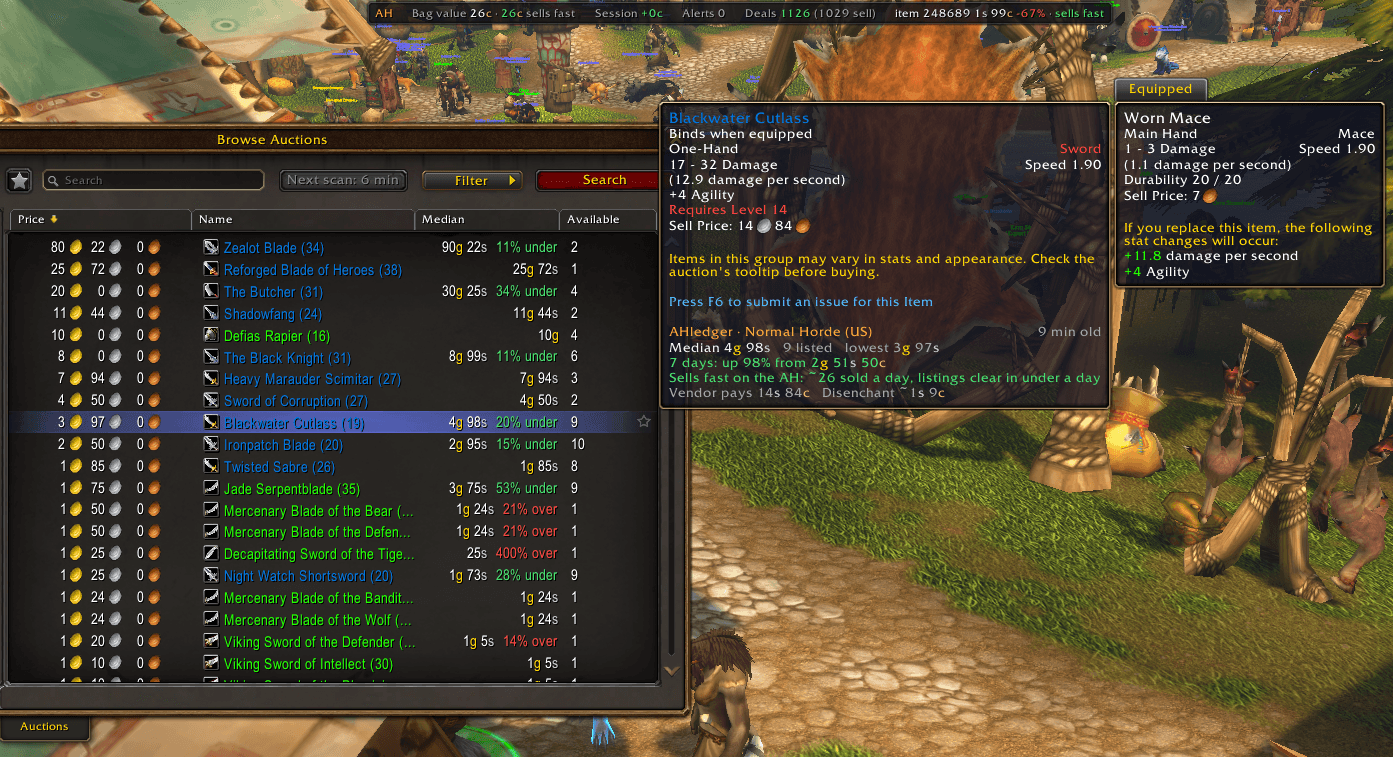
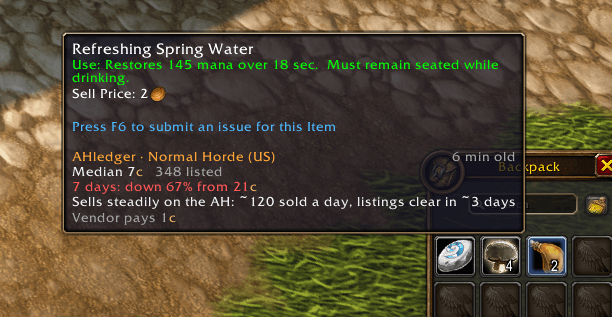
Every item tooltip gets an AHledger block: median buyout, minimum buyout, the 7 day change, how many are listed, how fast it sells, and how old the price table is. Works in bags, the bank, the AH, chat links, quest rewards and profession windows. Vendor price is in there too, and for green or better armor and weapons, what the disenchant mats are worth at current prices.
If that's too much, there's a compact mode: one line with the median, change and listed count, then a verdict. Auction it, or vendor it.
Professions
Open a profession and every recipe in the list gets a dot on the right of its row. Green means it clears 10% over the reagent cost (that's roughly the AH cut, so anything under that isn't really profit). Grey is about even. Yellow loses up to 30%, red loses more than that. A grey question mark means a reagent or the result has no price yet, so no guess is made. There's a + or - next to the dot for anyone who can't tell the colours apart.
Hover a row and the dot turns into the actual margin, with a tooltip showing cost, value and how fast the result sells.
Select a recipe and a line under the reagents shows the full math: reagent cost at the current median, what the output sells for, and the margin. Reagents with no price are named and left out of the cost, so you never see a margin that's better than it really is.
The Crafting tab in the /ahl window lists every recipe you know with cost, value, margin, how many sell a day and profit per day, sortable. There's a filter box for "only show me recipes above X%". Click a recipe for a shopping list of what you're missing for N crafts, right click to jump to it in the profession window.
At the auction house
A Scan button on the AH frame runs a full scan (same ReplicateItems call Auctionator and TSM use) and saves it. The button tells you where the scan is and counts down until the server will let you run another. Auto scan is optional and never runs more than once per 15 minutes.
Every result row in the browse list shows the median and how far under or over it the listing sits, green or red.
Put something on the sell frame and a side panel shows its median, minimum, 7 day change, 30 day range, listed count and sales pace, with buttons to undercut the current minimum, match the median, or add 10%. It fills the price field. You still click Post.
The watchlist
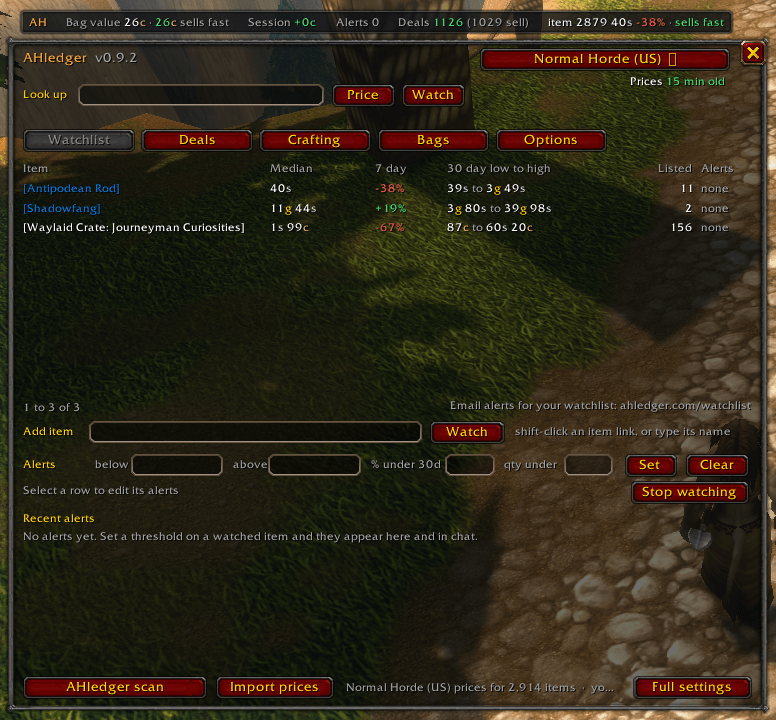
Track any item and see its median, 7 day change, 30 day range and listed count in one place. Each item can have alerts: median at or under a price, at or over a price, some percent under its 30 day median, or fewer than N listed. Alerts print in chat with a sound whenever a new price table loads.
Deals
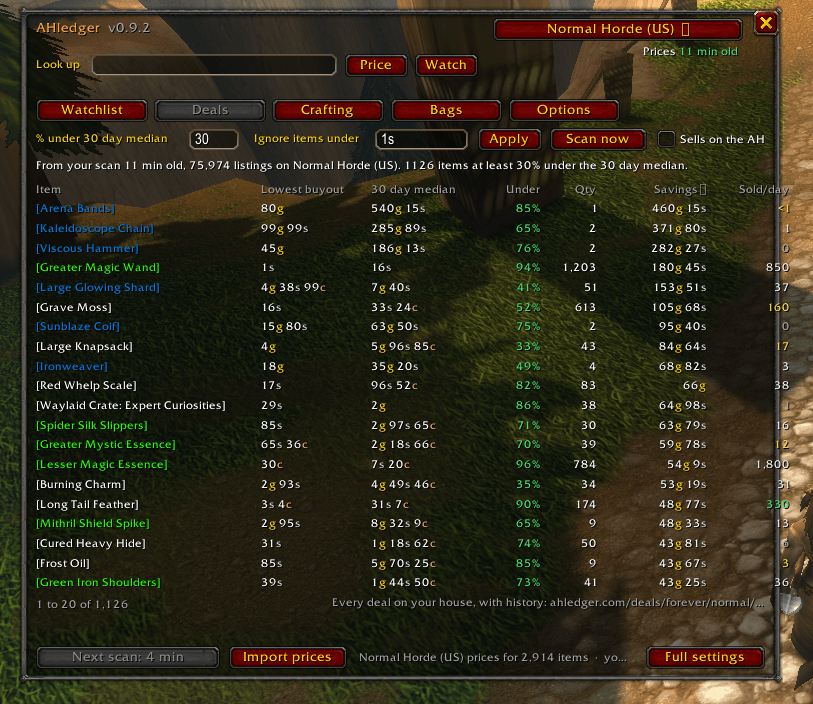
Your latest scan compared against the price table. Anything listed a chosen percent under its 30 day median shows up, biggest savings first, with a switch to hide stuff that doesn't actually sell. Click a row to search the AH for it, right click to watch it.
The ledger bar
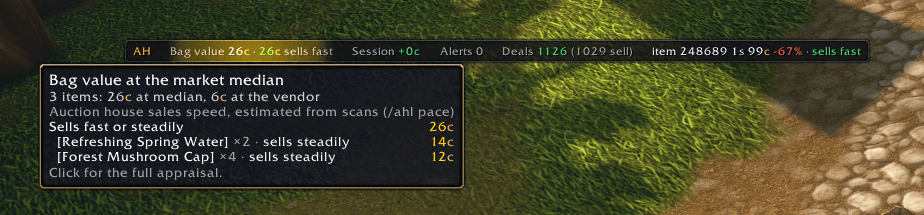
A thin movable bar with the numbers I kept opening the window for: bag value at the median, gold this session and per hour, watchlist alerts, deals in the latest scan, and a ticker that rotates through the watchlist. Click any number to open that tab. Drag it wherever, /ahl bar lock to pin it, /ahl bar to hide it.
Smaller things
- Quest rewards: when a quest offers a choice, each option shows what it's worth and the best one is marked. You still pick.
- Vendors: an item whose AH median is well above its vendor price shows the profit per buy, and how many are left if the vendor has limited stock.
- Mailbox: one chat line when you open it. Sold, expired, outbid, won, cancelled, and how much gold. Nothing gets opened or taken.
- After a scan saves, chat tells you how many deals it found and names the best three.
- Bags tab: everything you're carrying with count, median, total, vendor total and whether to auction or vendor it.
- Minimap button: left click for the window, right click to scan. Shows up in Titan Panel or Bazooka too.
Commands
/ahl open the window
/ahl deals | bags | craft open it on that tab
/ahl options settings panel (market override is here)
/ahl scan full scan, AH must be open
/ahl status version, market, table age, stored scans
/ahl import paste a price table from ahledger.com
/ahl watch add [item] | remove [item] | alert [item] <price>
/ahl bar show/hide the bar, also lock | unlock | reset
/ahl auto on|off auto scanning
/ahl link copyable ahledger.com link for an item
/ahl clear delete stored scans
Privacy
The addon itself can't touch the network, addons never can. A saved scan holds item ids, counts, buyout and bid prices and time left for one market, plus your realm, faction, region and the time. No character names, no seller names, no account info, no chat. The sync app only uploads while "Contribute scans" is on in the options (it's on by default). If you want credit for scanning, there's an opt in leaderboard on the site.
Beta client note
The Forever beta writes saved variables but doesn't read them back, so addons lose their settings every session. AHledger works around this by mirroring options, the market override and your watchlist into CVars, which the client does keep, and restoring them at login when the saved variables come back empty. Scans and price tables aren't affected. /ahl status tells you which path it took.
Links
Site: https://ahledger.com
Sync app: https://ahledger.com/download
Changelog: https://ahledger.com/changelog
Bugs and questions: hello@ahledger.com
AHledger Team