
AHFlow
- By
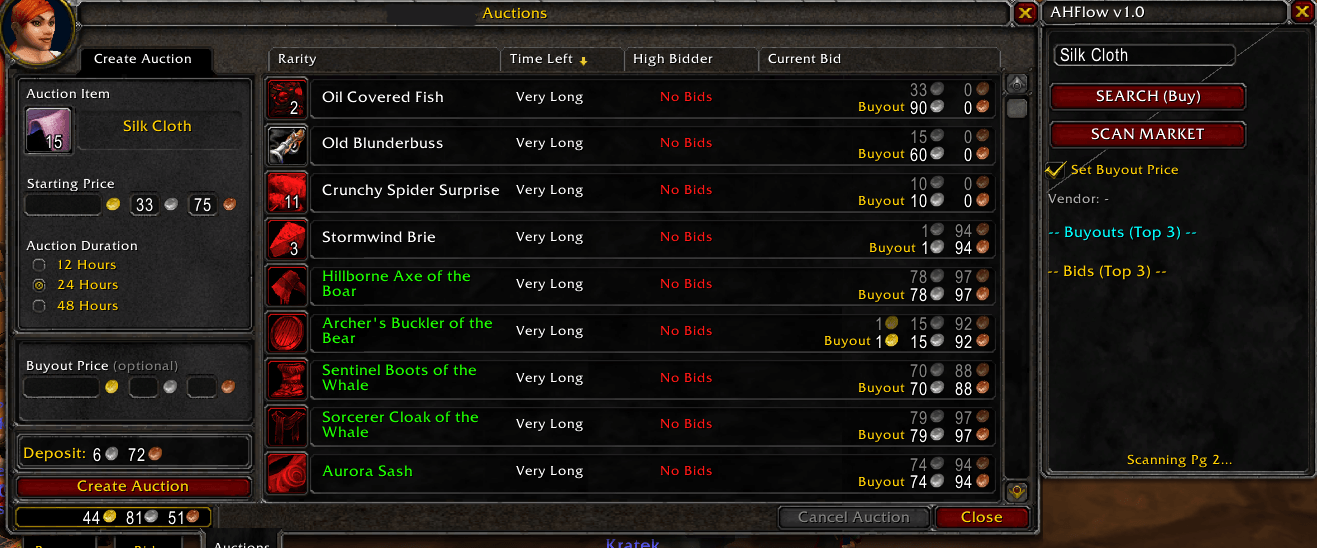
Capture2.PNG
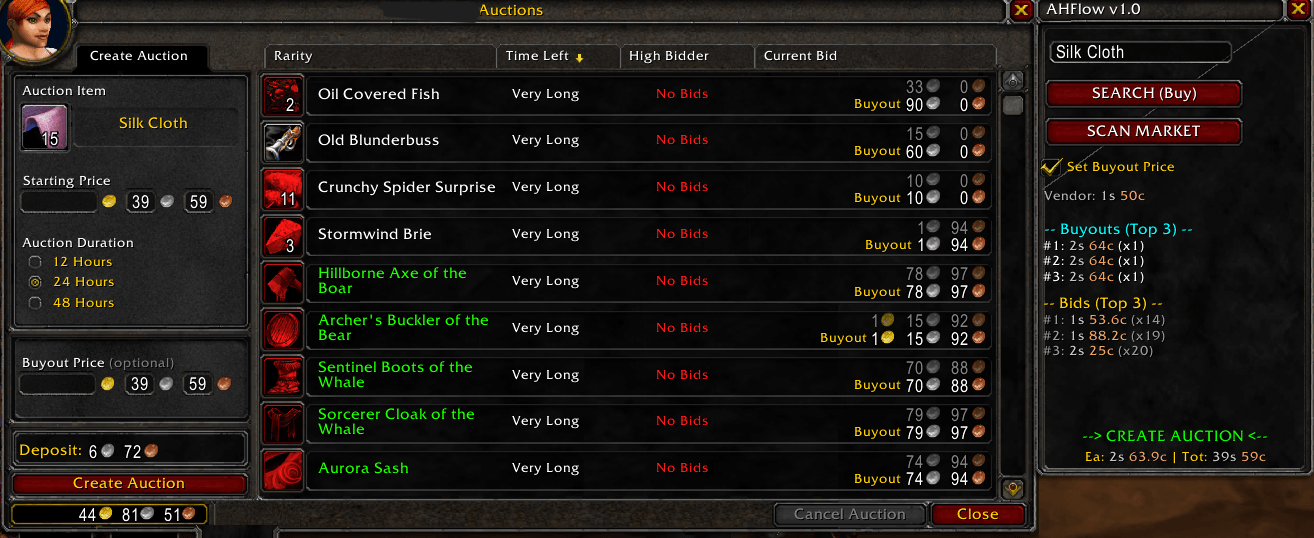
Capture3.PNG
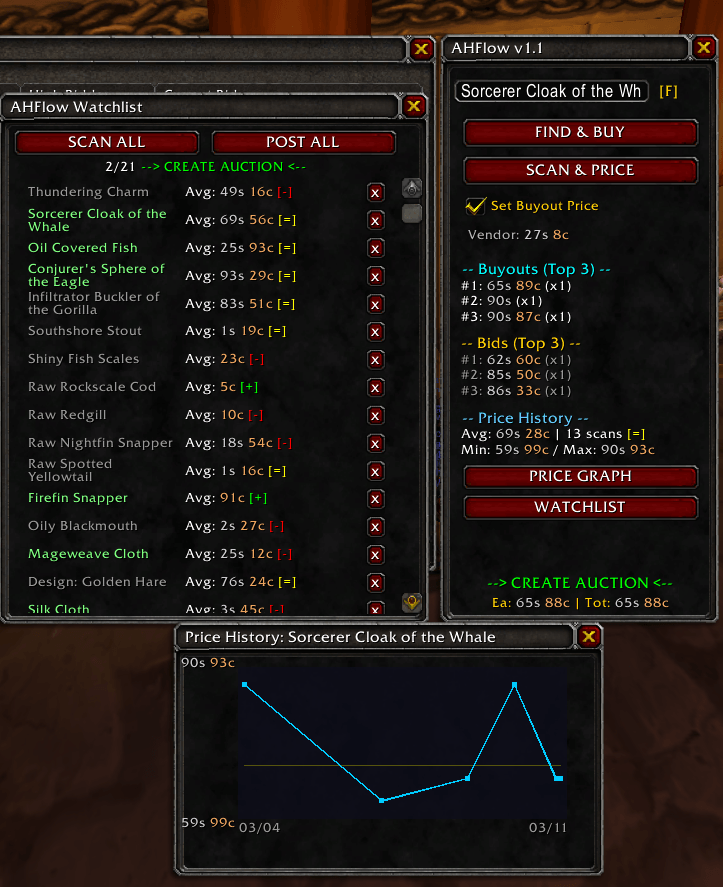
9.PNG
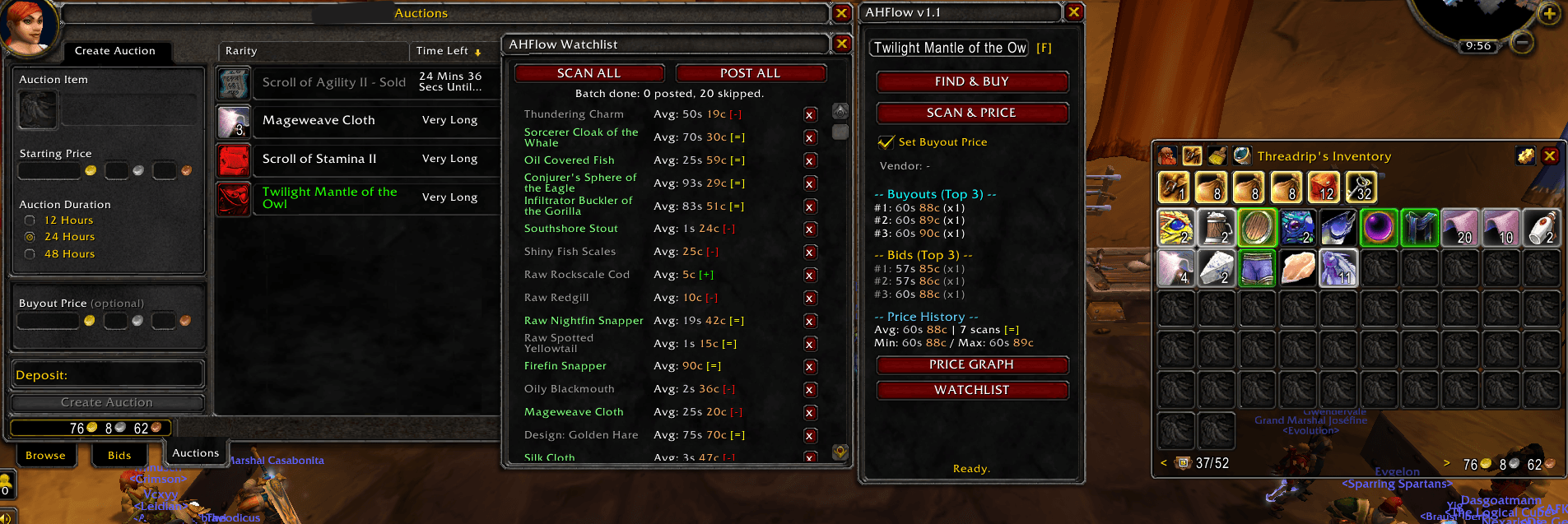
2.PNG
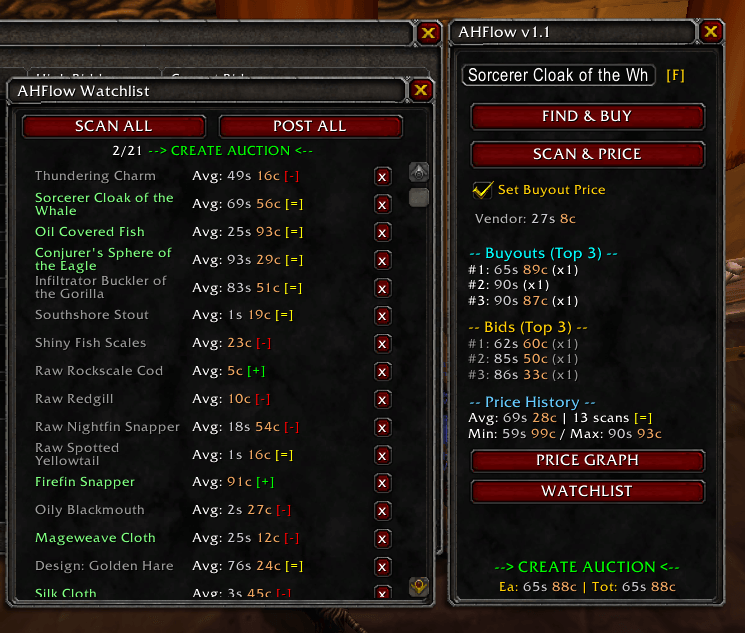
8.PNG
Description
AHFlow 💰

🇬🇧 English
AHFlow is a lightweight auction house tool for power sellers in World of Warcraft. It is designed to drastically speed up your selling workflow and completely eliminate annoying Blizzard UI bugs (like the notorious "Internal Auction Error") through intelligent, dynamic server queries.
✨ Features
- Smart Market Scan: Automatically scans multiple auction house pages and intelligently filters for the top 3 buyout prices and bids. Uses
exactMatchserver-side filtering for fast, accurate results. - Lightning Fast Price Cache: Perfect for bulk items (e.g., cloth, ores, herbs)! The addon remembers prices for an adjustable time (TTL) and applies them to your next stack in milliseconds without querying the server again.
- Dynamic API Traffic Light: Protects you from the "Internal Auction Error". The addon monitors the hidden server throttle (
CanSendAuctionQuery) in real-time and uses color coding to show you exactly when the server is ready to post the auction (Yellow = Waiting, Green = Ready). - Vendor Price Integration: Instantly displays the vendor sell price so you never accidentally post items below their vendor value.
- Intelligent Pricing: Automated undercutting of the lowest buyout. If there are only bids available, the addon automatically calculates a reasonable starting price (+10% of the 3rd bid).
- Find & Buy: Search the auction house for the cheapest listings of any item. The cheapest result is auto-selected and ready to purchase.
- Price History & Graph: Every scan is recorded persistently. View average, min, max prices and trend indicators (UP/DOWN) directly in the AHFlow panel. Open the interactive price graph to visualize price movements over time.
- Tooltip Integration: Hover over any item in your bags or the auction house to see AHFlow's historical price data directly in the tooltip.
- Watchlist: Star your frequently traded items to build a personal watchlist. Use Scan All to update prices for every watchlist item in one go — all results are saved to price history.
- Batch Posting: Click Post All in the watchlist to start a semi-automatic posting session. AHFlow finds each item in your bags, places it in the sell slot, scans for the best undercut price, and sets everything up. You just click Blizzard's "Create Auction" button — the next item loads automatically.
- Right-Click to Watchlist: While the watchlist is open, right-click any item in your bags to instantly add it. (Can be toggled in settings.)
🚀 Installation
- Download the latest version of AHFlow.
- Extract the ZIP archive.
- Copy the
AHFlowfolder into your WoW directory:\_classic_\Interface\AddOns\(or the respective folder for your WoW version). - Restart World of Warcraft or reload your user interface by typing
/reload.
🛠️ Usage
Selling Workflow
- Open the Auction House.
- Place an item into the auction slot (or enable Auto-Scan and
Shift + Left-Clickan item in your bags). - AHFlow scans the market, undercuts the lowest price, and fills in your auction fields.
- Watch the Traffic Light at the bottom of the AHFlow window:
Waiting for Server...(Yellow) → The backend is still processing.--> CREATE AUCTION <--(Green) → The server is ready!
- Click the Blizzard "Create Auction" button. Done!
Buying Workflow
- Type an item name into the AHFlow input box.
- Click Find & Buy — AHFlow searches the auction house and auto-selects the cheapest listing.
- Click Blizzard's "Buyout" button to purchase.
Batch Posting (Power Seller)
- Add your regularly traded items to the Watchlist using the star button or right-clicking bag items.
- Click Scan All to update all prices at once.
- Click Post All to start the batch session:
- AHFlow automatically finds, places, scans, and prices each item.
- Click Blizzard's "Create Auction" for each prepared item.
- The next item loads automatically after each post.
- Click Post All again at any time to abort.
⚙️ Settings
The addon features its own configuration menu under Interface -> AddOns -> AHFlow:
- Success Sound: Play an acoustic notification when a price is found and set.
- Auto-Scan on Drop: Automatically start scanning as soon as an item is placed in the auction slot.
- Show History in Tooltips: Display price history data in item tooltips.
- Price Cache Duration (1–60 min): How long the addon remembers prices for bulk items before re-scanning.
- Price History Retention (1–30 days): How many days of price data to keep.
- Right-Click to Watchlist: Toggle whether right-clicking bag items adds them to the watchlist.
- Auction Duration: Default auction length for batch posting (2h / 8h / 24h).
📋 Changelog
v1.1 — Watchlist, Batch Posting & Price History
- Watchlist & Favorites: Star items to build a personal watchlist. Scan All updates every item's prices in sequence.
- Batch Posting: Semi-automatic posting of all watchlist items in your bags. AHFlow handles scanning and pricing — you confirm each post with one click.
- Price History Database: Every scan is now recorded persistently. View avg/min/max prices and trend direction per item.
- Price Graph: Interactive line chart showing price movements over time with average reference line.
- Tooltip Prices: Historical price data appears directly in item tooltips.
- Find & Buy: Dedicated buy mode that searches the AH and auto-selects the cheapest result.
- Right-Click Favorites: Right-click bag items to quickly add them to the watchlist (toggleable).
- Exact Match Optimization: SELL scans use server-side exact name filtering for significantly faster results.
- UI Polish: Consistent layout, relabeled buttons (Find & Buy / Scan & Price), version indicator.
v1.0 — Initial Release
- Smart market scan with top 3 buyout/bid display.
- Price cache with adjustable TTL.
- Dynamic server-ready traffic light.
- Vendor price display.
- Intelligent undercutting.
📄 License
This project is licensed under the MIT License. See the LICENSE file for details.
🇩🇪 Deutsch
AHFlow ist ein leichtgewichtiges Auktionshaus-Tool für Power-Seller in World of Warcraft. Es wurde entwickelt, um den Verkaufs-Workflow extrem zu beschleunigen und nervige Blizzard-UI-Fehler (wie den "Internal Auction Error") durch intelligente Server-Abfragen komplett zu eliminieren.
✨ Features
- Smart Market Scan: Scannt automatisch mehrere Auktionshaus-Seiten und filtert intelligent nach den Top 3 Sofortkauf-Preisen und Geboten. Nutzt serverseitiges
exactMatch-Filtering für schnelle, präzise Ergebnisse. - Lightning Fast Price Cache: Perfekt für Bulk-Items (z.B. Stoffe, Erze, Kräuter)! Das Addon merkt sich die Preise für eine einstellbare Zeit (TTL) und trägt sie beim nächsten Stack in Millisekunden ein, ohne den Server neu anzufragen.
- Dynamic API Traffic Light (Die Smarte Ampel): Verhindert den berüchtigten "Internal Auction Error". Das Addon überwacht die versteckte Server-Drosselung (
CanSendAuctionQuery) in Echtzeit und zeigt dir farblich an, wann der Server wirklich bereit für die Auktionserstellung ist (Gelb = Warten, Grün = Klickbar). - Vendor Price Integration: Zeigt sofort den Händlerpreis an, damit du Items nie wieder versehentlich unter Wert ins Auktionshaus stellst.
- Intelligente Preisfindung: Automatisiertes Unterbieten des günstigsten Sofortkaufs. Gibt es nur Gebote, berechnet das Addon automatisch einen sinnvollen Startpreis (+10% auf das 3. Gebot).
- Finden & Kaufen: Durchsuche das Auktionshaus nach den günstigsten Angeboten eines Items. Das günstigste Ergebnis wird automatisch ausgewählt.
- Preisverlauf & Graph: Jeder Scan wird dauerhaft gespeichert. Sieh dir Durchschnitt, Min, Max und Trend-Indikatoren (UP/DOWN) direkt im AHFlow-Panel an. Öffne den interaktiven Preisgraphen für eine visuelle Preisentwicklung.
- Tooltip-Integration: Fahre über ein Item in deinen Taschen oder im Auktionshaus, um AHFlows historische Preisdaten direkt im Tooltip zu sehen.
- Watchlist: Markiere deine meistgehandelten Items mit dem Stern für eine persönliche Watchlist. Nutze Alle Scannen, um alle Preise auf einmal zu aktualisieren — alle Ergebnisse werden im Preisverlauf gespeichert.
- Batch Posting: Klicke Alle Posten in der Watchlist für eine halbautomatische Posting-Session. AHFlow findet jedes Item in deinen Taschen, platziert es im Verkaufsslot, scannt den besten Unterbietungspreis und richtet alles ein. Du klickst nur noch Blizzards "Auktion erstellen" — das nächste Item lädt automatisch.
- Rechtsklick zur Watchlist: Bei geöffneter Watchlist kannst du Items per Rechtsklick aus deinen Taschen hinzufügen. (In den Einstellungen umschaltbar.)
🚀 Installation
- Lade die neueste Version von AHFlow herunter.
- Entpacke das ZIP-Archiv.
- Kopiere den Ordner
AHFlowin dein WoW-Verzeichnis:\_classic_\Interface\AddOns\(oder den entsprechenden Ordner deiner WoW-Version). - Starte World of Warcraft neu oder lade das Interface mit
/reloadneu.
🛠️ Benutzung
Verkaufs-Workflow
- Öffne das Auktionshaus.
- Lege ein Item in den Auktions-Slot (oder aktiviere Auto-Scan und klicke mit
Shift + Linksauf ein Item im Rucksack). - AHFlow scannt den Markt, unterbietet den günstigsten Preis und füllt deine Auktionsfelder aus.
- Beobachte die Status-Ampel unten im AHFlow-Fenster:
Warte auf Server...(Gelb) → Das Backend rechnet noch.--> AUKTION ERSTELLEN <--(Grün) → Der Server ist bereit!
- Klicke auf Blizzards "Auktion erstellen"-Button. Fertig!
Kauf-Workflow
- Gib einen Item-Namen in das AHFlow-Eingabefeld ein.
- Klicke Finden & Kaufen — AHFlow durchsucht das Auktionshaus und wählt das günstigste Angebot aus.
- Klicke Blizzards "Sofortkauf"-Button zum Kaufen.
Batch Posting (Power Seller)
- Füge deine regelmäßig gehandelten Items über den Stern oder Rechtsklick zur Watchlist hinzu.
- Klicke Alle Scannen, um alle Preise auf einmal zu aktualisieren.
- Klicke Alle Posten, um die Batch-Session zu starten:
- AHFlow findet, platziert, scannt und bepreist jedes Item automatisch.
- Klicke Blizzards "Auktion erstellen" für jedes vorbereitete Item.
- Das nächste Item lädt automatisch nach jedem Post.
- Klicke jederzeit erneut Alle Posten, um abzubrechen.
⚙️ Einstellungen
Das Addon bietet ein eigenes Konfigurationsmenü unter Interface -> AddOns -> AHFlow:
- Erfolgs-Sound: Ein akustisches Feedback, wenn ein Preis gefunden und eingetragen wurde.
- Auto-Scan beim Reinlegen: Startet den Scan sofort, wenn ein Item in den Slot gelegt wird.
- Preisverlauf in Tooltips: Zeigt historische Preisdaten in Item-Tooltips an.
- Preis-Cache Dauer (1–60 Min): Wie lange sich das Addon Preise merkt, bevor neu gescannt wird.
- Preisverlauf Speicherdauer (1–30 Tage): Wie viele Tage an Preisdaten aufbewahrt werden.
- Rechtsklick zur Watchlist: Schaltet um, ob Rechtsklick auf Taschenitems diese zur Watchlist hinzufügt.
- Auktionsdauer: Standard-Auktionslänge für Batch Posting (2h / 8h / 24h).
📋 Changelog
v1.1 — Watchlist, Batch Posting & Preisverlauf
- Watchlist & Favoriten: Items markieren für eine persönliche Watchlist. Alle Scannen aktualisiert alle Preise nacheinander.
- Batch Posting: Halbautomatisches Posten aller Watchlist-Items. AHFlow übernimmt Scannen und Bepreisung — du bestätigst jeden Post mit einem Klick.
- Preisverlauf-Datenbank: Jeder Scan wird dauerhaft gespeichert. Durchschnitt/Min/Max und Trendrichtung pro Item.
- Preisgraph: Interaktives Liniendiagramm mit Preisentwicklung und Durchschnitts-Referenzlinie.
- Tooltip-Preise: Historische Preisdaten erscheinen direkt in Item-Tooltips.
- Finden & Kaufen: Dedizierter Kauf-Modus mit AH-Suche und Auto-Auswahl des günstigsten Ergebnisses.
- Rechtsklick-Favoriten: Rechtsklick auf Taschenitems zum schnellen Hinzufügen zur Watchlist (umschaltbar).
- Exact Match Optimierung: SELL-Scans nutzen serverseitiges exaktes Namensfiltering für deutlich schnellere Ergebnisse.
- UI-Polish: Konsistentes Layout, umbenannte Buttons (Finden & Kaufen / Scannen & Preisen), Versionsanzeige.
v1.0 — Erstveröffentlichung
- Smart Market Scan mit Top 3 Sofortkauf/Gebote-Anzeige.
- Preis-Cache mit einstellbarem TTL.
- Dynamische Server-Bereitschafts-Ampel.
- Händlerpreis-Anzeige.
- Intelligentes Unterbieten.
📄 Lizenz
Dieses Projekt ist unter der MIT License lizenziert. Weitere Details findest du in der LICENSE Datei.
AHFlow Team
