AEGIS: Pathfinder (Forever)
- By
Leveling guide for WoW: Forever. Collects quest and XP data while you play, to write its guides from. Quest automation and a Blizzard skin included.
Description
Aegis: Pathfinder — Forever
The Pathfinder leveling guide, ported to WoW: Forever. No guides yet, so for now it collects the data to write them.



Built for WoW: Forever (client 1.60.1, interface 16001), which runs the modern engine. This is a port of Aegis: Pathfinder for Turtle WoW (1.12), not that addon: the two clients share almost no API. On Turtle WoW? Get Aegis: Pathfinder instead.
⚠️ In development. No guides yet. What works now: the guide window, the guide browser, the settings, quest and vendor automation, and the data collector.
What it is right now
The Pathfinder look, on Forever. The guide window, the ≡ menu, the guide browser, the options window and the minimap button are the Turtle WoW addon's, panel for panel: same layout, same fonts, same colour themes: Pathfinder Day, Night, Green (the original), Purple, Grey, Tan and Red.
Default: Blizzard's own look. One more theme, Default, draws the same windows the way today's game draws its own Options window: the smooth metal frame over a solid dark background, the red close button, Blizzard's red buttons, slim check boxes, sliders, scroll bars and drop-downs, gold Friz Quadrata labels and the game's tooltip. Pick it under Settings → Appearance → Theme. Switching to or from it reloads the interface.
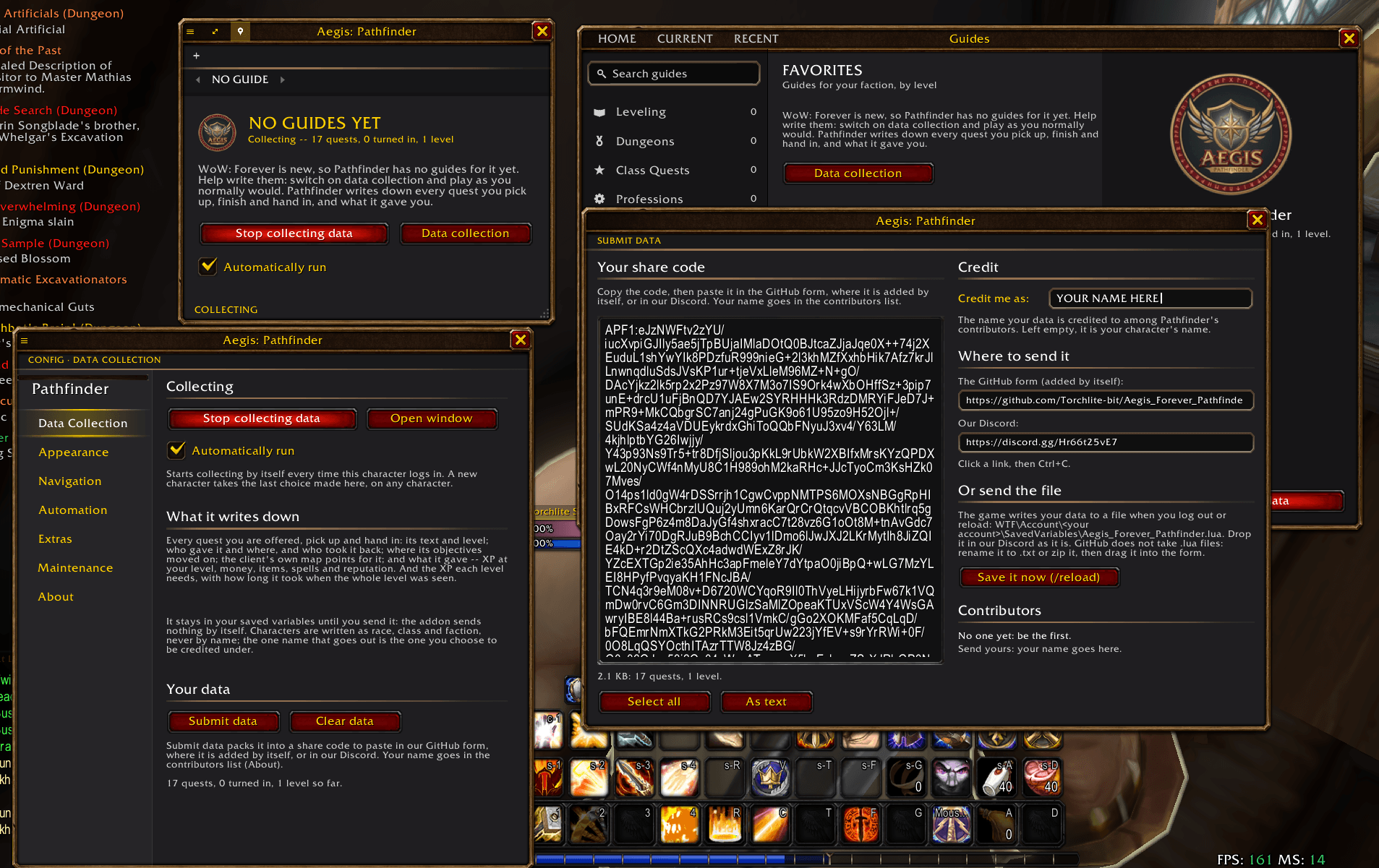
No guides yet. WoW: Forever is new, so the guide window says so and offers to start collecting data instead. The engine that follows guides is there and waiting.
The data collector
Switch it on and play normally. Pathfinder writes down:
- The XP each level needs, and how long each level took
- Every quest you're offered, pick up and hand in:
- its text, level and objectives
- who gave it and where: NPC, object or item, the map, x/y, and your level
- where its objectives moved on (where you stood as the count went up)
- the client's own map pins for it
- who took it back and where
- what it gave: XP at your level, money, the items to choose from and the ones given (and which one your class picked), spells, currencies and reputation
- which quest led to it
Repeat sightings are merged: counts add up, and the lowest and highest XP, money and coordinates are kept. Each record is stamped with the client build and the race, class and faction that saw it, never your character's name or realm. Nothing is sent by itself: it stays in your saved variables until you press Submit data, and the one name in what you send is the one you're credited under.
The data collection window (the ● chip on the guide window, shift-click the minimap button, or /apg collect):
- Start / Stop collecting data
- Automatically run: starts collecting at every login on this character, and new characters take the last choice you made (the guide window has this box too)
- What it has so far, and the last things it wrote down
- Submit data and Clear data
Sending us your data
Addons can't reach the internet, so the game can't send it for you, but it takes two keystrokes. Submit data (or /apg submit) opens a window with:
- A share code: everything you collected, compressed into one line and already selected. Press Ctrl+C.
- Where to paste it:
- The GitHub form: paste the code and press Submit. A bot files it, credits you and answers on the issue.
- Our Discord: paste it there. A long paste turns into a text file, and that's fine.
- Credit me as: the name you're listed under. Left empty, the code uses your character's name; the file carries a name only if you type one before saving it.
- Or the file, for very large collections:
WTF/Account/YOUR_ACCOUNT/SavedVariables/Aegis_Forever_Pathfinder.lua(the window's Save it now button writes it). Drop it in Discord, or rename it to.txt(or zip it) and drag it into the GitHub form.
Send again whenever you like, without clearing: a newer copy of a collection replaces the older one instead of counting twice. As text shows exactly what goes out. Everyone who sends data is listed in the contributors list, and in the game's Submit window and About page from the next update on.
Also working without guides
- Quest automation: accepts and hands in quests, on by default as in the Turtle addon, and picks them from an NPC's list. Never a grey quest, never a reward choice. Hold Shift to skip one.
- At the vendor (switch it on under Settings → Automation): sells greys with the game's own Sell All Junk, and repairs, with your own money or the guild's first. Where a vendor has no Sell All Junk, a Sell greys button does it.
- Reputation detail: "Stormwind +25: Honored 4,350 / 12,000, 7,650 to Revered"
- Level-ups: tell everyone nearby, your party or your guild with one click, and how long the level took when the data collector saw all of it
- Window settings: lock, transparency, opacity, step text size, window scale, hiding in dungeons or combat
Automation is set per character, under Settings → Automation.
Install
Use the CurseForge app, or download the file and unzip it into World of Warcraft/_classic_beta_/Interface/AddOns/, keeping the folder named exactly Aegis_Forever_Pathfinder. Restart the game fully the first time: a /reload isn't enough for new files.
Commands
| Command | |
|---|---|
/apg (or /pathfinder) |
Show or hide the guide window |
/apg collect |
The data collection window |
/apg start, /apg stop |
Start or stop collecting |
/apg status |
What has been collected so far |
/apg submit |
The Submit data window |
/apg config |
Settings |
/apg browser |
The guide browser |
/apg resetpanels |
Put every window back where it opens |
/apg minimapbutton |
Show or hide the minimap button |
Minimap button: click for the guide, right-click for settings, shift-click for data collection, drag to move it. Both windows have key bindings under Key Bindings → AddOns, and the game's Options → AddOns has a page that opens the settings.
Help and feedback
Bugs, ideas and chat on our Discord. Source code, the changelog and the data form on GitHub.
Credits
A port of Aegis: Pathfinder, which descends from TourGuide (Tekkub), VanillaGuide (isalcedo) and VanillaGuide-Plus (NostalgiaGeek, Brues). Fonts: Rajdhani and Inter (SIL Open Font License). Not made or endorsed by Blizzard Entertainment.
AEGIS: Pathfinder (Forever) Team