AHOS - Advanced Hotkey Overlay System
- By
This module provides the Advanced Hotkey Overlay System for World of Warcraft action bars.
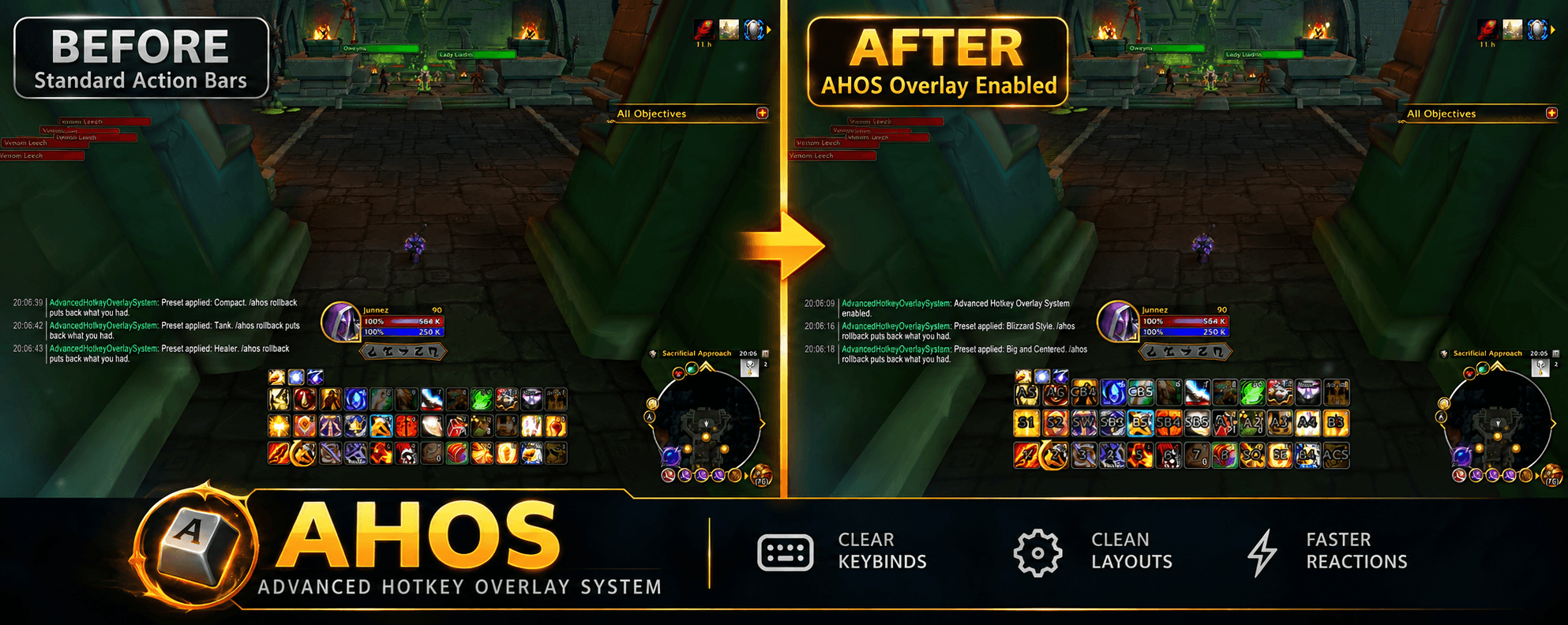
AHOS Before and After Overlay.png
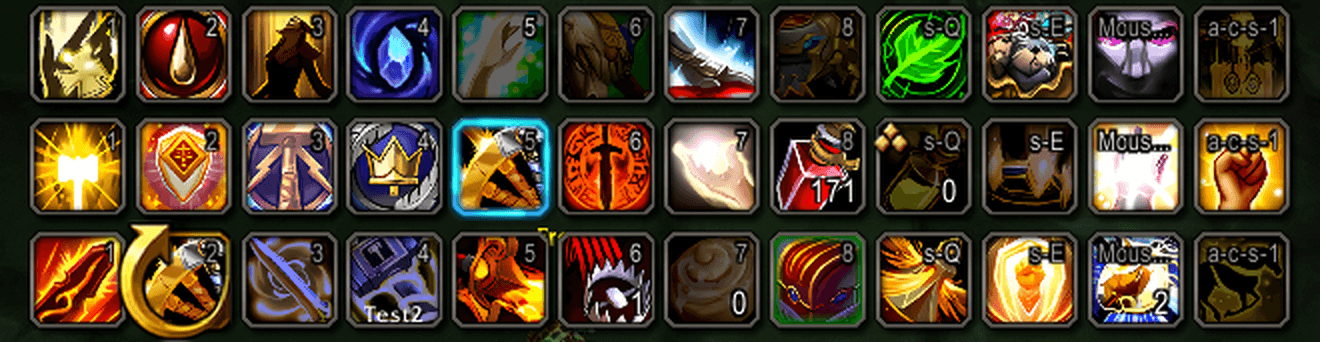
01-before.png

02-colour-by-modifier.png
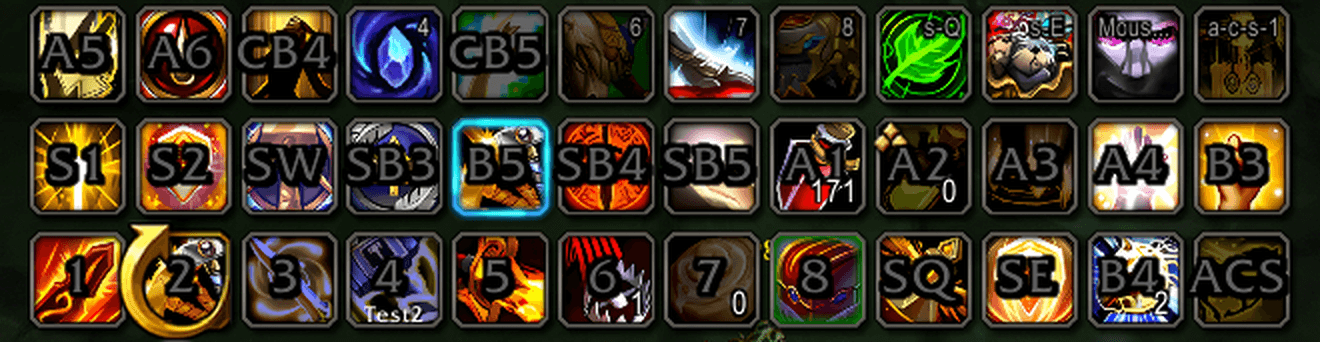
03-big-and-centered.png
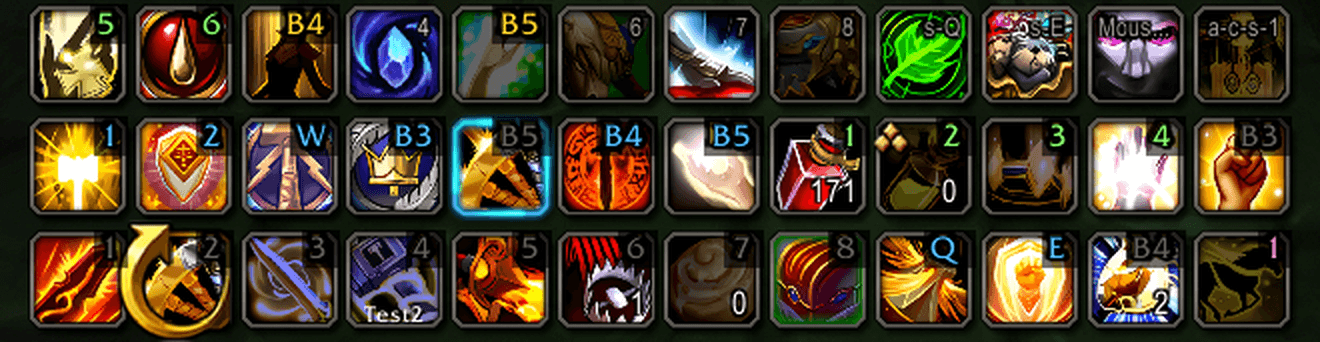
04-healer.png
Description
Advanced Hotkey Overlay System
Readable, styled hotkey text on every action bar, with a keyboard you can see, visibility rules, and drag-and-drop placement.
What does this addon do?
The game's hotkey text is small, white and cut short: "s-Q", "a-c-s-1", "Mous…". AHOS replaces it with text you style yourself: font, size, colour, outline, shadow, glow, a plate behind it, and where it sits on the button. Shift, Ctrl and Alt can each have their own colour, so you read a bind at a glance.
It works on the default Blizzard bars and on AzeriteUI, Bartender4, Dominos, DiabolicUI, LUI and Neuron, and runs on Retail, WoW Forever and Classic.
New in 3.0
- A new options window with a page rail, a search box across every setting, and one-click revert on anything you changed. Your real bars light up when you change a setting.
- See your binds on a keyboard. The Abbreviations page is a full keyboard and mouse. Keys you have bound light up, and Shift, Ctrl and Alt show their layer. Click a key to set its abbreviation, or to bind and unbind it right there.
- Controller support for Xbox, PlayStation, Nintendo Switch Pro, Steam Deck and Steam Controller, each drawn as the pad you have. Gamepad buttons show as their real button icons on your bars.
- Visibility rules: fade the text out of combat, show it only on mouseover per bar or while a modifier is held, or write a Lua condition of your own.
- /ahos edit: drag the hotkey text into place on your own bars. Shift-drag moves a single bar.
- Presets and templates: Blizzard Style, Big and Centered, Bottom Corner, Compact, plus Tank, Healer and Damage. Snapshots are taken automatically, and /ahos rollback takes you back.
- Inspector: point at any action button to see which bar addon drew it, the key that presses it, and why AHOS shows the text it does.
Recent Updates (v3.0.1)
- Empty buttons on Blizzard's extra bars no longer show the main bar's key for their number.
- Buttons with no key show nothing, not the game's range dot. The new Hide the Range Dot setting hides it even while AHOS is turned off.
- Key presses on Blizzard's bars flash and pulse the text, and Pulse uses your press colour too.
- The controllers on the Controller tab are redrawn to follow the real controllers.
Supported bar addons
- Blizzard: main bar, the bottom, side and extra bars (5-7), pet, stance and possess bars
- AzeriteUI: action bars 1-8, pet and stance bars
- Bartender4: every action bar, pet and stance bars
- Dominos: every action bar, also past the usual 200 buttons
- DiabolicUI: action bars, small bars, pet and stance bars
- LUI: bottom and side bars
- Neuron: action and pet bars, including the keys Neuron keeps on its buttons
- ElvUI: AHOS steps aside and warns you, since ElvUI draws its own hotkeys
The Status page in the options window shows which bar addons AHOS found and how many buttons it draws on.
Features
Looks
- Font, size, colour, outline, shadow colour and offset, and glow
- A background plate behind the text
- Colour by modifier: Shift, Ctrl and Alt bindings each get their own colour
- A combat style, and a flash or pulse in a colour of your choice when you press a button
- Mouse button icons, and both keys on a button bound to two
- Follow Masque Skin: the text goes where your Masque skin puts the hotkey
- Buttons with no key show nothing, not the game's range dot
Placement
- Anchor on a 3x3 grid, with X and Y offsets
- Per bar: text size, show on mouseover, and a position of its own
- Drag and drop on your real bars with /ahos edit
- Leave a whole bar, or a single button, to its own hotkey text
Abbreviations
- Every key can have its own abbreviation
- Keyboard layouts: English (US and UK), Danish, Norwegian, Swedish/Finnish, German, French, Russian, Ukrainian, Korean and Taiwanese
- Cyrillic, Korean and Chinese key names are drawn in the game's own fonts on any client
Controllers
- Xbox, PlayStation, Nintendo Switch Pro, Steam Deck and Steam Controller, picked automatically from the controller you use
- Gamepad buttons drawn as the controller's own button icons on your bars
Profiles
- Per-character and shared profiles, with import and export
- Presets, templates and snapshots you can roll back to
- Switch profile by specialization or talent loadout
- /ahos profile NAME switches profile, making it if it does not exist yet
Languages
The options window is in English, German, Spanish, French, Portuguese, Russian, Korean and Chinese (Simplified and Traditional).
Slash Commands
- /ahos opens the options window
- /ahos edit drags the text into place on your bars
- /ahos preset applies a preset or template
- /ahos profile NAME and /ahos profiles switch and list profiles
- /ahos snapshot and /ahos rollback save and restore a copy of your profile
- /ahos ignore ButtonName leaves one button to its own hotkey text
- /ahos inspect shows how AHOS reads a button
- /ahos toggle turns the overlays on and off
- /ahos lock and /ahos unlock lock the settings
- /ahos reset resets the profile
- /ahos help lists every command
FAQ
Does it work in combat?
Yes. AHOS only draws text on top of your buttons; it never touches what they do, so nothing is blocked in combat. Edit mode is the one exception: it does not start in combat, and it ends when combat starts.
Can I go back to how it looked before?
Every preset, import and reset takes a snapshot first. /ahos rollback puts it back, and /ahos toggle turns AHOS off and gives the buttons their own text.
A button shows the wrong text, or none.
Open the Inspector page, click Pick a Button and point at it. It tells you the bar, the key and why AHOS shows what it does. Copy Details puts it all in a box you can paste into a bug report.
Overlays not showing?
Check that AHOS is on with /ahos toggle, run /ahos refresh to find your bars again, and look at the Status page. If the wrong UI was detected, run /ahos detectui.
Requirements
- World of Warcraft Retail, WoW Forever or Classic (current patches)
- All libraries are included
Support
- Bugs and ideas: GitHub issues
- Support the work: Ko-fi or Patreon
Readable hotkeys that fit your UI, on any bar addon.
AHOS - Advanced Hotkey Overlay System Team