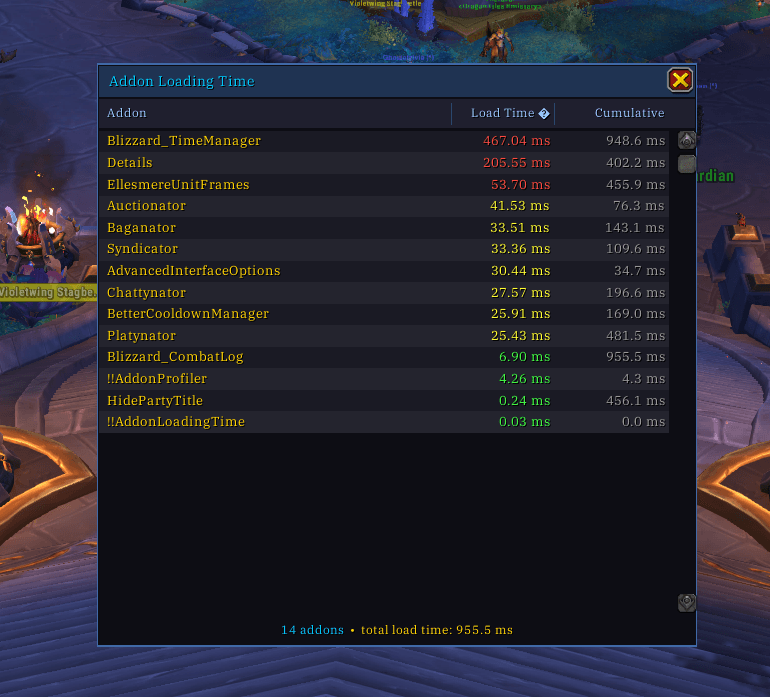
The whole UI
Description
AddonLoadingTime
A simple tool to see how much time each of your addons takes to load.
How it works
When you log in, the UI will automatically pop up with the results.
Just disable the addon once you are done profiling.
The addon folder is named !!AddonLoadingTime so that the game loads it first. This allows it to track the loading time of every other addon that follows.
Usage
- Sort: Click the column headers to sort by:
- Load Time: How long that specific addon took to load.
- Cumulative: The total time elapsed from the start of the game loading process until that addon finished. (e.g., if an addon shows 500ms, it finished half a second after you started loading).
- Colors: Red is > 50ms, yellow is > 10ms, and green is anything less.
- Toggle UI: Use
/altor/addonloadingtimeto show or hide the window.
Installation
- Put the
!!AddonLoadingTimefolder into yourWorld of Warcraft/_retail_/Interface/AddOns/directory. - Restart the game or reload your UI.
The AddonLoadingTime Team