Addon Profiles
- By
A World of Warcraft Classic addon that allows you to save and manage profiles of your addon configurations. Perfect for players who use different addons for different activities (leveling, raiding, PvP, etc.).
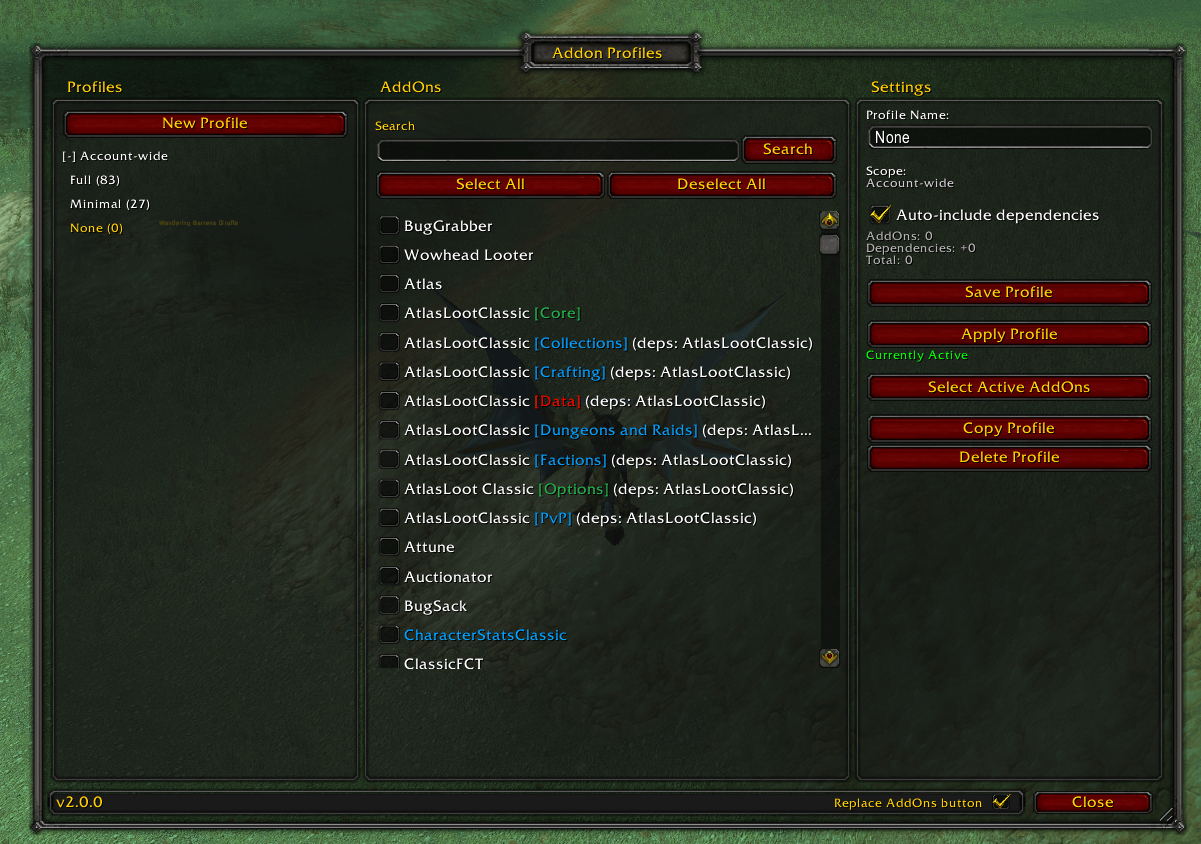
Screenshot 2025-10-24 224321.png
Description
AddonProfiles
A World of Warcraft Classic addon that allows you to save and manage profiles of your addon configurations. Perfect for players who use different addons for different activities (leveling, raiding, PvP, etc.).
Version 2.0.0 - Complete rewrite with UI support!
Features
- Profile Management: Create multiple profiles for different gameplay scenarios
- UI Interface: Full graphical interface for managing profiles and selecting addons
- Dependency Tracking: Automatically include addon dependencies (configurable per-profile)
- Scope Options: Create profiles that are account-wide or character-specific
- Migration Support: Automatically migrates from v1.x profile format
- Slash Commands: Full command-line interface for power users
Requirements
- World of Warcraft Classic: 20th Anniversary Edition (1.15.7)
- Ace3 library (included)
Installation
- Visit the GitHub releases page
- Download the latest release
- Extract the downloaded zip file
- Copy the
AddonProfilesfolder to your WoWInterface/AddOns/directory - Restart WoW or reload UI
Usage
UI Interface
Open the profile manager with:
/apor/addonprofilesor/addons- Game Menu > Interface > AddOns > AddonProfiles
The UI has three main sections:
Left Panel - Profile List
- View all profiles (filter by Character or Account scope)
- Create new profiles
- Delete existing profiles
- Active profiles are marked with a checkmark
Middle Panel - Addon Selection
- Check/uncheck addons to include in the selected profile
- Search for specific addons
- Filter to show only compatible addons
- Select All / Deselect All buttons for quick management
Right Panel - Profile Settings
- Rename profiles
- Toggle automatic dependency inclusion
- View addon and dependency counts
- Apply profile (activates and reloads UI)
- Capture current addon state
Slash Commands
/ap or /addonprofiles or /addons

Commands:
  /ap                           - Open UI (default)
  /ap show [profile]            - Show all profiles or specific profile details
  /ap load <profile>            - Activate a profile (reloads UI)
  /ap save <profile>            - Save current addon state to profile
  /ap new <profile> [account|char] - Create new profile
  /ap delete <profile>          - Delete a profile
  /ap help                      - Show help message
Examples
-- Create a new character-specific raiding profile
/ap new Raiding char

-- Create an account-wide leveling profile
/ap new Leveling account

-- Show all profiles
/ap show

-- Show details for a specific profile
/ap show Raiding

-- Save current addon configuration to a profile
/ap save Raiding

-- Load and activate a profile
/ap load Raiding

-- Delete a profile
/ap delete OldProfile
Profiles
Profile Scopes
Character-specific: Profiles that are unique to each character. Perfect for character-specific needs.
Account-wide: Profiles that are shared across all characters on your account. Great for common setups.
Profile Settings
Auto-include dependencies: When enabled, activating a profile will automatically enable all required dependencies for the selected addons. This is enabled by default for new profiles.
Addon selection: Manually select which addons to include in a profile. The UI shows dependency information for each addon.
Addon Profiles Team