capture_2.png
Description
이 안내문은 영문과 한글로 작성되었습니다.
ActionCam Helper
A World of Warcraft addon that provides convenient controls for ActionCam settings.
Features
- ✅ Toggle ActionCam on/off
- ✅ Status display via system messages
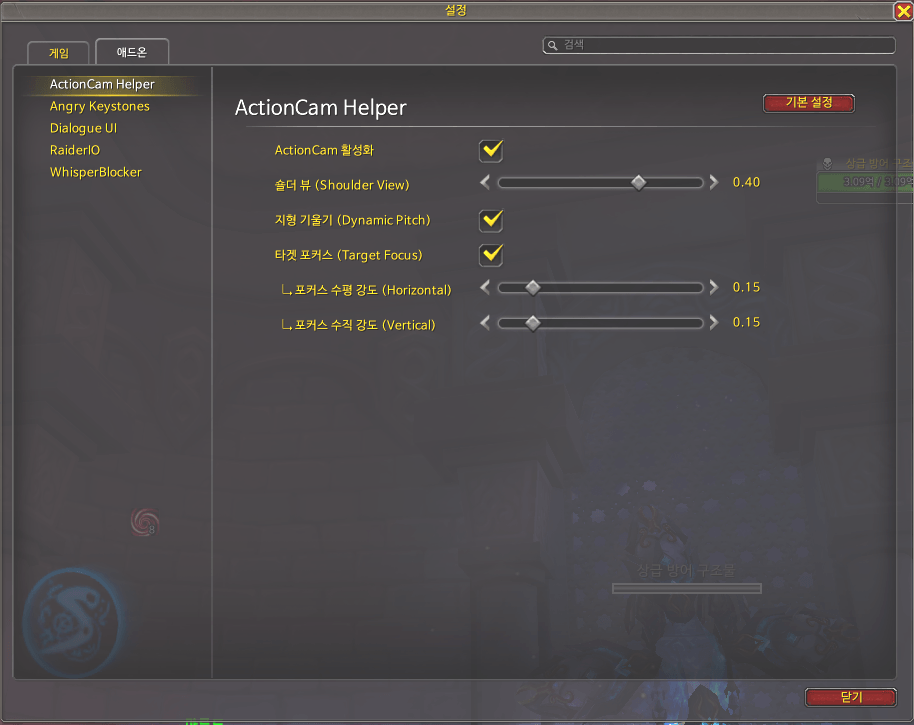
- ✅ Control 4 camera options
- Shoulder View - Slider
- Dynamic Pitch - Checkbox
- Target Focus - Checkbox
- Focus Horizontal Strength - Slider
- Focus Vertical Strength - Slider
- ✅ Automatic settings save
Installation
- Download or clone this repository
- Copy the
ActionCamHelperfolder toWorld of Warcraft\_retail_\Interface\AddOns\ - Restart WoW or type
/reload
Usage
To access settings:
- ESC → Settings → AddOns and select "ActionCam Helper"
- Or type
/actioncamor/acamin-game
🎮 Options Explained
1. Shoulder View
- Slider: -1.0 ~ 1.0
- Effect: Shifts camera position left/right
- Negative (-): Left shoulder view
- 0: Center
- Positive (+): Right shoulder view
- Default: 0.4 (slightly right)
2. Dynamic Pitch
- Checkbox: ON/OFF
- Effect: Camera automatically tilts on slopes and hills
- Default: ON
3. Target Focus
- Checkbox: ON/OFF
- Effect: Automatically focuses on enemies during combat
- Default: OFF
↳ Focus Horizontal Strength
- Slider: 0.0 ~ 1.0
- Effect: Camera rotation intensity left/right when targeting
- 0: No horizontal rotation
- 1: Maximum rotation
- Default: 1.0
- Only applies when Target Focus is enabled
↳ Focus Vertical Strength
- Slider: 0.0 ~ 1.0
- Effect: Camera tilt intensity up/down when targeting
- 0: No vertical tilt
- 1: Maximum tilt
- Default: 0.75
- Only applies when Target Focus is enabled
Requirements
- World of Warcraft Retail (The War Within 11.0. 2 or higher)
- Interface: 110002
Changelog
v1.4. 0 (2025-11-28)
- ❌ Removed Head Tracking Strength option (negligible effect)
- ✨ Added detailed Target Focus options
- Focus Horizontal Strength slider (0-1)
- Focus Vertical Strength slider (0-1)
- 🔧 Improved precision control of camera movement when targeting
ActionCam Helper
World of Warcraft 애드온으로 ActionCam 설정을 편리하게 조절할 수 있습니다.
기능
- ✅ ActionCam 켜기/끄기 토글
- ✅ 시스템 메시지로 상태 표시
- ✅ 4가지 카메라 옵션 조절
- 숄더 뷰 (Shoulder View) - 슬라이더
- 지형 기울기 (Dynamic Pitch) - 체크박스
- 타겟 포커스 (Target Focus) - 체크박스
- 포커스 수평 강도 - 슬라이더
- 포커스 수직 강도 - 슬라이더
- ✅ 설정 자동 저장
설치 방법
- 이 레포지토리를 다운로드하거나 클론합니다
ActionCamHelper폴더를World of Warcraft\_retail_\Interface\AddOns\경로에 복사합니다- WoW를 재시작하거나
/reload명령어를 입력합니다
사용 방법
설정에 접근하는 방법:
- ESC → 설정 → 애드온 메뉴에서 "ActionCam Helper" 선택
- 또는 게임 내에서
/actioncam또는/acam명령어 입력
🎮 옵션 설명
1. 숄더 뷰 (Shoulder View)
- 슬라이더: -1.0 ~ 1. 0
- 효과: 카메라 위치를 좌우로 이동
- 음수 (-): 왼쪽 어깨 뷰
- 0: 정중앙
- 양수 (+): 오른쪽 어깨 뷰
- 기본값: 0.4 (약간 오른쪽)
2. 지형 기울기 (Dynamic Pitch)
- 체크박스: ON/OFF
- 효과: 언덕이나 경사에서 카메라가 자동으로 기울어짐
- 기본값: ON
3. 타겟 포커스 (Target Focus)
- 체크박스: ON/OFF
- 효과: 전투 중 적을 자동으로 포커스
- 기본값: OFF
↳ 포커스 수평 강도 (Horizontal)
- 슬라이더: 0.0 ~ 1.0
- 효과: 적을 타겟했을 때 카메라가 좌우로 회전하는 강도
- 0: 좌우 회전 없음
- 1: 최대 회전
- 기본값: 1.0
- 타겟 포커스가 켜져있을 때만 적용됩니다
↳ 포커스 수직 강도 (Vertical)
- 슬라이더: 0.0 ~ 1.0
- 효과: 적을 타겟했을 때 카메라가 상하로 기울어지는 강도
- 0: 상하 기울임 없음
- 1: 최대 기울임
- 기본값: 0.75
- 타겟 포커스가 켜져있을 때만 적용됩니다
요구사항
- World of Warcraft Retail (The War Within 11. 0.2 이상)
- Interface: 110002
변경 이력
v1.4.0 (2025-11-28)
- ❌ 머리 움직임 강도 옵션 제거 (체감 효과가 미미함)
- ✨ 타겟 포커스 상세 옵션 추가
- 포커스 수평 강도 슬라이더 (0-1)
- 포커스 수직 강도 슬라이더 (0-1)
- 🔧 타겟을 잡았을 때 카메라 움직임을 더 세밀하게 조절 가능
The Actioncam Helper Team