ActionBarDoctor
- By
A quick action-bar check that finds missing, unavailable, hidden, and duplicate abilities before they catch you in combat.
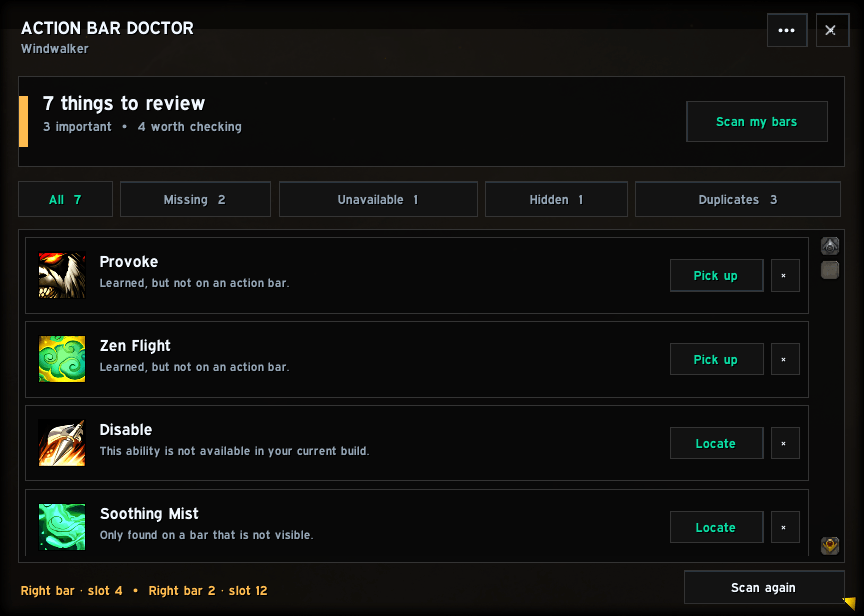
Bardoc1.png
Description
Action Bar Doctor
Changed talents, swapped specialization, copied an action-bar setup, or returned after a patch? Action Bar Doctor checks your bars and points out the easy-to-miss problems.
What it finds
-
Missing abilities — active abilities you know but have not placed on a bar.
-
Unavailable abilities — old buttons your current talent build no longer knows.
-
Hidden abilities — abilities found only on a disabled or inactive bar.
-
Duplicates — the same ability placed more than once, in case it was accidental.
Easy to use
Press Scan my bars and review the short results list. Each result gives you a simple next step:
-
Pick up puts a missing ability on your cursor so you can place it where you want.
-
Locate highlights the matching action-bar button or tells you where it is.
-
Ignore hides intentional results for that character and specialization.
Action Bar Doctor can scan again automatically after talent, specialization, or action-bar changes. It never casts abilities, rearranges your bars, or removes buttons on its own.
Interface
The window is compact, resizable, and designed to keep important information easy to read.
Action Bar Doctor works by itself and also supports EllesmereUI through its public skinning API, using the current EllesmereUI font and accent when third-party skins are enabled. EllesmereUI is not required or included.
Commands
-
/bardocor/abd— open or close the window. -
/bardoc scan— open the window and run a scan. -
/bardoc hide— hide the window.
Compatibility
-
World of Warcraft Retail
-
Interface support for 12.0.7 and 12.1.0
The ActionBarDoctor Team