Action Bar Button Growth Direction
- By
Reverse button growth direction (top/bottom, right/left) of any multi-row/column action bar.
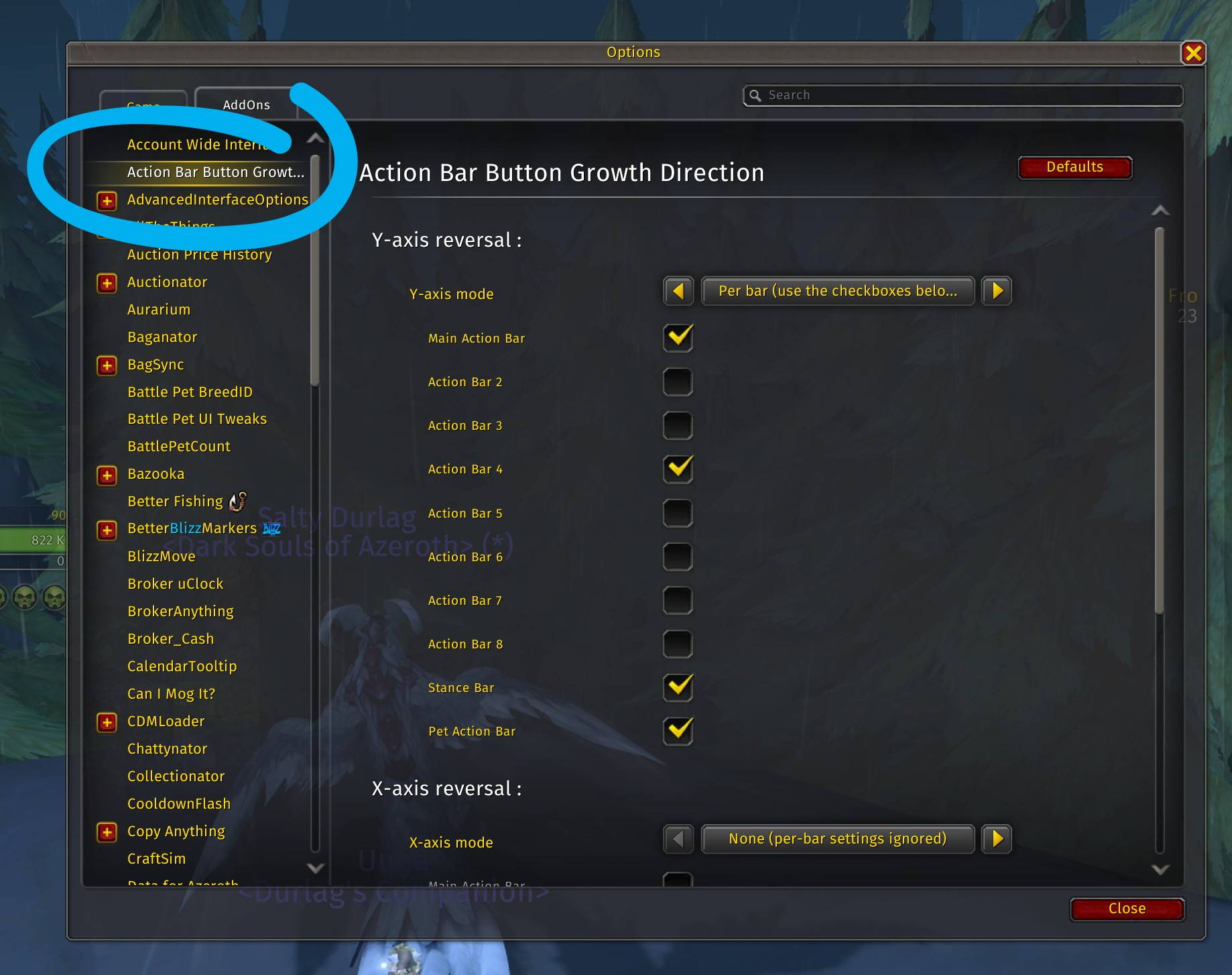
Select which bar(s) to reverse in the settings in the Options Panel.
Description
Action Bar Button Growth Direction
Summary
Reverse button growth direction (top/bottom, right/left) of any Blizzard action bar.
What it does
With Dragonflight, Blizzard changed the button growth direction for multi-row action bars. Formerly, it was ‘top to bottom’ (downwards), now it is ‘bottom to top’ (upwards).
I don’t know why they did this. For most action bars, this is not overly tragic, as you can adjust your spell mapping/keybinds accordingly. However, it can be a real problem with Action Bar 1 (Main Action Bar), which is used as Override and Vehicle UI bar, resulting in “wrong”, awkward keybinds in the Vehicle UI.
This addon allows you to reverse the button growth direction.
So if you were tempted to use a “biggie” addon like Dominos or Bartender just to get the button growth direction fixed, you might want to give ABBGD a try. It has no impact on your client performance: it only re-arranges the buttons when the bar layout can change (login, bar/page changes, Edit Mode, stance/pet changes), and never touches the bars in combat (a pending change is applied right after combat ends).
By default, only the Y-axis button growth direction of Action Bar 1 (Main Action Bar) is reversed (from ‘bottom to top’ to ‘top to bottom’); everything else remains unchanged.
If you’re having trouble reading this description on CurseForge, you might want to try switching to the Repo Page. You’ll find the exact same text there, but it’s much easier to read and free from CurseForge’s rendering errors.
A bit more in-depth
Let’s say you have an action bar with an horizontal orientation like this:
1 2 3 4 5 6 7 8 9 0 Q W
If you converted this bar to a 3-row bar before Dragonflight, you got ‘top to bottom’:
1 2 3 4
5 6 7 8
9 0 Q W
Since Dragonflight, you get ‘bottom to top’:
9 0 Q W
5 6 7 8
1 2 3 4
That’s where the addon comes in: it can revert the growth direction to the one before Dragonflight (‘top to bottom’). Or to whatever you like.
For the sake of completeness, I also added the ability to reverse the growth direction on the X-axis (horizontal), but since Blizz hasn’t screwed that up (it’s still ‘left to right’), I don’t think there’s much use for it, and the X-axis is completely untouched by default. But who knows, maybe they have ambitious plans to screw that up in the future.
Setup
Open the settings panel via Game Menu > Options > AddOns > Action Bar Button Growth Direction. There you can set the mode per axis (None / Per bar / All bars) and, in “Per bar” mode, choose the bars to reverse. Changes apply immediately, no reload needed; the panel’s “Defaults” button restores the default settings.
If you only want to reverse the Y (vertical) growth direction on Action Bar 1 (MainActionBar), which is the bar where the wrong growth direction causes key mis-mapping issues on the VehicleUI bar, then the default settings are fine for you.
Feel free to share your suggestions or report issues on the GitHub Issues page of the repository.
Please avoid posting suggestions or issues in the comments on Curseforge.
Addons by me:
- PetWalker: Never lose your pet again (…or randomly summon a new one).
- Auto Quest Tracker Mk III: Continuation of the one and only original. Up to date and tons of new features.
- Goyita: Your Black Market assistant. Know when BMAH auctions will end. Tracking, notifications, history, info.
- Move 'em All: Mass move items/stacks from your bags to wherever. Works also fine with most bag addons.
- Auto Discount Repair: Automatically repair your gear – where it’s cheap.
- Auto-Confirm Equip: Less (or no) confirmation prompts for BoE and BtW gear.
- Slip Frames: Unit frame transparency and click-through on demand – for Player, Pet, Target, and Focus frame.
- Action Bar Button Growth Direction: Fix the button growth direction of multi-row action bars to what is was before Dragonflight (top --> bottom).
- EditBox Font Improver: Better fonts and font size for the macro/script edit boxes of many addons, incl. Blizz’s. Comes with 70+ preinstalled monospaced fonts.
Action Bar Button Growth Direction Team

Owner