AccountClock
- By
ac1.png
Description
AccountClock — A Simple, Dedicated Playtime Dashboard
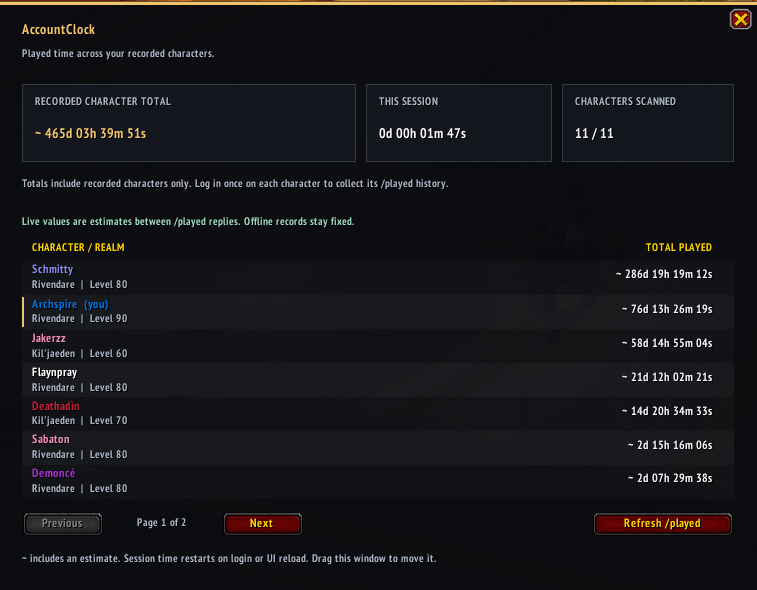
See your time in Azeroth at a glance. AccountClock is a lightweight addon focused on playtime, bringing your combined total, individual character totals, and current session timer into one clean window.
Easy to open, easy to read, and no additional addons required.
Your Playtime, Clearly Displayed
- Combined playtime: See the total across your recorded characters and realms.
- Character breakdown: View individual totals sorted by most played, with class-colored names, realms, and levels.
- Live session timer: Keep track of time since your latest login or UI reload.
- Lifetime history: Includes each character’s existing
/playedtime from before installing AccountClock. - Saved records: Keeps your recorded character totals between sessions.
- Simple controls: Move the window, refresh your current character’s total, and browse your characters with page buttons.
Getting Started
- Install AccountClock and enable it for your characters.
- Log in and wait a few seconds for your playtime to load.
- Type /accountclock or /aclock to open the dashboard.
- Log into each additional character once to add their existing history.
Keep the addon enabled while playing to keep your records current.
Commands
- /accountclock — Open or close the dashboard.
- /accountclock total — Print your combined total in your own chat.
- /accountclock refresh — Update the current character’s recorded playtime.
- /accountclock resetpos — Center the dashboard on your screen.
A Few Things to Know
Only characters visited with AccountClock enabled are included. Live estimates are marked with ~, and offline characters retain their last recorded totals. The session timer restarts on login or UI reload.
Records are saved locally for your WoW game account and do not automatically sync across computers, separate accounts, or Retail and Classic.
Designed for World of Warcraft Retail.
The AccountClock Team