Account UI Profiles
- By
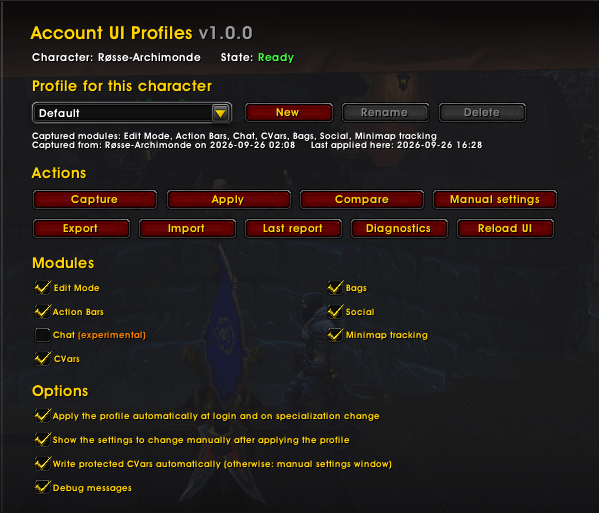
Capture your interface settings and sync them across your characters: Edit Mode, action bars, CVars, bags, social, minimap tracking, and chat.
AccountUIProfiles.png
Description
Account UI Profiles
Capture your interface settings once, apply them everywhere.
Account UI Profiles lets you capture a character's interface settings into a named profile, then apply that profile to any other character — Edit Mode layout, action bar visibility, dozens of CVars, bag options, social settings, minimap tracking, and (experimentally) chat windows.
No more manually re-doing the same settings on every alt.
How it works
Account UI Profiles never touches Blizzard's protected frames or internal
tables directly. It only writes through the same native APIs the in-game
Options panel itself uses (C_EditMode, SetActionBarToggles, C_CVar,
C_Container, C_Minimap, native chat setters…), then lets Blizzard's own
code read that data back and apply it. This keeps the addon safe from taint
and combat-lockdown issues, and every write is checked against what Blizzard
actually did — not just assumed to have worked.
What gets synced
- Edit Mode — your active account-wide layout, tracked per specialization
- Action Bars — visibility of bars 2–8, applied automatically at login
(no
/reloadneeded) - CVars — 250+ candidate settings from the in-game Options (raid/arena frames, combat assist, Cooldown Manager, Damage Meter, PvP diminishing returns, calendar filters, map filters…), filtered down at runtime to what is actually character-specific and modifiable on your account. A few settings that Blizzard restricts to direct player action are written automatically when possible; if a future patch changes that, the addon falls back to a guided "set this manually" window that jumps straight to the right checkbox in the Options panel.
- Bags — sort direction, loot placement, per-bag category assignments
- Social — block guild/neighborhood invites
- Minimap Tracking — which tracking types are active, matched by spell/ type rather than by list position (so it survives class/profession differences between characters)
- Chat (experimental, off by default) — window names, docking, channels, message types. Applying it may prompt you to reload the UI so Blizzard can rebuild the chat frames from the saved data.
First login is safe
A brand-new character is never captured over your reference profile by accident. On first login the addon applies your existing profile first; capturing only becomes available once that's done.
Combat-safe
If you try to apply a profile while in combat, the addon queues it and applies automatically the moment you leave combat. Nothing is ever forced through combat lockdown.
Known limitations
- Character-type Edit Mode layouts aren't copied between characters — Blizzard rewrites its own layout list on every save, so an addon-created one would just get erased. Use an account-wide layout instead.
- Chat stays experimental until it's had more real-world testing, and applying it may require a UI reload.
- Localization: English and French only for now.
Feedback
Found something odd? Open an issue or leave a comment — diagnostics from
/aup diag and /aup report are very helpful for tracking down real
in-game API behavior.
The Account UI Profiles Team