Account-HUB
- By
**Account-HUB** is a clean WoW Retail dashboard addon focused on Mythic+, Great Vault, party keys, guild keys, seasonal progress, account-wide character snapshots, KeystoneLoot targets, and MDT route support.
Bild_2026-03-26_122719516.png
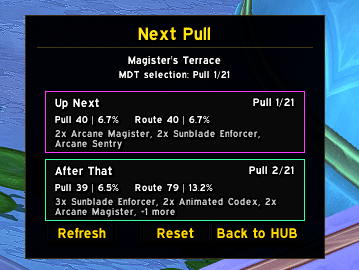
Bild_2026-03-26_122824984.png
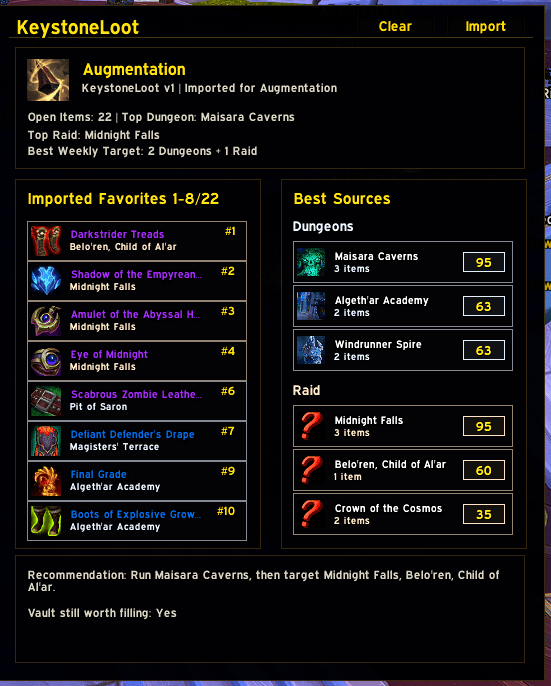
Bild_2026-03-26_122927139.png
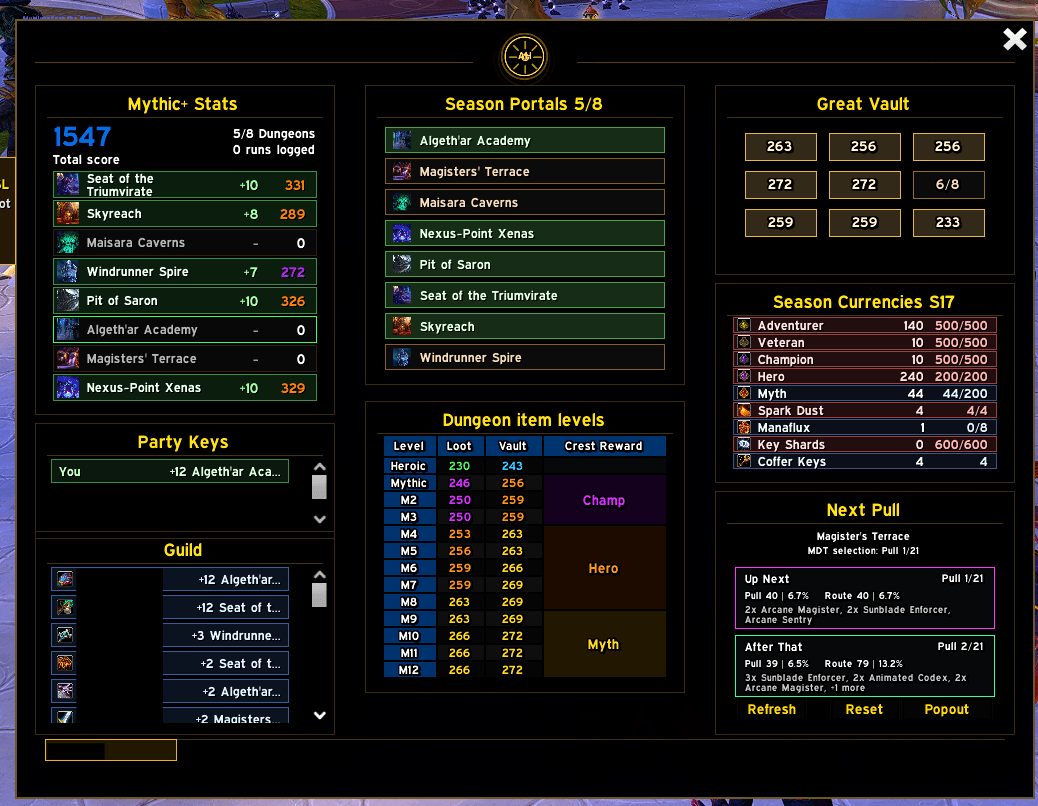
Bild_2026-03-26_123038162.png
Description
# Account-HUB
*
**Account-HUB** is a clean WoW Retail dashboard addon focused on Mythic+, Great Vault, party keys, guild keys, seasonal progress, account-wide character snapshots, KeystoneLoot targets, and MDT route support.
It brings your most useful Mythic+ information into one place:
- Mythic+ score and seasonal dungeon overview
- Great Vault progress
- Party Keys and Guild overview
- Seasonal portals
- Seasonal currencies
- Season 2 dungeon pool and timers
- Dungeon item level reference
- Alt character tabs
- KeystoneLoot import and copyable KeystoneLoot.io link
- MDT-based Next Pull helper with popout mode
- Collapsible panels, Compact mode, and edit-mode hide buttons
## Features
- **Mythic+ Stats**
Shows total score, seasonal dungeon rows, and best runs per dungeon.
- **Party Keys**
Displays your current key and known keys from your active party.
- **Guild**
Shows online guild members with class icon and known key data.
- **Great Vault**
Compact vault summary with hover tooltips for progress and next upgrade breakpoints.
- **Season Portals**
Displays current season dungeon teleports and their unlock state.
- **Season Currencies**
Tracks important current-season currencies in one panel.
- **Season 2 Dungeons**
Shows the current Season 2 dungeon pool with timers, best run, key status, and portal status.
- **Dungeon Item Levels**
Quick-reference table for dungeon loot, vault rewards, and crest tracks.
- **Character Tabs**
Account-wide snapshots for mains and alts, directly inside the addon.
- **KeystoneLoot Import**
Import your KeystoneLoot export string and track target items and best sources.
Includes a copyable `https://keystoneloot.io` link in the KSL panel.
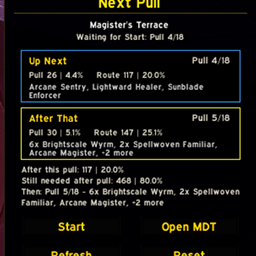
- **MDT Next Pull**
Uses the active Mythic Dungeon Tools route to show the next pull and the pull after that.
Supports live progress, manual forward/back control, reset, and detachable popout mode.
- **Customizable HUB Layout**
Panels can be moved, collapsed, hidden from the edit view, restored from options, and switched into Compact mode.
## Required Addons
**None.**
Account-HUB works on its own.
## Recommended / Optional Addons
- **MythicDungeonTools**
Recommended for the Next Pull panel.
- **KeystoneLoot**
Recommended for loot-target planning and imports.
- **TomTom**
Optional.
- **HandyNotes**
Optional.
## Slash Commands
`/hub`
- `/hub options`
- `/hub advisor`
- `/hub pull`
- `/hub pull refresh`
- `/hub pull detach`
- `/hub pull dock`
- `/hub ksl`
## MDT / Next Pull Guide
The `Next Pull` panel uses your current `Mythic Dungeon Tools` route and shows:
- the next planned pull
- the pull after that
- the current pull source (`Live progress`, `MDT selection`, or `Manual`)
### Requirements
- `MythicDungeonTools` must be installed and loaded.
- You need a valid MDT preset for the dungeon.
- For `Live progress`, you must be inside an active Mythic+ run.
### How To Use It
1. Open `MDT` and select the dungeon and route preset you want to use.
2. Open `Account-HUB` with `/hub`.
3. Look at the `Next Pull` panel in the HUB.
4. If needed, click `Refresh` or use `/hub pull refresh`.
### Pull Sources
- `Live progress`
The panel follows the actual Mythic+ enemy-forces progress from your current run.
- `MDT selection`
Outside of an active key, the panel follows the pull currently selected in MDT.
- `Manual`
If you manually move the panel forward or backward, it temporarily uses your manual position.
### Controls
- `Left-click` on the current pull card: mark the pull as done and move forward.
- `Right-click` on the current pull card: move one pull back.
- `Middle-click` on a pull card: open MDT.
- `Reset`: return to the current live or MDT-based position.
- `Popout`: detach the panel from the HUB.
- `Back to HUB`: dock the detached panel back into the main window.
### Popout Mode
When detached, the `Next Pull` panel stays visible even if you close `Account-HUB`.
This is useful during active dungeon runs.
The panel position is saved, so you can place it where you want.
### Troubleshooting
If the panel does not show useful data:
- make sure `MDT` is loaded
- make sure the current dungeon has an MDT preset
- click `Refresh`
- check whether the panel source says `MDT selection` instead of `Live progress`
- if needed, press `Reset` to clear a manual pull override
## Localization
- English
- German
## Credits
- **KeystoneLoot Team**
Credit and thanks to the KeystoneLoot team for the KeystoneLoot addon and export format used for loot-target planning.
- **KeystoneLoot Addon**
[https://www.curseforge.com/wow/addons/keystoneloot](https://www.curseforge.com/wow/addons/keystoneloot)
- **KeystoneLoot Website**
[https://keystoneloot.io](https://keystoneloot.io)
## Notes
- Retail only
- Visible addon name: **Account-HUB**
- Current addon version: `1.1.9`
- Some key data depends on available key-sharing information from your group, guild, or compatible addons
Account-HUB Team