Accessibility TTS
- By
Accessibility TTS is an addon that allows players to hear other players specific characters that cannot use voice communication when they type out messages ingame via the ingame text to speech system, without enabling TTS for all messages.
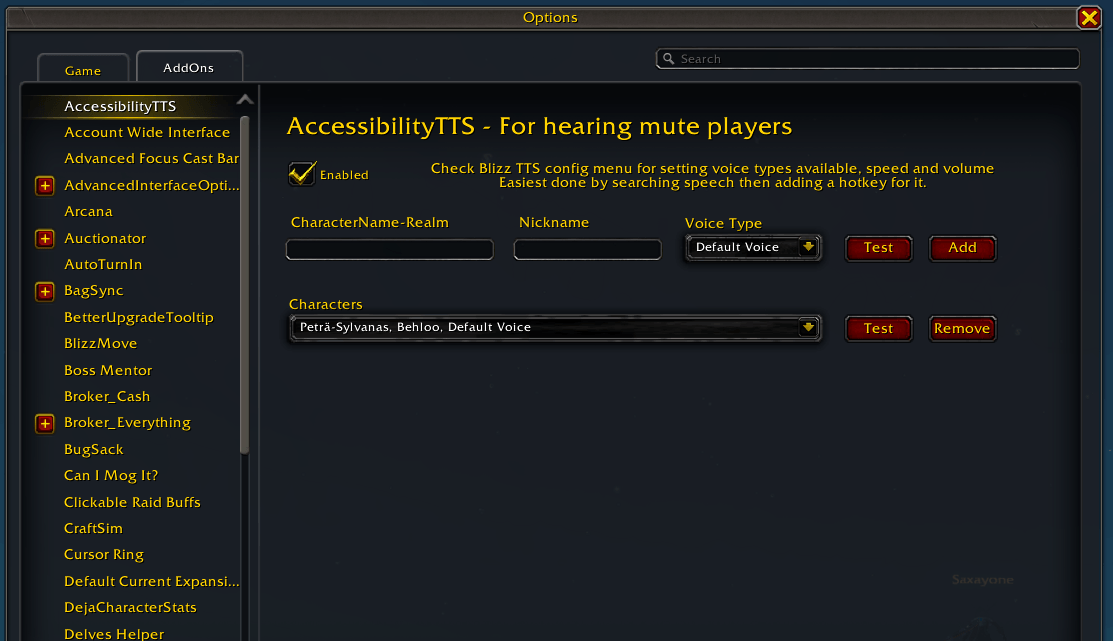
atts settings.png
Description
Accessibility TTS is an addon that allows you to hear other players specific mute characters that cannot/will not use voice communication.
You can add specific characters you want to be able to hear via the in-game TTS system so when they type something out you are much less likely to miss what they said.
/atts will open the options screen where you can add/remove players, test the how the TTS settings sound and also give them a nickname so you can know who is talking if they have multiple characters/want the TTS to pronounce things a little more accurately.
You will need to open the TTS config window at least once to check/modify the in-built Blizzard TTS settings such as volume, read-speed and TTS voices. I found the easiest way to do this without fully enabling TTS for everything was to search the settings for "speech" and adding a hotkey for opening the TTS config window.
Limitations:
This unfortunately will now work within situations where the chat is locked down as the text becomes a secret value. (I.e. Boss Encounters & M+)
Accessibility TTS Team

Owner