


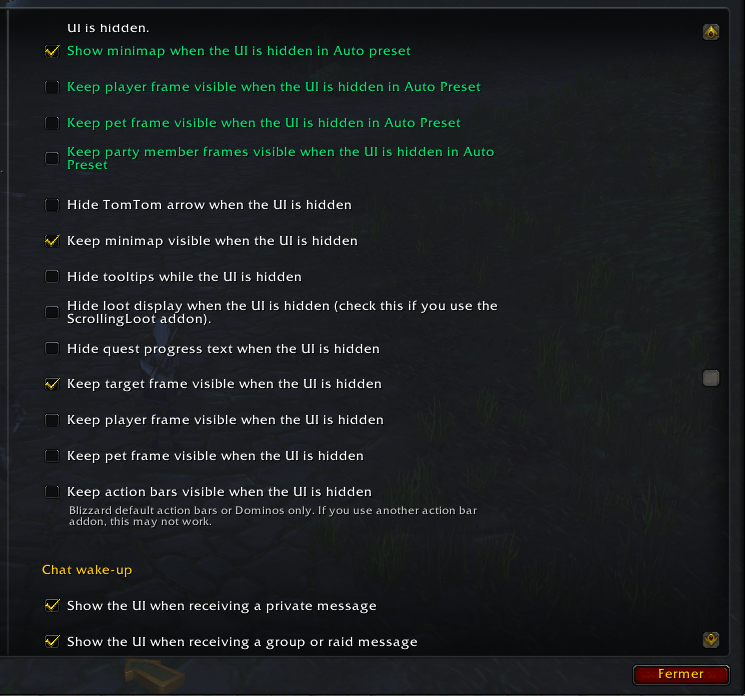
auh.png
Description
A.U.H - Adaptive UI Hide is a lightweight World of Warcraft addon that automatically hides selected UI elements when you are not actively using them, creating a cleaner and more immersive gameplay experience.
The addon is designed to stay out of the way while keeping important interface elements available when you need them.
Commands
/auh
Opens the A.U.H - Adaptive UI Hide settings panel.
TAB key
By default, pressing TAB temporarily shows the UI for 10 seconds.
The TAB key behavior can be enabled or disabled in the options if you do not want TAB to temporarily show the UI.
Supported UI Elements
A.U.H can automatically manage supported UI elements depending on your actions, while keeping important elements available when needed, such as:
- Action bars
- Bags
- Chat
- Target frame
- Player frame
- Pet frame
- Party frames
- Tooltips
- Minimap
- Quest tracking messages for items and killed monsters
- Pet happiness warning messages for hunters
- Other supported UI elements
Mouse Hover Behavior
Supported UI elements can appear when you move your mouse over their area.
This includes:
- Action bars
- Bags
- Chat
- Player health bar
- Pet health bar
- Party frames
All hover and visibility behavior can be configured in the options panel.
Hunter Pet Hunger Alerts
Even when your UI is hidden, A.U.H can display warning messages when your hunter pet is hungry.
The addon can show different messages depending on your pet happiness state, helping you react before your pet becomes unhappy.
Quest Progress Tracking
A.U.H can display quest progress messages for collected items and killed monsters, allowing you to follow your quest progress even while the UI is hidden.
Configuration
You can adjust the automatic UI hiding behavior in the options panel.
Available settings include:
- Hide delay
- Fade-in and fade-out duration
- TAB display duration
- TAB on/off
- TAB temporary display behavior
- Mouse hover behavior
- Mouse-leave delay
- Minimap behavior
- Tooltip visibility
- Chat wake-up options
- Floating loot text size
- Quest progress tracking messages
- Hunter pet hunger alerts
- Compatibility options
Manual Controls
A.U.H allows you to manually show or hide selected UI elements using custom key bindings.
You can hold a modifier key such as Alt, Ctrl, or Shift to quickly display the interface.
The hold-to-show key can be fully disabled by unchecking Alt, Ctrl, and Shift in the options. This setting is saved and persists across sessions.
Addon Compatibility
Compatible with addons such as:
TomTom, Questie, ScrollingLoot, RareScanner, Leatrix Plus, Leatrix Maps, Bagnon, Dominos, LootCodex, Dialogue UI, and Tamed.
Important
If you are using another action bar or UI addon other than the default Blizzard UI or Dominos, some features may not work properly.
The A.U.H - Adaptive UI Hide Team
