


BetterBuildingTools (BBT)
- By

BBTlogo400.png
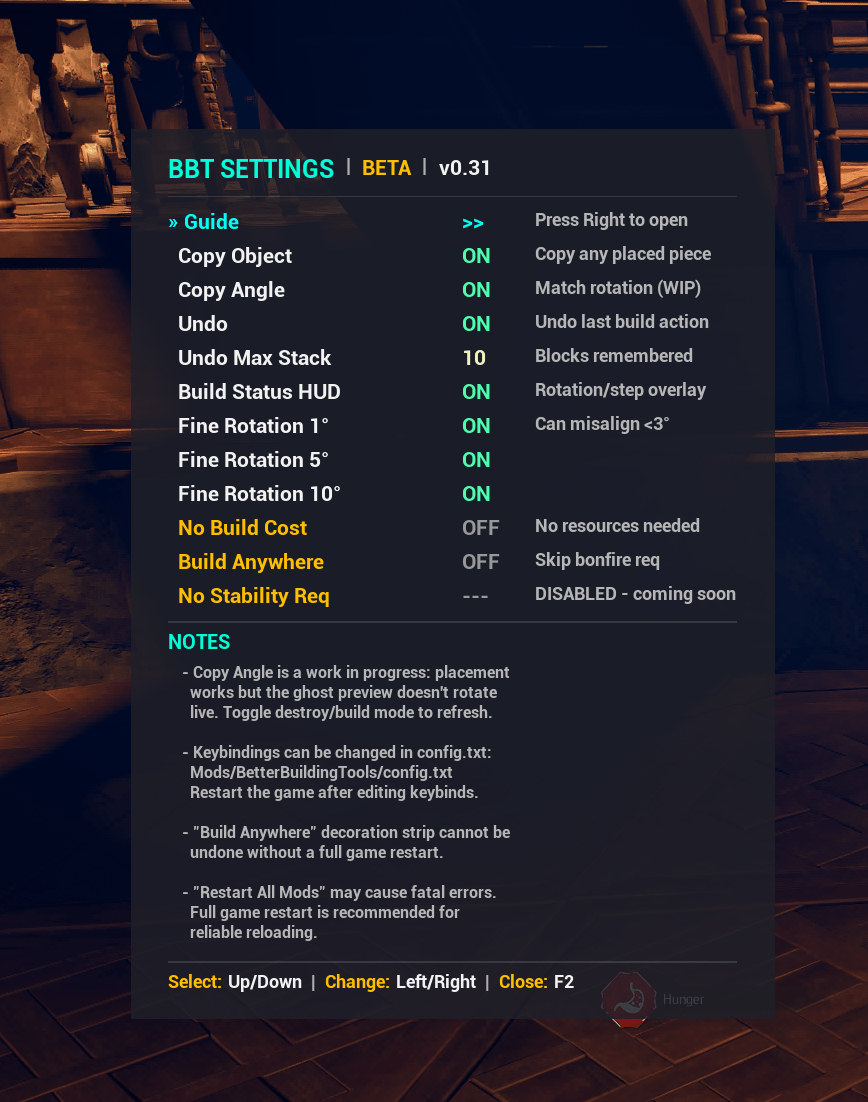
BBTSettingsUI.png
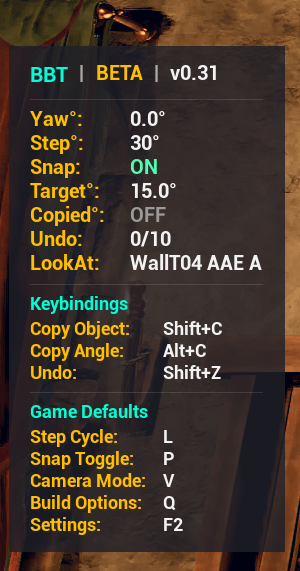
BStat UI
Description
Description
BetterBuildingTools adds precision building tools that Windrose doesn't have out of the box. Fine-tune rotation down to a single degree, copy a placed block's type or exact angle, undo misplaced builds, remove placement restrictions, and see your rotation/snap state at a glance — all from an in-game HUD and drill-down settings menu. Every feature can be toggled on or off individually, and all settings persist between sessions.
ACTIVE DEVELOPMENT New features are added regularly. If something breaks, crashes, or behaves unexpectedly, please report it! Include your UE4SS.log if possible.
Main Features

Fine Rotation (1 / 5 / 10 Degrees)
- Adds 1, 5, and 10 degree steps to the game's built-in rotation cycle. Uses your existing Rotation Step keybind — no new key needed. Each increment can be enabled or disabled independently.

Copy Object (Shift+C)
- Look at any placed object and press Shift+C to instantly switch your build selection to that piece. No more scrolling through menus.

Copy Angle (Alt+C)
- Look at a placed block and press Alt+C to copy its exact rotation to your build preview. Great for matching wall angles, roof pitches, or any non-standard rotation. The placement uses the correct angle — the ghost preview doesn't visually update until you toggle build mode, but the final block lands exactly where it should.

Undo (Shift+Z)
- Misplaced a block? Press Shift+Z to undo your last build action — no need to hunt for it with the delete tool. Remembers up to 10 actions by default (configurable up to 50).

Build Status HUD (BStat) - F3 Toggle
- A compact overlay during build mode showing current rotation, step size, snap mode, target angle, copy angle lock status, undo stack count, the name of what you're aiming at, and a full keybind reference. Press F3 to show/hide. F2 settings has a master enable/disable that overrides F3.

In-Game Settings Menu (F2)
- Press F2 during build mode to open the drill-down settings panel. Organized into sections — select a category with Up/Down, press Right to open it, F2 to go back. All changes apply immediately and save automatically. Includes a built-in 10-page guide covering every feature. Scale the menu with PgUp/PgDn (70-150%).

Free Build (Off by Default)
Optional cheats for creative building, all disabled by default:
- No Build Cost — build without consuming resources
- No Stability Req — skip structural integrity checks
Placement Freedom
Remove placement restrictions without affecting resource cost:
- No Bonfire Required — decorations + crafting stations anywhere
- No Shore Required — bells, docks, piers away from shoreline
- No Roof Required — beds + workstations without a roof
- Allow Under Roof — furnaces + kilns under roofed areas
Installation
Manual Install
- Install [UE4SS] (Click Here) if you haven't already
- Extract the BetterBuildingTools folder into your UE4SS Mods directory:
Windrose/R5/Binaries/Win64/ue4ss/Mods/BetterBuildingTools/ - Launch the game
Vortex
- Install through Vortex as usual — the Windrose extension handles UE4SS mod detection automatically.
Configuration
All settings live in Mods/BetterBuildingTools/config.txt. Every feature can be toggled on/off, and keybindings can be changed to any single key (A-Z, 0-9) with optional Shift/Alt modifiers. Settings changed in the F2 menu save automatically. Keybind changes in the config file require a game restart.
!!Important Notes!!
- BStat HUD is now toggled with F3! It no longer appears automatically in build mode. Press F3 to show/hide. F2 master toggle still works.
- Wharfs placed too far from the water won't be able to dock ships.
- Copy Angle placement works perfectly, but the ghost preview doesn't update. Workaround: toggle destruct mode and back, or leave and re-enter build mode. (working on fixing this give me time)
- "Restart All Mods" in UE4SS may cause a fatal error. A full game restart is recommended for reliable reloading.
Requirements
- UE4SS — Required. BBT uses a C++ DLL for performance-critical operations and Lua for the in-game UI.
- Solo play only for now. May work in co-op but has not been tested. (Planned to work in all once features are fleshed out)
Mod Conflicts
BBT does nothing until you toggle a feature on. If you already use another mod that handles something BBT also offers (e.g. a PAK mod that removes placement restrictions), just set that feature to false in config.txt before launching the game. BBT won't touch it, and the other mod runs without interference. No need to uninstall either mod — just disable the overlapping feature in one of them.
Source Code
Full source (C++ DLL + Lua) available on GitHub for learning and reference: github.com/2BITTER/windrose-modding
What's New in v0.37
- Copy Angle entry no longer says the ghost doesn't update (it does now)
- Undo entry mentions the grace period
- Important Notes no longer has the "toggle build mode as workaround" line
- What's New section updated to v0.37
- Roadmap: Copy Angle + Undo Grace moved to (D), Text Signs shows (P) — ready to move to (W) once you start that
Roadmap
- Copy Angle Ghost Preview Fix (D)
- Undo Grace Period (D)
- Text Signs (W)
- Redo Build Actions (W)
- Replace Object (P)
- More Build Camera Modes (P)
- Copy Selection (P)
- Save Blueprint (P)
- Build Blueprint (P)
- Bonfire Stacking (P)
Done = D | Work In Progress = W | Planned = P
Shout Outs
Thanks to the UE4SS team for making Windrose modding possible, and to the Windrose modding community for feedback and testing. Placement Freedom inspired by zeeCameLsnake's Ultimate Base Freedom.
The BetterBuildingTools (BBT) Team
