
Disclaimer: This addon was developed with AI assistance (code generation). I have zero coding knowledge I just made this add-on for myself. Played it for a couple of months, loved it and wanted to share with other players. Making it publishable was hardwork but I think it's working great right now. Please report any issues you encounter.
I want to keep improving this addon, so feel free to share any feedback, no matter how small.
Language: This addon’s interface is primarily English. A partial translation (top of the Settings page) is available in German, French and Russian via Settings > About > Language — full localization is in progress.
Your bag, sorted the way you think.
Inventory 2.0 turns your bag, bank and crafting stations into clean, color-coded groups you can open and close. Sets by where they drop. Consumables by kind. Everything where you expect it.
DRAW EVERY SECTION YOUR WAY
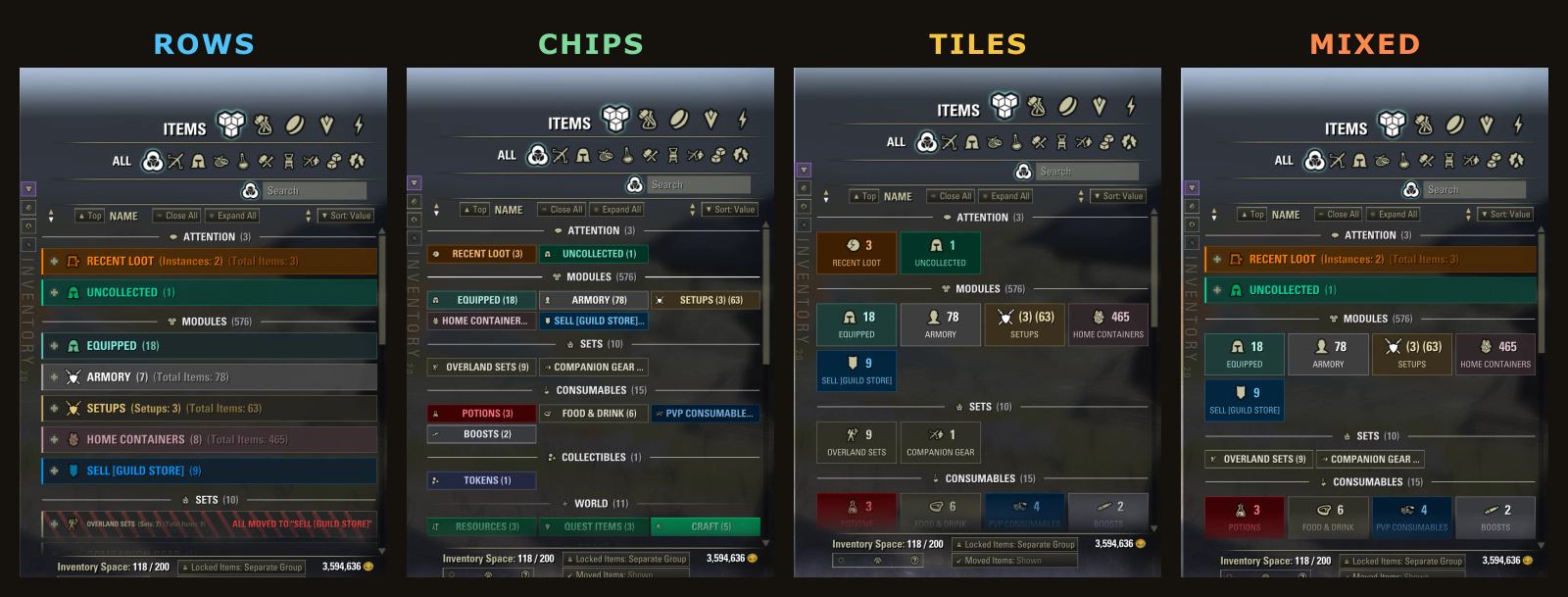
Every section of your bag can be Rows, Chips or Tiles, and you can mix them freely. Sets as a long readable list, consumables as compact chips, crafting as tiles. Right-click a section divider to switch.
And every category wears the color you give it: recolor one from its right-click menu, or a whole section at once.
ONE CLICK, A NEW LOOK
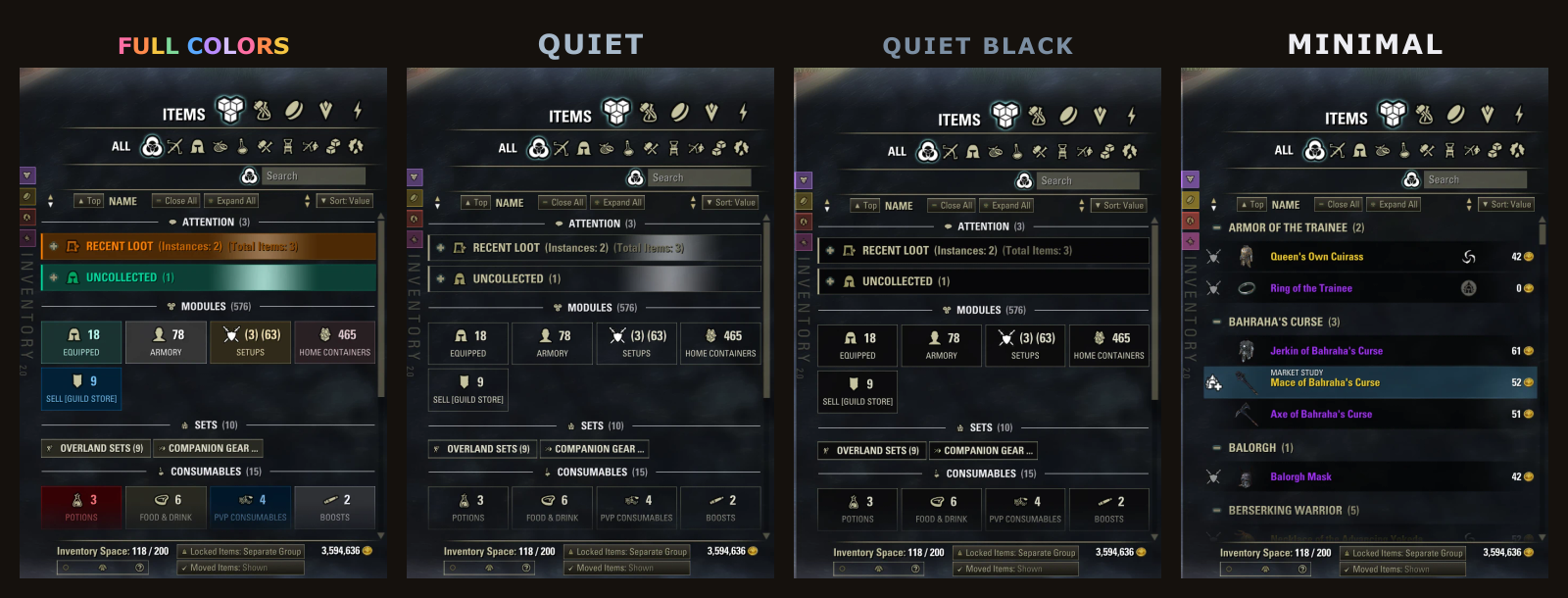
Five ready-made themes: Full Colors, Full Colors Low Brightness, Quiet, Quiet Black and Minimal. Change any switch and it becomes your own look. Save it and come back to it anytime. Colorblind palettes included.
EVERY SET KNOWS ITS JOB
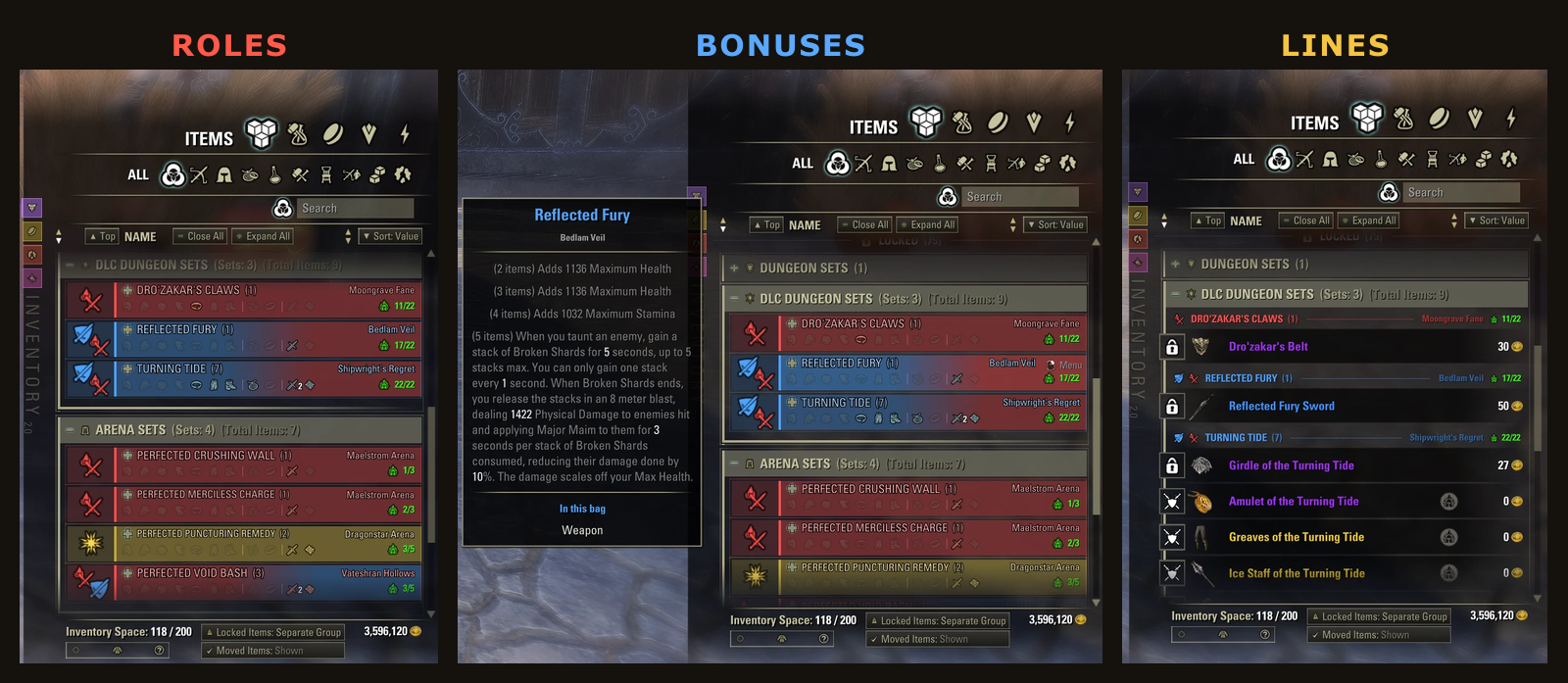
Sets are grouped by where they drop. Each set header shows what the set is for, damage, tank or support, along with the pieces you own, where it drops and your collection progress. Hover it for the bonuses. Show sets as buttons to open, or as lines with their items right under them.
FOUR DRAWERS BESIDE YOUR BAG
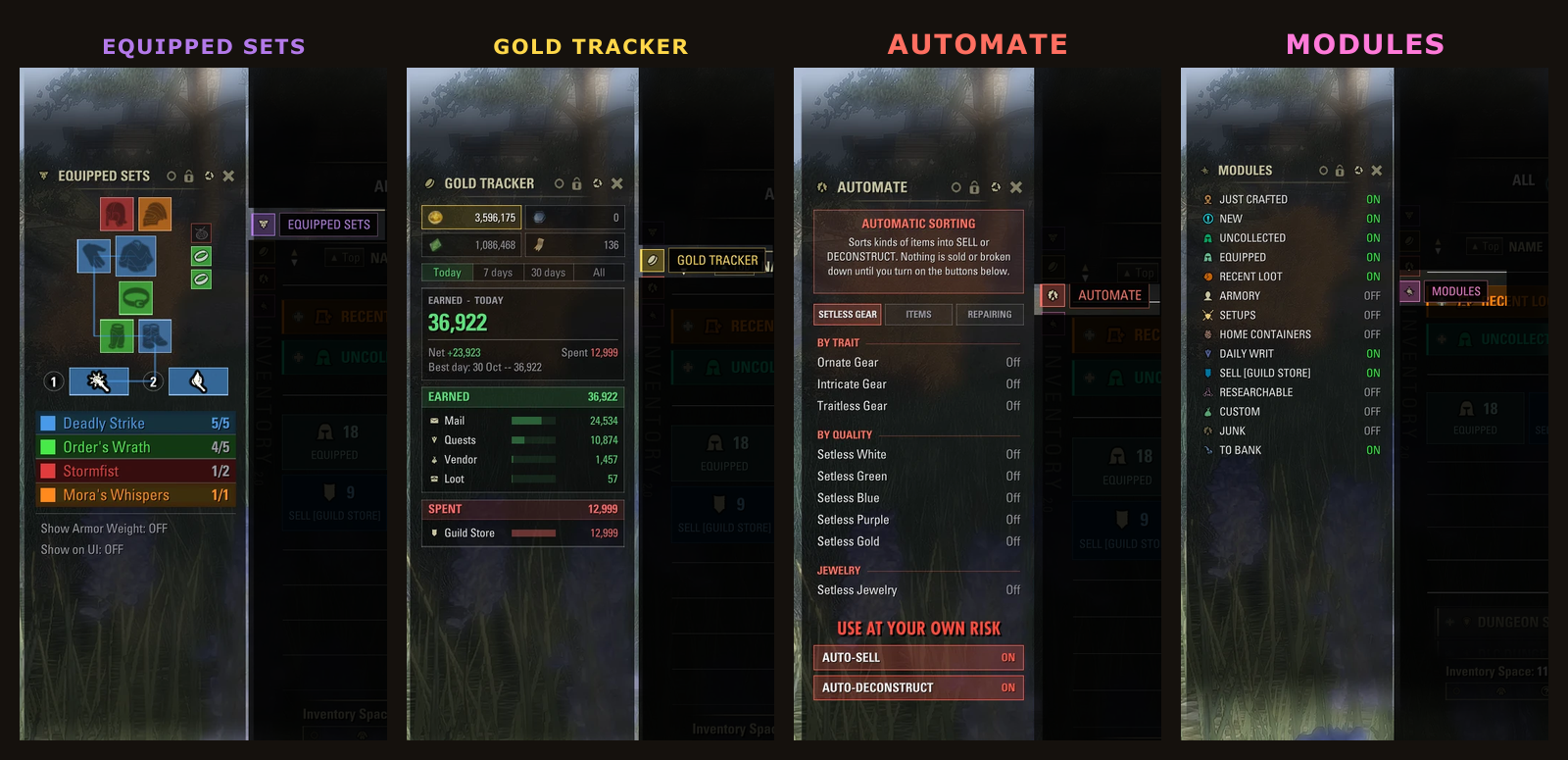
One click on the strip beside the bag opens a drawer. It stays open the next time you open your bag.
- EQUIPPED SETS Everything you wear on one figure, colored set by set, with full sets lit up.
- GOLD TRACKER What you earned and spent today, this week or this month, and where it came from. Gold, Tel Var, Alliance Points and Writ Vouchers.
- AUTOMATE Sort kinds of items into SELL or DECONSTRUCT, sell and deconstruct them for you if you ask, and keep your gear repaired.
- MODULES Turn every optional group on or off in one place.
AND FIVE MORE THINGS WORTH KNOWING
Move an item by hand and the addon remembers where you put it. Loot from your last run gathers in one place. Locked items can stand apart from the rest. A crafting bench shows what you just made. And right-click gets you somewhere useful almost everywhere in the bag.
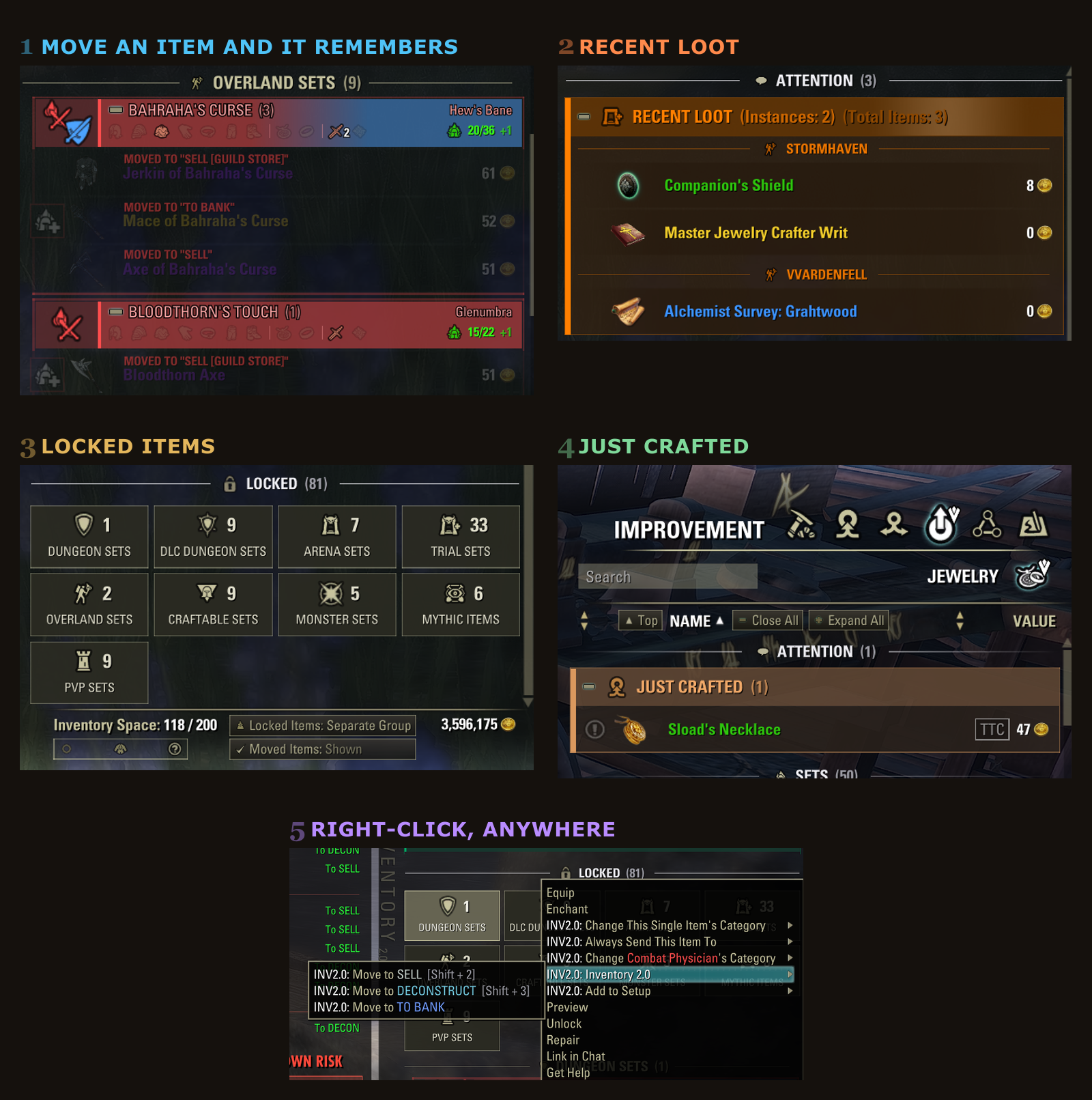
WHAT YOU GET
- Mark several, do one thing. Ctrl+click to select a handful of pieces, then right-click any of them to sort them all at once.
- Everywhere you open a list. Bag, bank, guild bank, house storage, crafting stations, merchants and fences.
- The category you are in never leaves the screen. A long category's header sticks to the top as you scroll. Click it to jump back.
- Undo. In an inventory addon. Ctrl+Z takes back your last 20 sorting decisions, bound under Controls.
- Open a box. Your NEW items are still new. Opening a container no longer wipes NEW; the box's own loot joins it.
- Crafted it for the writ? It is still there at turn-in. Pieces a crafting writ wants gather in DAILY WRIT and are never sold or deconstructed.
- Sort first. Sell later. AUTOMATE sends whole kinds of items into SELL or DECONSTRUCT, each Off, Ask First or On.
- Armory loadouts, grouped. ARMORY lists what each saved build equips, set by set.
- Save your gear as a Setup. SETUPS keeps loadouts of your own; right-click a saved one to equip it all at once.
- House chests, remembered. HOME CONTAINERS keeps what is stored in each of your house chests, so you can check without a trip home.
- Mark it, bank it. TO BANK flags a piece and deposits it the next time your bank is open.
- A category just for the guild store. SELL [GUILD STORE] tracks what you are holding for Market Study or an awaiting price drop.
DEPENDENCIES
- Required: LibSets, LibAddonMenu-2.0, LibCustomMenu
- Optional: LibFoodDrinkBuff (recognises food and drink buffs a little more reliably)
NOTES
- Every automatic action is off until you turn it on.
- Keyboard UI only. In gamepad mode the game's own inventory is used.
- Compatibility: Inventory 2.0 redraws the bag, bank and crafting lists. Other addons that also restyle the inventory window (grid views, inventory overhauls) will likely clash with it. Use one or the other.
Settings: Settings > Add-Ons > Inventory 2.0
Inventory 2.0 Team