bitfix — Lua Runtime Patcher
- By
A Lua-based runtime patcher that allows compatible Sword Art Online: Fatal Bullet mods to modify game behavior without permanently editing the executable.
Description
What is bitfix?
bitfix is an open-source Lua-based runtime binary patcher originally developed by Truman Kilen (trumank).
It allows compatible Lua modifications to change certain game instructions while the game is running, without permanently modifying the original executable.
bitfix does not change gameplay by itself. It is a tool used by compatible mods.
Changes From the Original Project
This is a community-compiled distribution of trumank's original bitfix project, prepared and tested for Sword Art Online: Fatal Bullet.
No changes were made to the original source code or functionality.
The following work was performed for this release:
- Compiled the original bitfix source code using Rust 1.85.1.
- Prepared the compiled DLL as
x3daudio1_7.dllfor Fatal Bullet. - Verified successful DLL initialization, Lua script loading, byte-pattern scanning, and Lua callback execution.
- Packaged the DLL,
bitfixfolder, and original MIT license. - Added beginner-friendly installation instructions.
This release is intended to make the original bitfix tool easier for Fatal Bullet players to install and use.
Features
- Loads compatible Lua modifications.
- Supports game-code pattern scanning and runtime patches.
- Does not permanently modify the game's EXE.
- Allows individual Lua mods to be installed or removed separately.
- Does not require Rust or Visual Studio for ordinary users.
Installation
Step 1 — Find your game folder
In steam, users can right-click Sword Art Online: Fatal Bullet and select Manage → Browse local files.
Open:
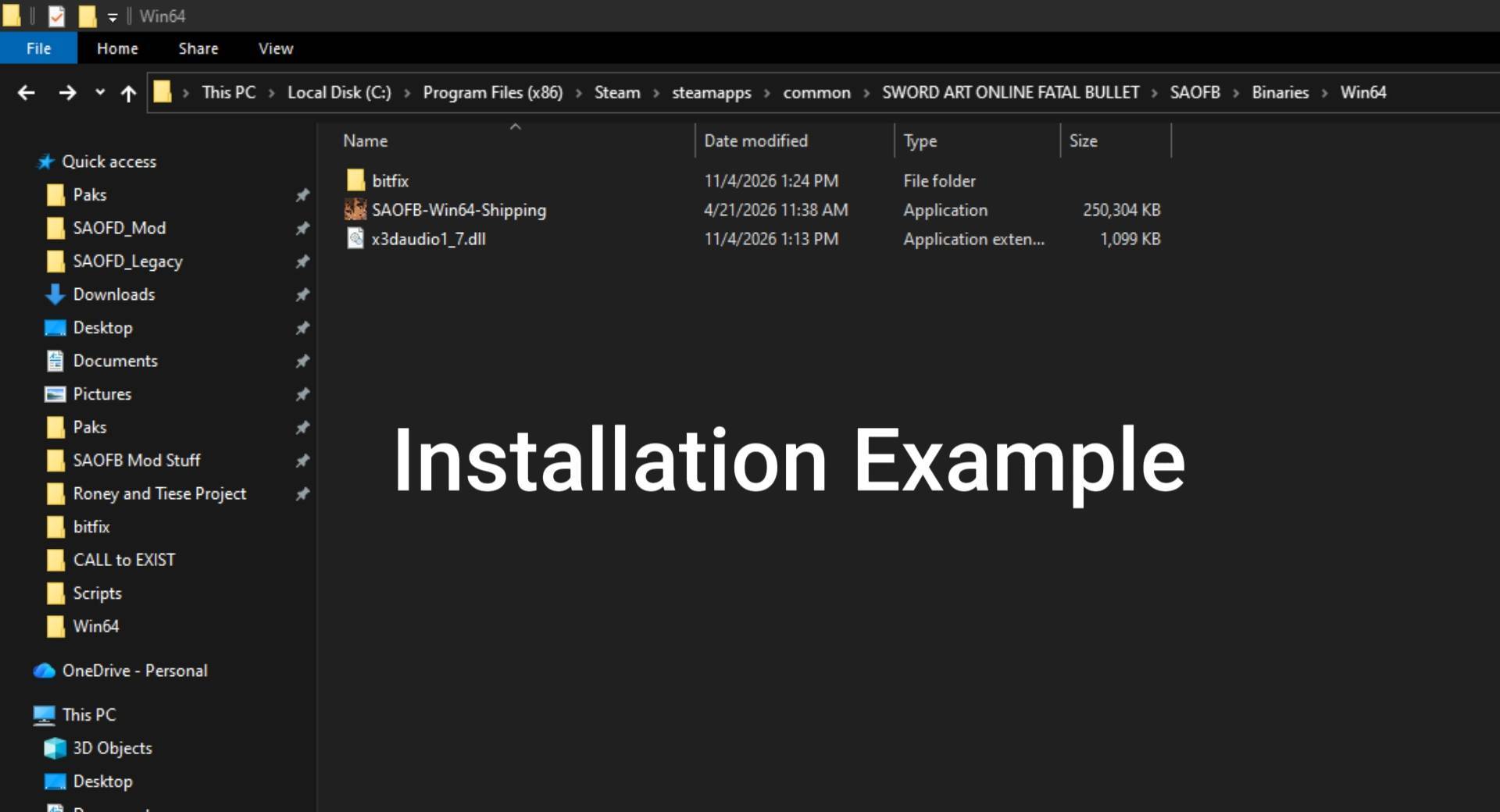
SAOFB\Binaries\Win64
Step 2 — Install bitfix
-
Download and extract this project's ZIP.
-
Copy
x3daudio1_7.dllinto theWin64folder. -
Copy the
bitfixfolder into the same location.
Refer to the Installation Example image to verify installation was done correctly
Step 3 — Install compatible Lua mods
-
Download any mod(s) that specifically requires bitfix in the mod description when applicable.
-
Place its
.luafile inside thebitfixfolder. -
Launch the game.
Example:
SAOFB\Binaries\Win64\bitfix\ExampleMod.lua
How to Check if bitfix Works
Launch Fatal Bullet, then check the Win64 folder for:
bitfix.txt
This log records initialization and Lua patch activity when bitfix loads.
If a particular mod isn't working, check the log and the mod's own installation instructions.
Uninstallation
-
Open
SAOFB\Binaries\Win64. -
Remove the
x3daudio1_7.dllinstalled by this package. -
Remove the
bitfixfolder if you no longer need its Lua mods.
Important Information
Back up your game saves before testing gameplay modifications.
Credits and License
Original Developer: Truman Kilen (trumank)
Original Source Code: https://github.com/trumank/bitfix
License: MIT
I am not the original developer of bitfix. This community build was compiled from trumank's original open-source project without modifying its source code. The complete original MIT license is included in the download.
bitfix — Lua Runtime Patcher Team