# SN2PropulsionTweaks
**Get around faster in Subnautica 2** — a deliberately conservative UE4SS Lua mod that boosts your swim speed and the Tadpole's speed, configured in-game via SN2ModSettings. Built with clipping safety in mind: speeds are capped where the game (and physics) stay happy.
---
## What it does
| Toggle | Effect |
|---|---|
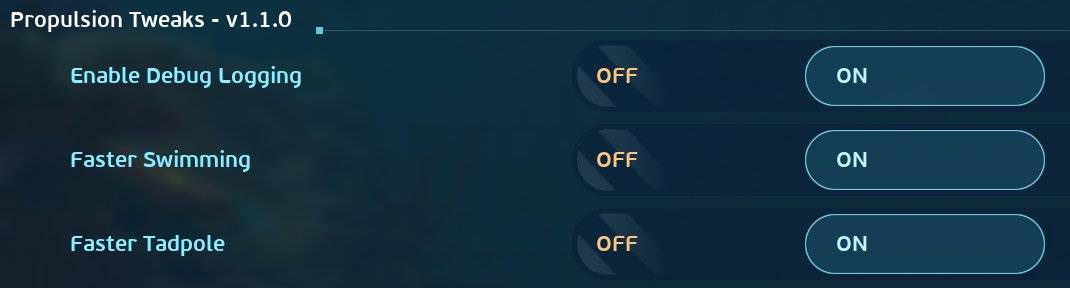
| **Faster Swimming** | Swim at the game's natural max-swim speed (~2×) *without needing fins equipped*. Fins and the Wakemaker still stack on top. Off = vanilla. |
| **Faster Tadpole** | Increases the Tadpole's acceleration → higher cruising speed (2×). Off = vanilla. |
Simple ON/OFF — flip a toggle off and the vanilla value is restored.
### Why just on/off (no slider)?
The effect is binary. Subnautica 2 **soft-caps swim speed** at roughly 2× base (the ceiling you'd hit with Improved Fins + Wakemaker) — push past it and the game just clamps you, and higher speeds start **clipping through terrain and outrunning world streaming**. So there's nothing meaningful between "vanilla" and "the ceiling" — a toggle says exactly that. The Tadpole is held to 2× for the same safety reason: fast vehicles punch through geometry far more easily than a swimming player.
---
## ⚠️ Single-player / host only
Movement is server-authoritative, so this works in single-player and for the **host** of a co-op session. Joining players won't see the effect on their own movement.
---
## Requirements
1. **UE4SS for Subnautica 2** — [Nexus](https://www.nexusmods.com/subnautica2/mods/36) / [GitHub](https://github.com/Subnautica2Modding/Subnautica2-UE4SS)
2. **SN2ModSettings** — [Nexus](https://www.nexusmods.com/subnautica2/mods/20) — the in-game slider UI.
---
## Installation
1. Make sure UE4SS is installed (`dwmapi.dll` next to `Subnautica2-Win64-Shipping.exe`, `ue4ss/` folder beside it).
2. Extract this archive so the `SN2PropulsionTweaks/` folder lands in:
```
<game>\Subnautica2\Binaries\Win64\ue4ss\Mods\
```
3. Add this line to `ue4ss\Mods\mods.txt`:
```
SN2PropulsionTweaks : 1
```
(loads it before SN2ModSettings so it appears in the settings UI; otherwise just restart once).
4. Launch → **Settings → Mods → Propulsion Tweaks**.
---
## How it works (technical)
| Aspect | Target | Method |
|---|---|---|
| Swim speed | `UWEMovementSetComponent:SetBaseSwimSpeed()` | Proper setter UFunction, applied **only to the local player pawn's** component (matched by owner, so creatures aren't sped up). ×2 when on, ×1 (vanilla) when off. |
| Tadpole speed | `UWESubmersibleMovementComponent.MaxSwimAcceleration` | Direct write. Higher acceleration → higher thrust-vs-drag top speed. ×2 when on, ×1 when off. |
Vanilla base values are snapshotted once so toggling off cleanly restores the original. Deliberately **not** touched: creatures, swimming friction, turn rate, water currents.
---
## Credits
- **UE4SS** — ported for Subnautica 2 by the [Subnautica2Modding](https://github.com/Subnautica2Modding/Subnautica2-UE4SS) group.
- **SN2ModSettings** by [Just-Chaldea](https://github.com/Just-Chaldea/SN2-ModSettings) — the in-game slider UI.
- ConfigManager pattern adapted from **Capacity & QuickBar Tweaks** by [iTestor](https://www.nexusmods.com/subnautica2/mods/252).
---
## License
MIT — see [LICENSE](./LICENSE).
---
## Changelog
### 1.1.0
- Simplified to ON/OFF toggles. The effect is binary (the game soft-caps swim speed at ~2×), so the 1–2× sliders were redundant with the enable toggles.
- Toggling off now cleanly restores the vanilla value.
### 1.0.0
- Initial release: player swim speed and Tadpole speed via SN2ModSettings sliders. Conservative caps for clipping safety.